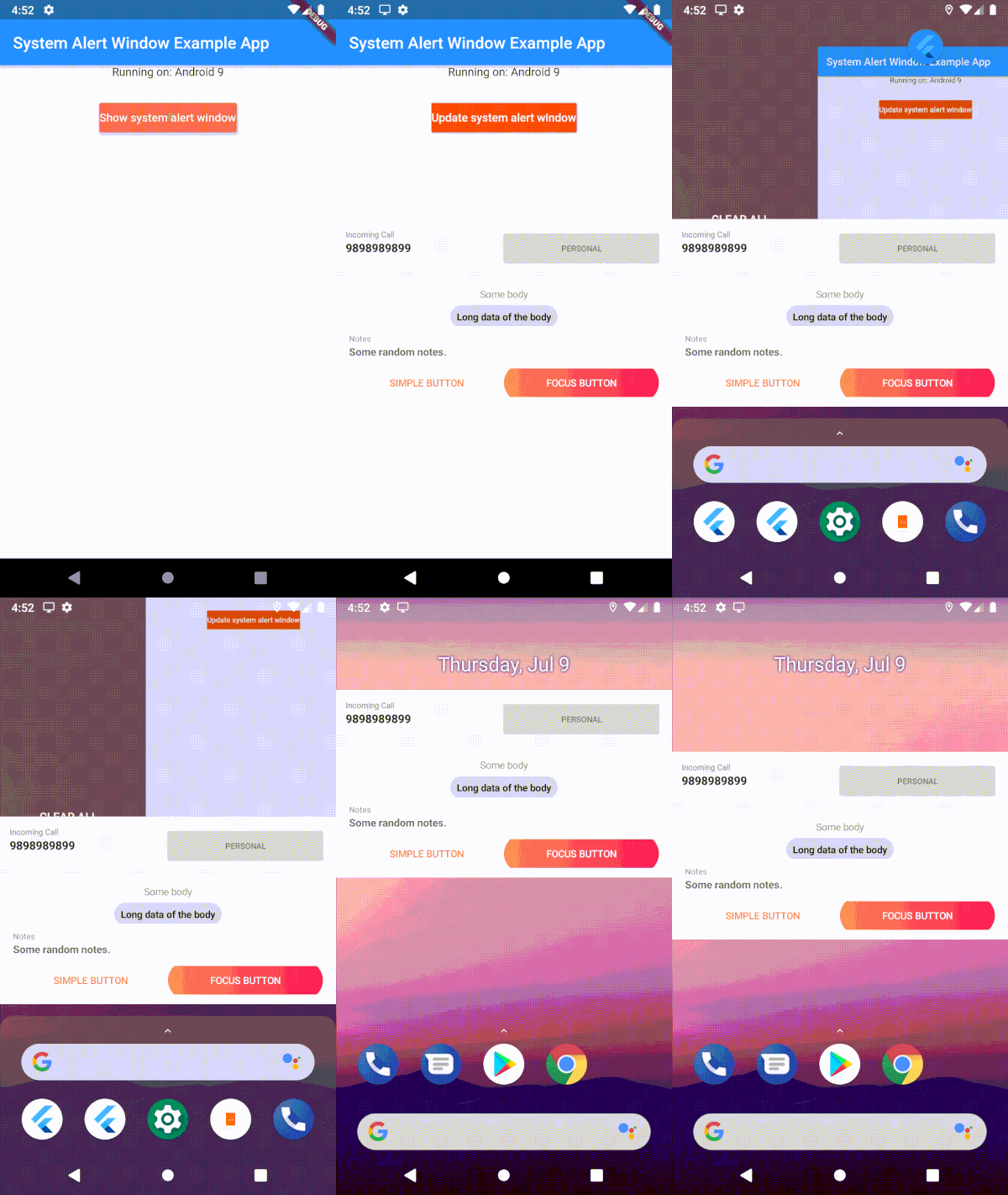
Android 및 iOS에서 지속적이고 시스템 수준의 오버레이 창을 표시할 수 있는 플러터 플러그인으로, Truecaller의 알림 인터페이스와 유사합니다. 모든 다른 앱 위에 작동하며 사용자 상호작용에 대한 콜백 이벤트를 지원합니다. 높은 가시성의 알림이나 긴급 경고용으로 설계되었으며, 네이티브 시스템 권한과 원활하게 통합됩니다. 표준 푸시 알림에 의존하지 않고도 사용자의 즉각적인 주의를 끌어야 하는 애플리케이션에 유용합니다.
사용 사례
긴급 경보 표시
항상 위에 표시되는 알림 창 만들기
통화 차단 인터페이스 구현
실시간 상태 오버레이 활성화
시스템 수준의 상호작용 프롬프트 제공
주요 기능
시스템 오버레이 지원
크로스 플랫폼(안드로이드 및 iOS)
콜백 이벤트 처리
다른 앱 위에 지속적으로 표시
시스템 권한 설정과의 통합
적합한 대상
보안 및 개인정보 보호 앱
통화 관리 도구
실시간 모니터링 유틸리티
긴급 경보 시스템
고우선순위 사용자 상호작용이 필요한 앱
고려 사항
안드로이드에서 시스템 권한이 필요합니다
플랫폼 제한으로 인해 iOS 기능이 제한됨
보안 앱에 의해 표시될 수 있습니다
사용자는 수동으로 오버레이 권한을 활성화해야 합니다
잠재적인 배터리 및 성능 영향
원본 README
연결된 소스 저장소의 README 원문 스냅샷입니다. 최신 내용은 저장소에서 확인하세요.
system_alert_window
A flutter plugin to show Truecaller like overlay window, over all other apps along with callback events. Android Go or Android 11 & above, this plugin shows notification bubble, in other android versions, it shows an overlay window.
Android
Demo
1. Clip of example app and 2. Working of button click in the background
Uses 'draw on top' permission and displays it as a overlay window
Android 11 & above
With SystemWindowPrefMode.OVERLAY, system alert windows uses 'overlay functionality' wherever it's supported. In that mode, it will show as bubbles if the 'display over other apps' is not supported.
With SystemWindowPrefMode.DEFAULT/SystemWindowPrefMode.BUBBLE, User has to allow 'All conversations can bubble' in the notification settings of the app. Uses Android Bubble APIs to show the overlay window inside a notification bubble.
Edge-to-edge content and window insets are handled automatically inside the bubble container — wrap your overlay widget with SafeArea to avoid content being obscured by system bars.
Android GO (API 29)
User has to manually enable bubbles from the developer options. Uses Android Bubble APIs to show the overlay window inside a notification bubble.
IOS
Displays as a notification in the notification center [Help Needed]
Example
Show Overlay
Request overlay permission
await SystemAlertWindow.requestPermissions;
Inside main.dart create an entry point for your Overlay widget;
// overlay entry point@pragma("vm:entry-point")
voidoverlayMain() {
runApp(constMaterialApp(
debugShowCheckedModeBanner: false,
home: Material(child: Text("My overlay"))
));
}
//Open overLay content// - Optional arguments:/// `gravity` Position of the window and default is [SystemWindowGravity.CENTER]/// `width` Width of the window and default is [Constants.MATCH_PARENT]/// `height` Height of the window and default is [Constants.WRAP_CONTENT]/// `notificationTitle` Notification title, applicable in case of bubble/// `notificationBody` Notification body, applicable in case of bubble/// `prefMode` Preference for the system window. Default is [SystemWindowPrefMode.DEFAULT]/// `layoutParamFlags` List of List of WindowManager.LayoutParams. This is not applicable for bubbles.awaitSystemAlertWindow.showSystemWindow();
/// update the overlay flag while the overlay in action/// - Optional arguments:/// `gravity` Position of the window and default is [SystemWindowGravity.CENTER]/// `width` Width of the window and default is [Constants.MATCH_PARENT]/// `height` Height of the window and default is [Constants.WRAP_CONTENT]/// `notificationTitle` Notification title, applicable in case of bubble/// `notificationBody` Notification body, applicable in case of bubble/// `prefMode` Preference for the system window. Default is [SystemWindowPrefMode.DEFAULT]/// `layoutParamFlags` List of List of WindowManager.LayoutParams. This is not applicable for bubbles.awaitFlutterOverlayWindow.updateSystemWindow();
// closes overlay if openawaitSystemAlertWindow.closeSystemWindow();
// broadcast data to overlay app from main appawaitSystemAlertWindow.sendMessageToOverlay("Hello from the other side");
//streams message from main app to overlay.SystemAlertWindow.overlayListener.listen((event) {
log("Current Event: $event");
});
Isolate communication
Use this snippet, if you want the callbacks on your main thread
While initializing system alert window in your code
awaitSystemAlertWindow.checkPermissions;
ReceivePort _port = ReceivePort();
IsolateManager.registerPortWithName(_port.sendPort);
_port.listen((message) {
log("message from OVERLAY: $message");
print("Do what ever you want here. This is inside your application scope");
});
Use this to send data to isolate mentioned above
voidcallBackFunction(String tag) {
print("Got tag " + tag);
SendPort port = IsolateManager.lookupPortByName();
port.send(tag);
}