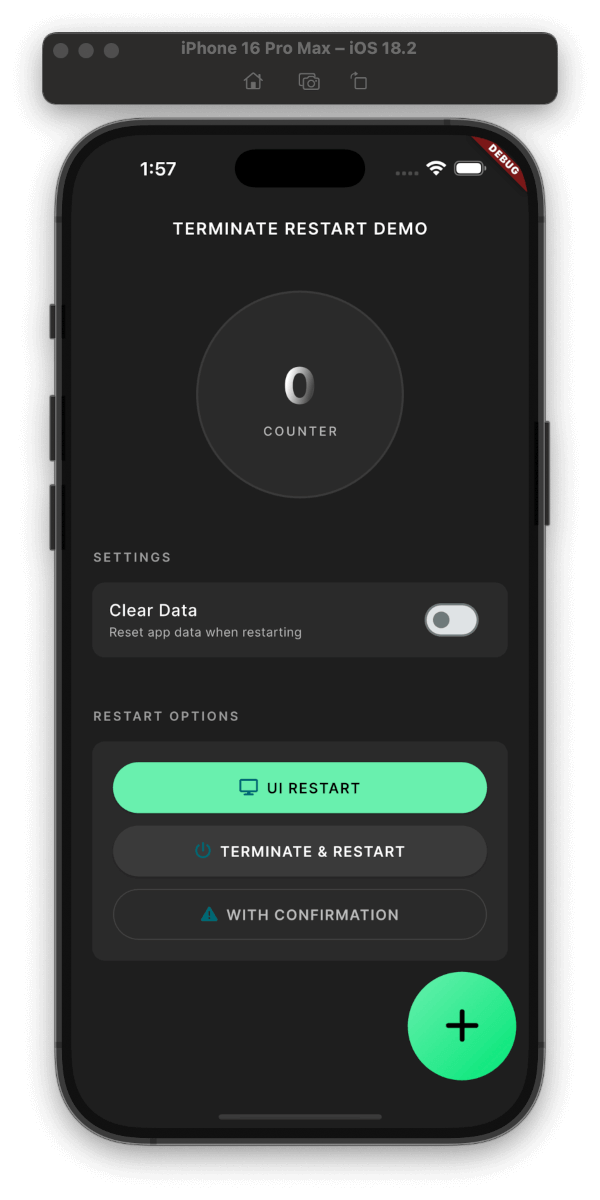
안드로이드, iOS, 웹용으로 앱 종료 및 재시작을 가능하게 하는 플러터 플러그인입니다. 선택적으로 데이터를 지울 수 있으며, 설정 변경이나 인증 리셋 후와 같은 깨끗한 상태가 필요한 시나리오에 유용합니다. 개발자는 프로그래밍 방식으로 앱을 종료하고 다시 시작할 수 있으며, 다양한 플랫폼에서 동일한 동작을 보장하는 간단한 API를 제공합니다. pub.dev를 통해 기존 플러터 프로젝트에 원활하게 통합됩니다.
사용 사례
설정 변경 후 앱 재시작
로그아웃 시 캐시된 데이터 지우기
앱 상태 재초기화
인증 리셋 처리
업데이트 후 새 시작 강제
주요 기능
크로스 플랫폼 지원 (Android, iOS, Web)
재시작 시 앱 데이터를 지우는 옵션
종료 및 재시작을 위한 간단한 API
모든 주요 플랫폼에서 작동합니다
경량이며 간편한 통합
적합한 대상
앱 재시작 기능이 필요한 개발자
사용자 작업 후 상태를 재설정해야 하는 앱
복잡한 세션 관리를 갖춘 프로젝트
민감한 데이터 처리를 하는 모바일 앱
제어된 재시작이 필요한 웹 애플리케이션
고려 사항
모든 Android 런처에서 작동하지 않을 수 있습니다
iOS 제한으로 인해 완전 종료가 제한될 수 있습니다
웹 지원은 브라우저 동작에 의해 제한됩니다
데이터 정리 동작은 플랫폼에 따라 다릅니다
일부 장치에서는 적절한 권한이 필요합니다
원본 README
연결된 소스 저장소의 README 원문 스냅샷입니다. 최신 내용은 저장소에서 확인하세요.
Terminate Restart
A robust Flutter plugin for terminating and restarting your app with extensive customization options. Perfect for implementing dynamic updates, clearing app state, or refreshing your app's UI.
Demo
Plugin in Action
Clean & Simple Interface
Features
Three Restart Modes:
UI-only Restart: (~200ms)
Recreates activities/views while maintaining connections
Perfect for theme changes, language switches
Preserves network connections and background tasks
Faster execution with minimal disruption
Full Process Restart: (~800ms)
Complete app termination and restart
Ideal for updates, security-related changes
Cleans up all resources and states
Ensures fresh start with no residual state
With Confirmation Dialog: (+50ms)
Shows a customizable confirmation dialog
User can choose to proceed or cancel
Supports both UI-only and full restart
Perfect for user-initiated actions
Smart Data Management:
Configurable data clearing during restart
Granular control over data preservation
Secure handling of sensitive information
Security Features:
Optional keychain data preservation
Secure user defaults handling
Clean process termination
Platform Support:
Android: Full support with activity recreation
iOS: Compliant with App Store guidelines
Web: Page reload with browser storage clearing
User Experience:
Built-in confirmation dialogs
Customizable messages and buttons
Smooth transitions and animations
Installation
dependencies:terminate_restart:^1.1.0
Quick Start
Get up and running with Terminate Restart in minutes:
voidmain() {
WidgetsFlutterBinding.ensureInitialized();
TerminateRestart.instance.initialize();
// Wrap your app with wrapWithRestart to enable UI-only restartrunApp(TerminateRestart.wrapWithRestart(child: MyApp()));
}
Basic Usage
// Quick UI refreshawaitTerminateRestart.instance.restartApp(
options: constTerminateRestartOptions(
terminate: false,
),
);
// Full app restartawaitTerminateRestart.instance.restartApp(
options: constTerminateRestartOptions(
terminate: true,
),
);
// With confirmation dialogawaitTerminateRestart.instance.restartAppWithConfirmation(
context,
title: 'Restart App',
message: 'Do you want to restart the app?',
terminate: true,
);
Feature Comparison
Feature
Description
UI Restart
Quick UI refresh without app termination
Full Restart
Complete app termination and restart
Data Clearing
Optional storage clearing with keychain preservation
Confirmation
Optional user confirmation before restart
iOS Compliance
System-approved methods for App Store compliance
Web Support
Page reload with browser storage clearing
iOS App Store Compliance
This plugin follows Apple's App Store guidelines regarding app termination:
User-Initiated Actions: The plugin only performs termination in response to explicit user actions.
Graceful Shutdown: On iOS, the plugin uses approved APIs to ensure graceful app termination:
Uses exit(0) for clean termination
Properly saves state and closes resources
Follows iOS application lifecycle
Restart Mechanism: The restart functionality complies with iOS guidelines by:
Using approved launch mechanisms
Preserving user preferences when requested
Maintaining system integrity
Data Handling: When clearing data:
Respects iOS data protection
Properly handles keychain items
Maintains necessary system files
Note: While Android allows direct app termination, iOS termination is handled through system-approved methods.
Common Use Cases
After Dynamic Updates
// After downloading new assets/codeawaitTerminateRestart.instance.restartAppWithConfirmation(
context,
title: 'Update Ready',
message: 'Restart to apply updates?',
terminate: true,
);
Clearing Cache
// Clear app data but preserve important settingsawaitTerminateRestart.instance.restartApp(
options: constTerminateRestartOptions(
terminate: true,
clearData: true,
preserveKeychain: true,
preserveUserDefaults: true,
),
);
Quick UI Refresh
// Refresh UI without full restartawaitTerminateRestart.instance.restartApp(
options: constTerminateRestartOptions(
terminate: false,
),
);
With Confirmation Dialog
// Show confirmation dialog before restartawaitTerminateRestart.instance.restartAppWithConfirmation(
context,
title: 'Restart Required',
message: 'Do you want to restart the app?',
terminate: true,
clearData: false,
preserveKeychain: true,
);
Shows a confirmation dialog before restarting the app. Returns true if the user confirmed and the restart was successful, or false if the user canceled.
Parameters:
context: The BuildContext used to show the dialog.
title: The title of the confirmation dialog.
message: The message shown in the confirmation dialog.
confirmText: The text for the confirm button.
cancelText: The text for the cancel button.
clearData: Whether to clear app data during restart.
preserveKeychain: Whether to preserve keychain data when clearing app data.
preserveUserDefaults: Whether to preserve user defaults when clearing app data.
terminate: Whether to fully terminate the app process or just restart the UI.
Frequently Asked Questions
1. What's the difference between UI-only and Full restart?
UI-only Restart: Only recreates the UI components while keeping the app process alive. Perfect for theme changes or language switches.
Full Restart: Completely terminates the app process and starts fresh. Ideal for updates or when you need a clean state.
2. When should I use confirmation dialog?
Use confirmation dialog when:
User needs to be aware of the restart
Data might be lost during restart
Action is user-initiated
Critical operations are in progress
3. Will my app data be preserved?
By default, all app data is preserved
Use clearData: true to clear app data
Use preserveKeychain and preserveUserDefaults to selectively preserve data
4. Is it safe to use in production?
Yes! The plugin:
Uses official platform APIs
Follows platform guidelines
Handles errors gracefully
Has no special permission requirements
Advanced Use Cases
1. Language Change with Data Preservation
Future<void> changeLanguage(String newLocale) async {
// Save new localeawait prefs.setString('locale', newLocale);
// Restart UI only with confirmationawaitTerminateRestart.instance.restartAppWithConfirmation(
context,
title: 'Language Change',
message: 'Restart app to apply new language?',
terminate: false,
preserveUserDefaults: true,
);
}
graph TD
    A[Start] --> B{Restart Type}
    B -->|UI-only| C[Recreation Mode]
    B -->|Full| D[Termination Mode]

    C --> E{Show Dialog?}
    D --> E

    E -->|Yes| F[Show Confirmation]
    E -->|No| G[Process Restart]

    F -->|Confirmed| G
    F -->|Cancelled| H[Cancel Operation]

    G --> I{Clear Data?}
    I -->|Yes| J[Clear App Data]
    I -->|No| K[Preserve Data]

    J --> L[Restart App]
    K --> L

    L --> M[End]