패키지, 저장소 및 앱 카테고리 검색

패키지 상세v0.3.4

timeline_editor

비디오 타임라인처럼 트랙을 편집 가능 또는 불가능하게 할 수 있는 타임라인을 관리하는 데 도움이 되는 플러터 위젯. 이동, 작업 등이 가능합니다.

30일 다운로드
47
좋아요
41
Pub 점수
30

패키지 설치

flutter pub add timeline_editor

패키지 개요

공개 정보를 바탕으로 생성한 선택 가이드입니다.

비디오 편집 인터페이스와 유사한 타임라인을 관리하기 위해 설계된 플러터 위젯으로, 편집 가능하거나 잠긴 여러 트랙을 지원합니다. 이동, 추가 및 타임라인 작업을 관리하는 직관적인 상호작용을 가능하게 합니다. 트랙 단위 제어가 필요한 시각적 타임라인 조작이 필요한 애플리케이션에 적합합니다. 멀티미디어 편집 워크플로우를 위한 것으로, 플러터 앱에 원활하게 통합됩니다. 동적 트랙 관리 및 사용자 기반 타임라인 작업을 지원합니다.

사용 사례

  • 비디오 편집 인터페이스
  • 오디오 타임라인 관리
  • 인터랙티브 프레젠테이션 도구
  • 애니메이션 시퀀스 편집기
  • 교육 시간선 빌더
  • 멀티미디어 프로젝트 기획

주요 기능

  • 편집 가능한 및 편집 불가능한 트랙
  • 드래그 앤 드롭 타임라인 이동
  • 트랙 기반의 타임라인 조직
  • 타임라인 작업 지원
  • 사용자 정의 가능한 타임라인 UI
  • 실시간 타임라인 업데이트

적합한 대상

  • 미디어 편집 앱을 개발하는 개발자
  • 인터랙티브 타임라인을 만드는 교육자
  • 타임라인 시각화가 필요한 앱 제작자
  • 창의적 콘텐츠 플랫폼을 개발하는 팀
  • 정확한 타임라인 제어가 필요한 사용자

고려 사항

  • 신중한 상태 관리가 필요합니다
  • 긴 타임라인에 대한 성능 최적화가 필요할 수 있습니다
  • 제한된 플랫폼 전용 통합
  • 중간 복잡도의 타임라인에 가장 적합
  • 업데이트를 위해 외부 저장소에 의존합니다
  • 내장된 내보내기 기능 없음

원본 README

연결된 소스 저장소의 README 원문 스냅샷입니다. 최신 내용은 저장소에서 확인하세요.

timeline_editor

Early version of a timeline editor. Support:

  • Move of element
  • Context menu
  • Zoom of timeline
  • Progress indicator
  • track boxes
  • continuous tracks
  • scrub

Usage

Installation

Add timeline_editor as a dependency in your pubspec.yaml file (what?).

Import

Import timeline_editor:

import 'package:timeline_editor/timeline_editor.dart';
Migrate from V2 to V3

We now use Duration instead of seconds. To migrate you can use the helper functions to transform your seconds to Duration:

Duration durationFromSeconds(double seconds)
double durationToSeconds(Duration duration)
widgets

See example


TimelineEditor(
                  positionStream: positionStream,
                  onPositionTap: (s) => position = s,
                  countTracks: 2,
                  trackBuilder: (track, pps, duration) => track == 1
                      ? TimelineEditorTrack(
                          defaultColor: Colors.green[700],
                          boxes: [
                            TimelineEditorBox(box1Start, 100,
                                onMoved: updateBox1,
                                color: Colors.blue,
                                onMovedEnd: () => print('end moved')),
                            TimelineEditorBox(157, 80),
                          ],
                          pixelsPerSeconds: pps,
                          duration: duration,
                        )
                      : TimelineEditorTrack.fromContinuous(
                          continuousBoxes:[
                            TimelineEditorContinuousBox(
                                Duration.zero,
                                color: Colors.deepOrange,
                                child: const Image(image: const AssetImage('assets/image2.jpg')),
                            ),
                            TimelineEditorContinuousBox(
                                box2Start,
                                menuEntries: [
                                PopupMenuItem<String>(child: Text('Delete'), value: 'deleted')
                                ],
                                onMoved: updateBox2,
                                onSelectedMenuItem: (v) {
                                print('Selected: $v');
                                setState(() {
                                    deleted = true;
                                });
                                },
                                onTap: (start, duration) =>
                                    print('tapped for $start to ${start + duration}'),
                                color: Colors.black,
                                child: const Image(image: const AssetImage('assets/image.jpg')),
                            ),
                            ],
                          pixelsPerSeconds: pps,
                          duration: duration,
                        ),
                  duration: Duration(seconds: 300),
                ))

TimelineEditor

Main widget used to hold your tracks, display position and time

TimelineEditorTrack

A provided track to use with the TimelineEditor track builder (you can use your own)

It can either hold simple TimelineEditorBox with a start and an end

or TimelineEditorTrack.fromContinuous with TimelineEditorContinuousBox to have a conitunuous track where you only set start time and duration will be calculated so the box go up to the next box

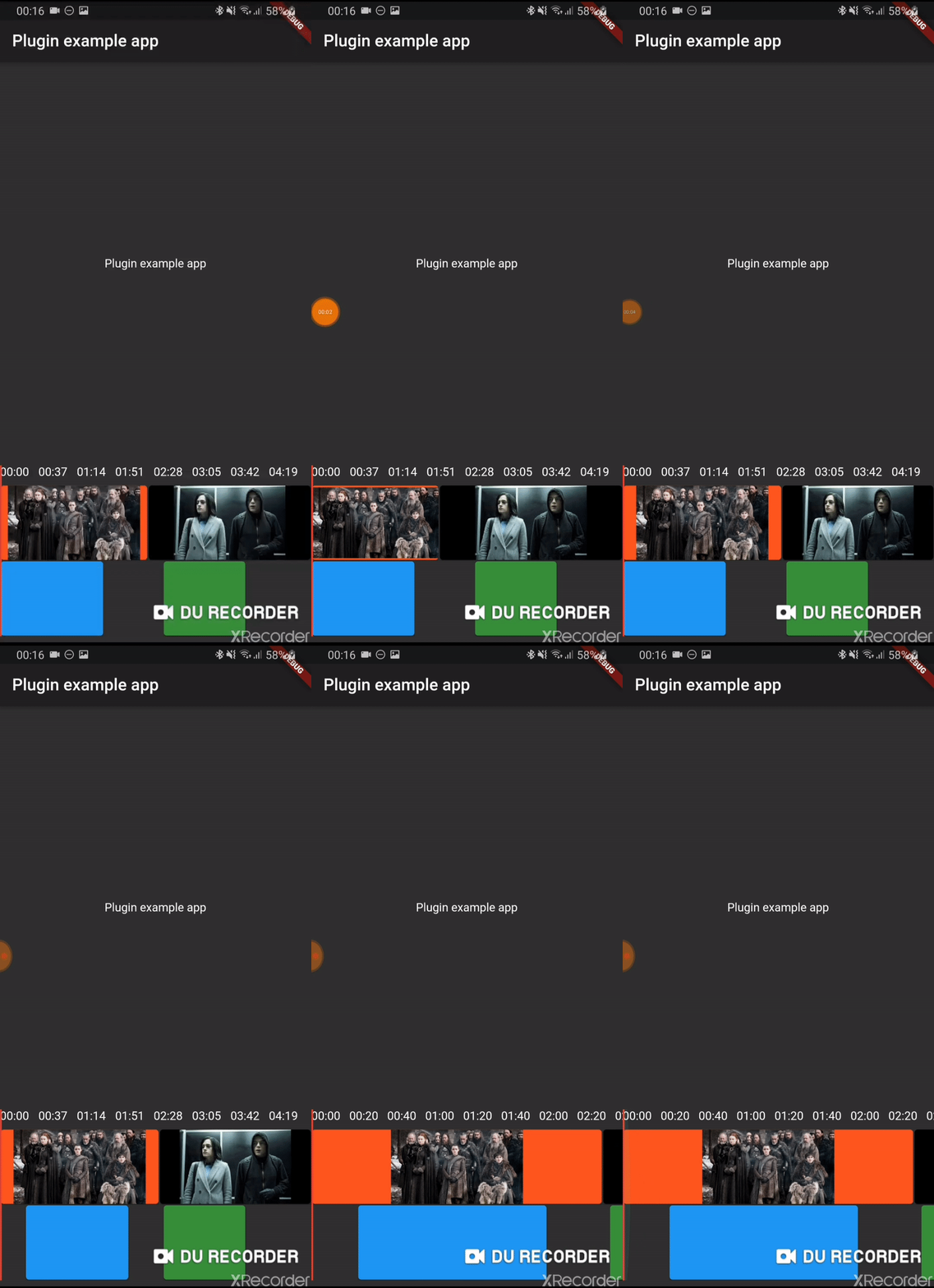
Example

/example

카테고리

소스 저장소

이 패키지를 사용하는 프로젝트

아직 데이터가 없습니다.