패키지, 저장소 및 앱 카테고리 검색

timeline_list 표지
패키지 상세v0.1.1

timeline_list

높은 사용자 정의가 가능한 타임라인을 만들 수 있는 Flutter 위젯입니다. 온보딩 흐름, 진행 상황 추적 및 인터랙티브한 역사 표시에 적합합니다.

AndroidiOSWebmacOSWindowsLinux
30일 다운로드
4.1천
좋아요
222
Pub 점수
160

패키지 설치

flutter pub add timeline_list

패키지 개요

공개 정보를 바탕으로 생성한 선택 가이드입니다.

온보딩 프로세스, 진행 추적, 역사적 사건 표시와 같은 시퀀스를 시각화하는 데 이상적인 상호작용 가능한 타임라인을 구축하기 위한 매우 사용자 정의 가능한 Flutter 위젯입니다. 다양한 레이아웃 옵션과 스타일링을 지원하여 여러 플랫폼에서 매력적인 사용자 경험을 만들 수 있습니다. 패키지는 타임라인 항목, 연결선, 마커 등을 사용자 정의할 수 있도록 유연하게 설계되었습니다. 최소한의 설정으로 Flutter 앱에 원활하게 통합됩니다.

사용 사례

  • 온보딩 흐름
  • 진행률 추적
  • History displays
  • 이벤트 시퀀싱
  • 사용자 여정 시각화
  • 인터랙티브 튜토리얼

주요 기능

  • 높은 사용자 정의 디자인
  • 다중 플랫폼 지원
  • 유연한 항목 및 연결기 스타일
  • 부드러운 애니메이션
  • Flutter와의 간편한 통합
  • 반응형 레이아웃 옵션

적합한 대상

  • 앱 온보딩 화면
  • 작업 완료 추적기
  • 시계열 데이터 표시
  • 교육 앱
  • 사용자 활동 로그

고려 사항

  • 복잡한 레이아웃을 위해 수동 구성이 필요합니다
  • 제한된 내장 테마
  • 접근성에 대한 추가 스타일링이 필요할 수 있습니다
  • 대규모 데이터 세트의 성능 영향
  • 밀도 높은 타임라인에서 세로 스크롤링에 최적화되지 않음

원본 README

연결된 소스 저장소의 README 원문 스냅샷입니다. 최신 내용은 저장소에서 확인하세요.

Flutter Timeline Widget

pub package Flutter Timeline List Web Demo

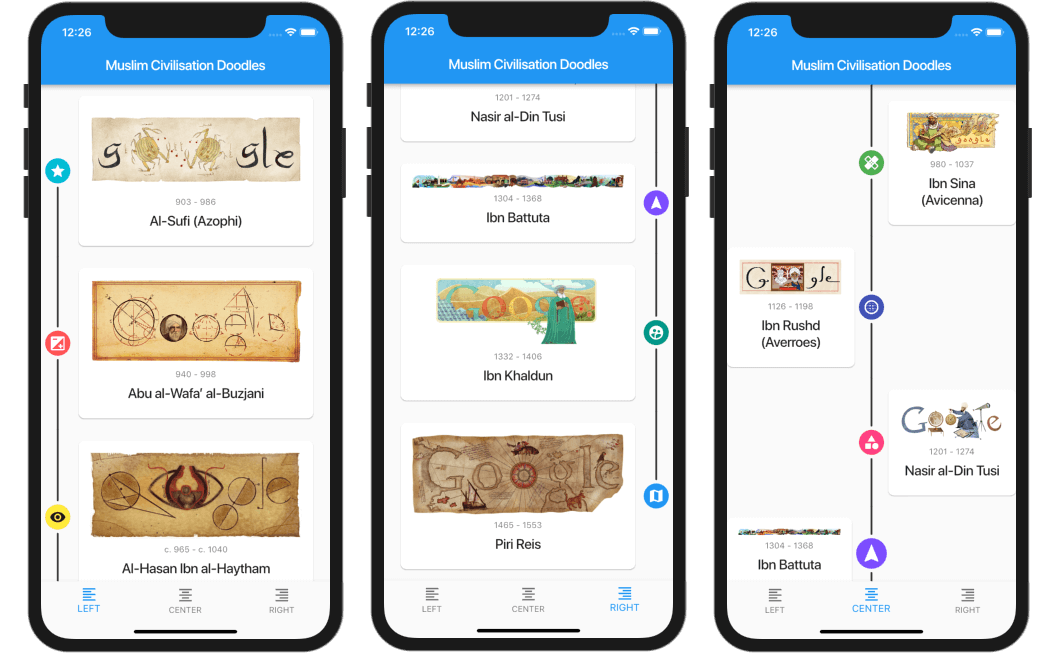
A highly customizable Flutter widget for displaying vertical timelines with custom markers, icons, and flexible positioning options.

Flutter Timeline List Screenshot

[!WARNING] 🦚 The documentation was created using LLMs. If you notice any errors or typos, please submit a Pull Request or create an issue.

Features

  • 🎯 Three timeline positions: start (left), center, or end (right)
  • 🎨 Fully customizable markers with any widget as content or icon
  • 📍 Flexible icon alignment: top, center, or bottom of markers
  • 🎯 Individual marker positioning for centered timelines
  • 🔄 Support for reversed timeline order
  • 📱 Custom scroll physics and controller support

Installation

Add this to your package's pubspec.yaml file:

dependencies:
  timeline_list: ^0.1.0

Usage

Simple Timeline

Flutter Simple Timeline List Screenshot

import 'package:timeline_list/timeline_list.dart';

Timeline(
  children: [
    Marker(child: Text("Step 1")),
    Marker(child: Text("Step 2")),
    Marker(child: Text("Step 3"))
  ],
)
Onboarding Example

Here's a more advanced example showing an onboarding timeline with custom icons:

Flutter Onboarding Timeline List Screenshot

var checkIcon = Container(
    width: 16,
    height: 16,
    decoration: BoxDecoration(shape: BoxShape.circle, color: Colors.green),
    child: Icon(Icons.check, color: Colors.white, size: 12));
var emptyIcon = Container(
    width: 16,
    height: 16,
    decoration: BoxDecoration(shape: BoxShape.circle, color: Colors.grey));
return Scaffold(
    appBar: AppBar(title: const Text("Onboarding example")),
    body: Column(children: [
      Timeline.builder(
        context: context,
        markerCount: 10,
        properties: TimelineProperties(
            iconAlignment: MarkerIconAlignment.center,
            iconSize: 16,
            timelinePosition: TimelinePosition.start),
        markerBuilder: (context, index) => Marker(
          child: Padding(
            padding: const EdgeInsets.all(8.0),
            child: Text("Step ${index + 1}"),
          ),
          icon: index >= 8 ? emptyIcon : checkIcon,
          position: MarkerPosition.left,
        ),
      ),
    ]));

Customization

Timeline Properties
  • timelinePosition: Controls the overall timeline position (start, center, end)
  • iconAlignment: Sets icon alignment relative to marker content
  • iconSize: Defines the size of marker icons
  • lineWidth: Sets the width of connecting lines
  • lineColor: Customizes the color of connecting lines
  • itemGap: Controls spacing between markers
  • iconGap: Sets gap between icon and marker content
Marker Properties
  • child: The main content widget of the marker
  • icon: Optional custom icon widget
  • position: Marker position for centered timelines (left, right)
  • onTap: Optional callback for marker tap events
  • maxWidth: Maximum width constraint for marker content

Examples

Check out the example/ folder for complete sample applications, including:

  • Fully featured timeline with custom icons and widgets
  • Simple onboarding flow

Contributing

This repo is looking for maintainers. Contributions are welcome! Please feel free to submit a Pull Request.

Thank you for all the contributors!


Sponsored by:

카테고리

소스 저장소

이 패키지를 사용하는 프로젝트