패키지, 저장소 및 앱 카테고리 검색

upi_india 표지
패키지 상세v3.0.1

upi_india

Android에서 다양한 앱을 통해 UPI 거래를 수행하는 Flutter 플러그인입니다.

Android
30일 다운로드
248
좋아요
141
Pub 점수
150

패키지 설치

flutter pub add upi_india

패키지 개요

공개 정보를 바탕으로 생성한 선택 가이드입니다.

upi_india 패키지는 Android용 플러터 플러그인으로, 장치에 설치된 다양한 UPI(통합 결제 인터페이스) 지원 앱과 통합하여 원활한 UPI 거래를 가능하게 합니다. 사용자는 Google Pay, PhonePe, Paytm과 같은 인기 있는 UPI 앱을 통해 은행 정보를 수동으로 입력하지 않고도 직접 결제를 시작할 수 있습니다. 이 플러그인은 네이티브 UPI 기능을 활용함으로써 인도 전자상거래 및 서비스 앱에서 결제 처리를 간소화합니다. 금액, 수취인, 거래 참조와 같은 동적 거래 매개변수를 지원하여 안전하고 효율적인 결제를 보장합니다. 이 패키지는 인도 시장 대상의 금융 또는 소매 애플리케이션을 개발하는 개발자에게 이상적입니다.

사용 사례

  • 모바일 전자상거래 체크아웃
  • 디지털 지갑 통합
  • 서비스 결제 수금
  • 계산서 분할 앱
  • 기부 플랫폼

주요 기능

  • 여러 UPI 앱을 지원합니다
  • 보안 거래 시작
  • 동적 결제 매개변수
  • Android용 간단한 API
  • 내장된 오류 처리

적합한 대상

  • 인도 중심 모바일 앱
  • 결제 게이트웨이
  • 소매 및 서비스 플랫폼
  • Android에서의 Flutter 개발자
  • UPI 결제가 필요한 앱

고려 사항

  • Android 전용 지원
  • UPI 앱 설치 필요
  • 인도 금융 시스템에만 제한됨
  • iOS 호환성 없음
  • 사용자의 UPI 앱 사용 가능 여부에 따라 달라짐

원본 README

연결된 소스 저장소의 README 원문 스냅샷입니다. 최신 내용은 저장소에서 확인하세요.

This repository is now Archived.

UPI India (for Android only)

This plugin is used to integrate UPI Options in your Android app. You can use this plugin to initiate transaction to any UPI ID or to any Account number.
Check the Supported apps here.

For a complete example of how to use this plugin, look at the Example tab or in the Github repository.

IMPORTANT!

Some apps like Google Pay, PhonePe, Paytm are currently unable to process the transaction and showing "Maximum limit exceeded" or "Risk threshold exceeded" errors. Reason for this is not clear yet.

Help required

If you can help to extend this for iOS, feel free to check this issue.
If you can help to verify the compatibility of different UPI apps, feel free to check this issue.

Thanks in advance :)


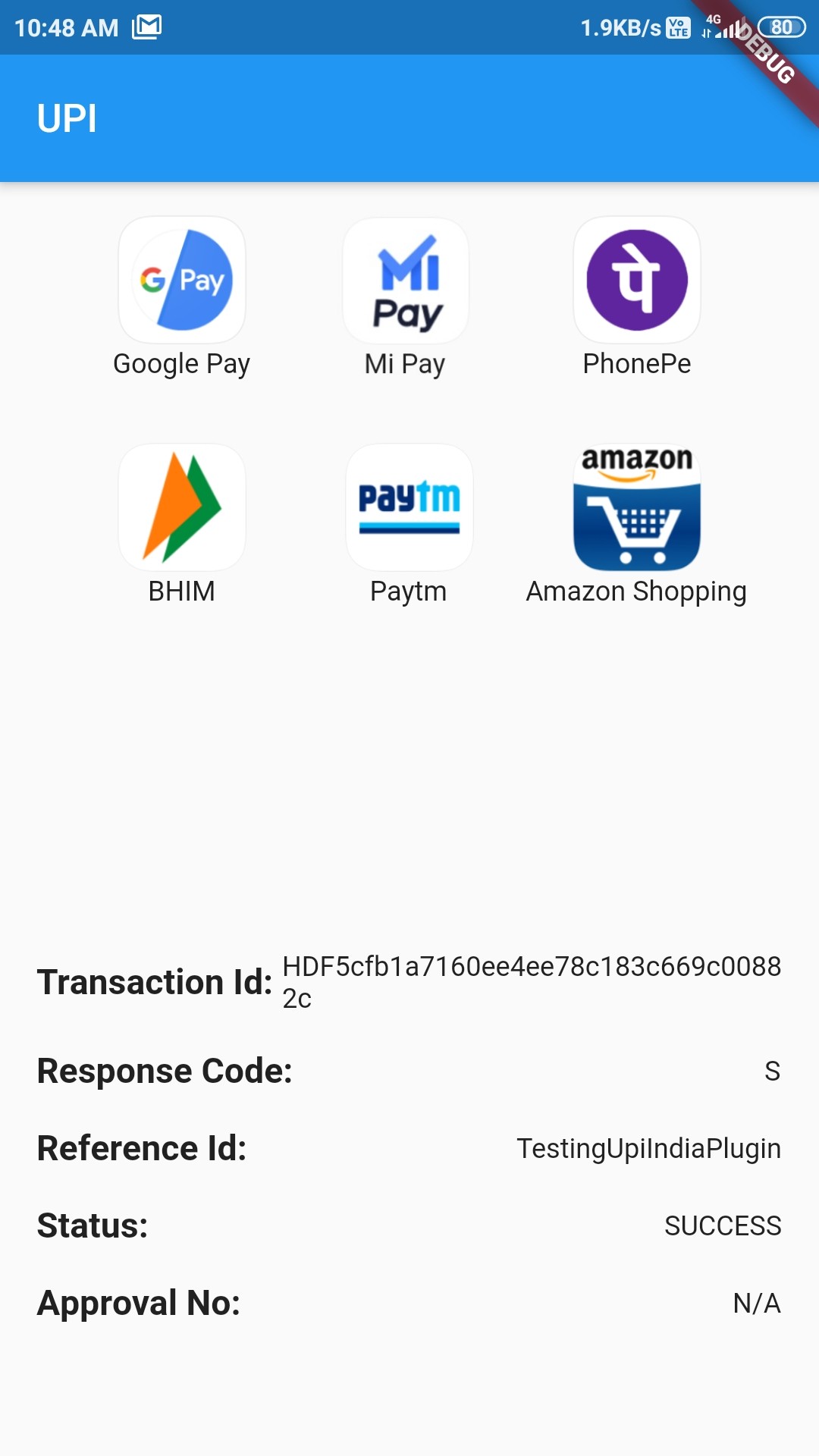
How example looks Success Status

Classes to know

  1. UpiIndia - It is the main class containing two methods:
  • getAllUpiApps() - It takes:

    • bool allowNonVerifiedApps: Should include apps whose working has not been verified yet or not
    • List[UpiApp] includeOnly: List of UpiApps which should be shown and hide the others.
    • bool mandatoryTransactionId: Should include those apps which doesn't return Transaction ID or not
  • startTransaction() - It takes:

    • double amount: Amount to transfer (in ₹)
    • UpiApp app: Which app to use to do the transaction
    • String currency: Currently only supports INR
    • bool flexibleAmount: Set true to allow user to fill the amount
    • String merchantId: Merchant code if present
    • String receiverId: ID of the receiver
    • String receiverName: Name of receiver
    • String transactionNote: A note about the transaction
    • String transactionRefId: Reference Id of transaction
    • String url: For some extra information
  1. UpiApp - It contains supported apps. It is also the model class for the apps returned by getAllUpiApps().

  2. UpiResponse - You will use this to get response from the requested app.

  3. UpiPaymentStatus - Use this to see if transaction was a success or not.


Custom Exception thrown by this Plugin (with self explanatory names)

  1. UpiIndiaAppNotInstalledException

  2. UpiIndiaUserCancelledException

  3. UpiIndiaNullResponseException

  4. UpiIndiaInvalidParametersException

  5. UpiIndiaActivityMissingException

  6. UpiIndiaAppsGetException

How to start transaction?

Step 1:

Import the Package:

import 'package:upi_india/upi_india.dart';
Step 2:

Create UpiIndia object.

UpiIndia _upiIndia = UpiIndia();
Step 3:

Get list of all apps in the device which can handle UPI Intent, as shown.

  List<UpiApp>? apps;

  @override
  void initState() {
    _upiIndia.getAllUpiApps(mandatoryTransactionId: false).then((value) {
      setState(() {
        apps = value;
      });
    }).catchError((e) {
      apps = [];
    });
    super.initState();
  }

OR

You can directly use the predefined apps, like:

UpiApp app = UpiApp.googlePay;

and assign it to the app parameter in Step 4

Step 4:

Create a method which will start the transaction on being called, as shown.
To initiate transaction to any UPI ID, directly pass the ID to receiverId

  Future<UpiResponse> initiateTransaction(UpiApp app) async {
    return _upiIndia.startTransaction(
      app: app,
      receiverUpiId: "9078600498@ybl",
      receiverName: 'Md Azharuddin',
      transactionRefId: 'TestingUpiIndiaPlugin',
      transactionNote: 'Not actual. Just an example.',
      amount: 1.00,
    );
  }
Step 5:

Call this method on any button click or through FutureBuilder and then you will get the Response!


How to handle Response?

Step 1:

After getting the snapshot from the Future, check if there is any error or not:

if (snapshot.hasError) {
  switch (snapshot.error.runtimeType) {
    case UpiIndiaAppNotInstalledException:
      print("Requested app not installed on device");
      break;
    case UpiIndiaUserCancelledException:
      print("You cancelled the transaction");
      break;
    case UpiIndiaNullResponseException:
      print("Requested app didn't return any response");
      break;
    case UpiIndiaInvalidParametersException:
      print("Requested app cannot handle the transaction");
      break;
    default:
      print("An Unknown error has occurred");
      break;
  }
}
Step 2:

If snapshot.hasError is false, you can then get the response UpiResponse from snapshot.data and extract these parameters:

  • Transaction ID
  • Response Code
  • Approval Reference Number
  • Transaction Reference ID
  • Status
Step 3:

Check the Status property. It has following values:

  • UpiPaymentStatus.SUCCESS
  • UpiPaymentStatus.SUBMITTED
  • UpiPaymentStatus.FAILURE

If Status is SUCCESS, Congratulations! You have successfully used this plugin.


For a complete example of how to use this plugin, look at the Example tab or in the Github repository.

Supported Apps

Verified Apps - These Apps have been tested to work fine with this plugin (included by default):
  • All Bank
  • Amazon Pay
  • Axis Pay
  • Baroda Pay
  • BHIM
  • Cent UPI
  • Cointab
  • Corp UPI
  • DCB UPI
  • Fino BPay
  • Freecharge
  • Google Pay
  • iMobile ICICI
  • Indus Pay
  • Khaali Jeb
  • Maha UPI
  • Mobikwik
  • Oriental Pay
  • Paytm
  • Paywiz
  • PhonePe
  • PSB
  • SBI Pay
  • Yes Pay
Apps that don't return Transaction ID in response (pass mandatoryTransactionId: false to getAllUpiApps to use them):
  • MiPay (Both Play Store and GetApps version)
  • HSBC Simply Pay
Non-Verified Apps - These apps haven't been tested yet (pass allowNonVerifiedApps: true to getAllUpiApps to use them):
  • True Caller
  • BOI UPI
  • CSB UPI
  • CUB UPI
  • digibank
  • Equitas UPI
  • Kotak
  • PayZapp
  • PNB
  • RBL Pay
  • realme PaySa
  • United UPI Pay
  • Vijaya UPI

Unsupported Apps

(These apps are not working as expected currently)
  • Airtel Thanks
  • AUPay
  • Bandhan Bank UPI
  • CANDI
  • Indian Bank UPI
  • Jet Pay
  • KBL UPI
  • KVB UPI
  • LVB UPAAY
  • Synd UPI
  • UCO UPI
  • Ultra Cash

Special Thanks to:

Don't forget to give Like and Stars!

카테고리

소스 저장소

이 패키지를 사용하는 프로젝트