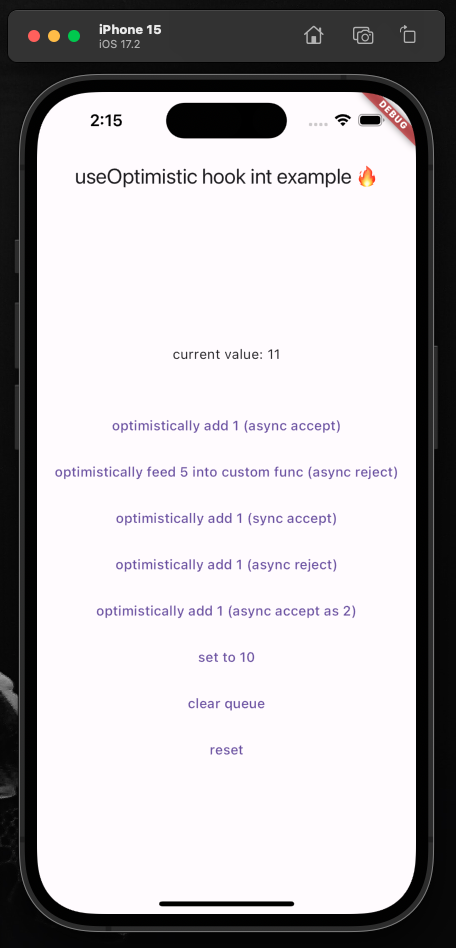
Flutter/Dart 패키지로, 상태를 낙관적으로 업데이트하기 위한 간단한 훅을 제공합니다. 개발자는 UI에 변경 사항을 즉시 반영할 수 있으며, 이후 accept, acceptAs 또는 reject 메서드를 사용하여 비동기적으로 해결할 수 있습니다. 서버 확인 전에 사용자 경험을 향상시키기 위해 즉각적인 피드백이 필요한 폼 제출, 토글 또는 기타 작업에 이상적입니다. 이 훅은 상태 전환을 부드럽게 관리하고 여러 플랫폼을 지원합니다.
사용 사례
실시간 폼 업데이트
즉각적인 피드백과 함께 액션을 전환합니다
낙관적 UI를 갖춘 비동기 작업
롤백 기능을 갖춘 데이터 제출
사용자 상호작용 시뮬레이션
주요 기능
낙관적 상태 업데이트
accept/acceptAs/reject 지원
최소한의 부록 코드를 가진 간단한 API
크로스 플랫폼 호환성
내장 상태 관리
기존 훅과의 간편한 통합
적합한 대상
즉각적인 UI 피드백을 원하는 개발자
임시 상태 변경이 필요한 프로젝트
자주 비동기 상호작용을 하는 앱
UX 반응성에 중점을 두는 팀
함수형 위젯을 사용하는 플러터 앱
고려 사항
비동기 상태 처리에 대한 이해가 필요합니다
백업이 없는 경우 핵심 데이터에는 적합하지 않습니다
거부할 때 적절한 오류 처리가 필요합니다
명확한 사용자 피드백 메커니즘과 함께 사용할 때 가장 효과적입니다
복잡한 워크플로우를 위해 추가 로직이 필요할 수 있습니다
원본 README
연결된 소스 저장소의 README 원문 스냅샷입니다. 최신 내용은 저장소에서 확인하세요.
Flutter hook: useOptimistic 🪝
An easy-to-use hook to optimistically update generic state and then resolve it later (async or sync) by accept, acceptAs, or reject-ing.
Documentation
Full example of using this hook to manage integer state.
Documentation is largely found in the package itself via doc-comments (i.e. hover over package functions in your editor and it'll tell you what they do). First, however, view the above full example to get started.
TextButton(
onPressed: () async {
Resolver r = useOptimistic.fn(
1, // the [newValue] to be passed to functions below
todo: (currentState, newValue) => currentState + newValue,
undo: (currentState, oldValue) => currentState - oldValue,
);
// simulating an API callawaitFuture.delayed(constDuration(seconds: 1));
// three mutually exclusive ways to deal with result
r.acceptAs(2); // [undo] original function, then [todo] with new value
r.accept(); // accept the original optimistic update
r.reject(); // reject the original optimistic update and [undo] original function
},
child: constText("optimistically add 1"),
),
You can call useOptimistic.fn( ... ) multiple times with different todo and undo functions and it'll execute the proper todo/undo associated with fn at the moment you called it. This means you can call multiple separateuseOptimistic.fn( ... )s safely together. It does not mean you can have a single fn like this (pseudo-code): useOptimistic.fn( if x todo: () => {...} else todo: () => {...} ) that has conditionally rendered todo/undo functions.
Listen to the state:
Text("current value: ${useOptimistic.state}"),
Extra
The package is always open to improvements, [suggestions](mailto:me@matthewtrent.me), and additions!
I'll look through GitHub PRs and Issues as soon as I can.