분류, 패키지 및 저장소 검색

vertical_card_pager 표지
패키지 상세v1.6.3

vertical_card_pager

다이나믹하고 아름다운 카드 뷰 페이지러를 사용하여 훌륭한 앱을 만들어보세요.

AndroidiOSWeb
30일 다운로드
314
좋아요
313
Pub 점수
140

패키지 설치

flutter pub add vertical_card_pager

패키지 개요

공개 정보를 바탕으로 생성한 선택 가이드입니다.

개발자가 동적이고 시각적으로 매력적인 수직 카드 페이저를 만들 수 있도록 해주는 플러터 패키지입니다. 부드러운 스크롤링과 상호작용 가능한 카드 전환을 지원하며, 계층적으로 몰입감 있는 방식으로 콘텐츠를 보여주는 데 이상적입니다. 안드로이드, iOS 및 웹에서 사용할 수 있도록 설계되었으며, 우아한 애니메이션과 반응형 레이아웃을 통해 사용자 경험을 향상시킵니다. 카드 기반의 몰입형 탐색이나 콘텐츠 표시가 필요한 앱에 특히 유용합니다.

사용 사례

  • 인터랙티브 제품 쇼케이스
  • 사용자 프로필 슬라이더
  • 콘텐츠 캐러셀
  • 교육용 앱 인터페이스
  • 미디어 브라우징 경험

주요 기능

  • 부드러운 수직 카드 전환
  • 사용자 지정 가능한 카드 외관
  • 다양한 플랫폼 간 반응형 디자인
  • 터치 제스처 지원
  • 내장 애니메이션 효과

적합한 대상

  • 모바일 및 웹 앱 개발자
  • 디자인 중심 애플리케이션
  • 카드 기반 UI 구현
  • 풍부한 시각 콘텐츠를 갖춘 앱

고려 사항

  • 대규모 데이터 세트에 대한 성능 최적화가 필요할 수 있습니다
  • 복잡한 레이아웃에 대한 맞춤 설정 제한
  • 모든 플랫폼에서 안정적인 제스처 처리에 의존합니다

원본 README

연결된 소스 저장소의 README 원문 스냅샷입니다. 최신 내용은 저장소에서 확인하세요.


Use dynamic and beautiful card view pagers to help you create great apps.

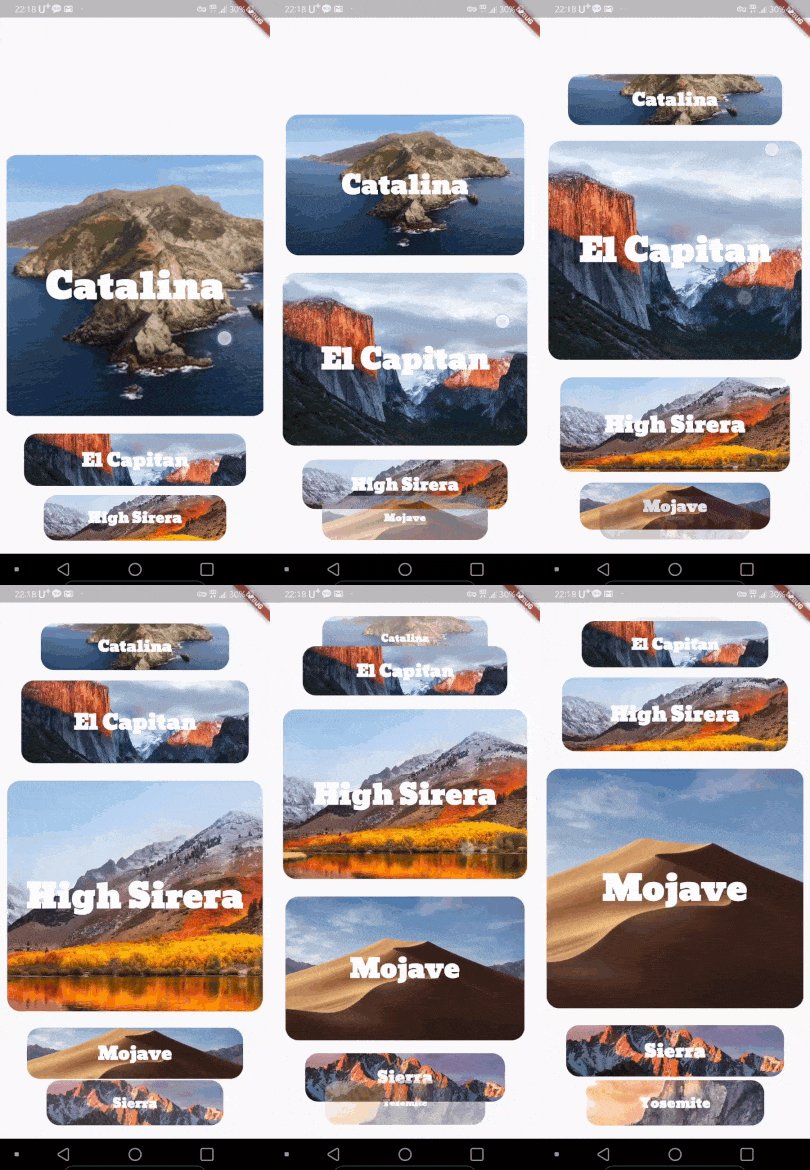
Preview

Alignment

Left Center(Default) Right
left center right

Installing

  1. Add dependency to pubspec.yaml

    Get the latest version in the 'Installing' tab on pub.dartlang.org

dependencies:
    vertical_card_pager: ^1.6.0
  1. Import the package
import 'package:vertical_card_pager/vertical_card_pager.dart';
  1. Adding VerticalCardPager

With optional parameters

  @override
  Widget build(BuildContext context) {
    final List<String> titles = ["RED", "YELLOW", "BLACK", "CYAN", "BLUE", "GREY", ];

    final List<Widget> images = [
      Container(
        color: Colors.red,
      ),
        Container(
        color: Colors.yellow,
      ),
        Container(
        color: Colors.black,
      ),
        Container(
        color: Colors.cyan,
      ),
        Container(
        color: Colors.blue,
      ),
        Container(
        color: Colors.grey,
      ),
    ];
    return Scaffold(
      body: SafeArea(
        child: Column(
          children: <Widget>[
            Expanded(
              child: Container(
                child: VerticalCardPager(
                  titles: titles,  // required
                  images: images,  // required
                  textStyle: TextStyle(color: Colors.white, fontWeight: FontWeight.bold), // optional
                  onPageChanged: (page) { // optional
                  },
                  onSelectedItem: (index) { // optional
                  },
                  initialPage: 0, // optional
                  align : ALIGN.CENTER, // optional
                  physics : ClampingScrollPhysics() // optional 
                ),
              ),
            ),
          ],
        ),
      ),
    );
  }

How to use

Check out the example app in the example directory or the 'Example' tab on pub.dartlang.org for a more complete example.

Example on Web

https://origogi.github.io/Vertical_Card_Pager/#/

Reference

This package's animation is inspired from from this Dribbble art.

카테고리

소스 저장소

이 패키지를 사용하는 프로젝트

아직 데이터가 없습니다.