Chrome 및 기타 현대 브라우저용으로 HLS(HTTP Live Streaming) 지원을 추가하는 video_player 패키지의 웹 플랫폼 구현입니다. Flutter 웹 애플리케이션에서 HLS 스트림을 원활하게 재생할 수 있게 하며, 핵심 video_player 기능을 확장하여 적응형 스트리밍 프로토콜을 처리할 수 있도록 합니다. 이 패키지는 네이티브 HLS 지원이 제한적이거나 일관되지 않을 수 있는 웹 환경을 위해 특별히 설계되었습니다.
The Web platform does not suppport dart:io, so attempts to create a VideoPlayerController.file will throw an UnimplementedError.
Autoplay
Playing videos without prior interaction with the site might be prohibited
by the browser and lead to runtime errors. See also: https://goo.gl/xX8pDD.
Supported Formats
Different web browsers support different sets of video codecs.
Video codecs?
Check MDN's Web video codec guide to learn more about the pros and cons of each video codec.
What codecs are supported?
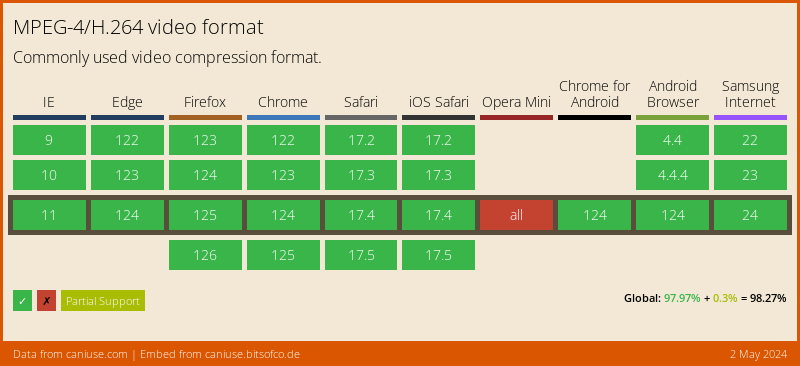
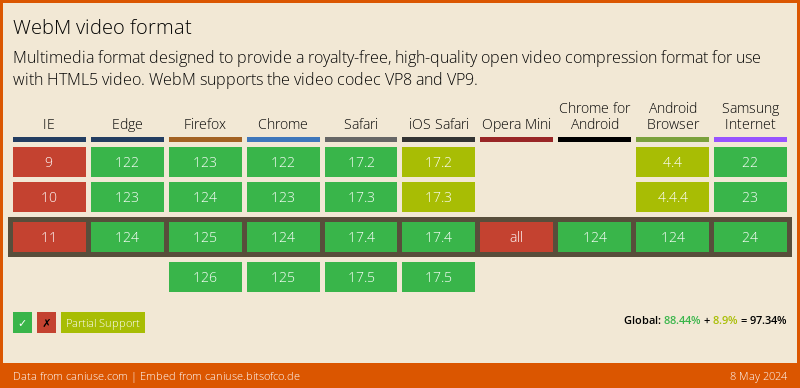
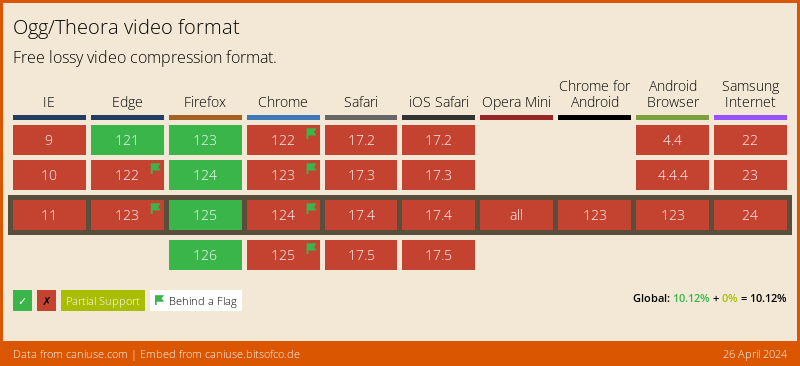
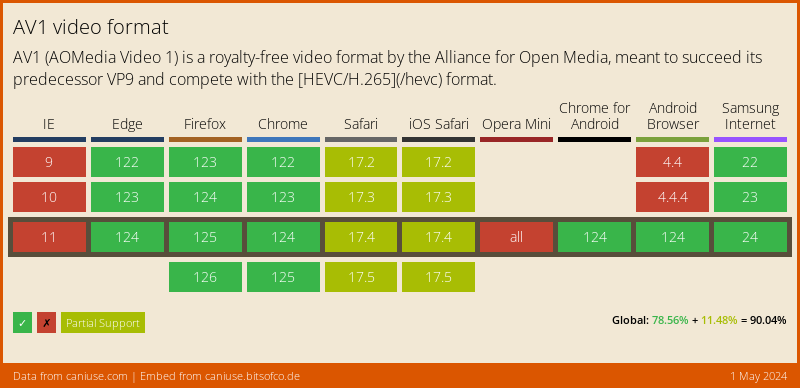
Visit caniuse.com: 'video format' for a breakdown of which browsers support what codecs. You can customize charts there for the users of your particular website(s).
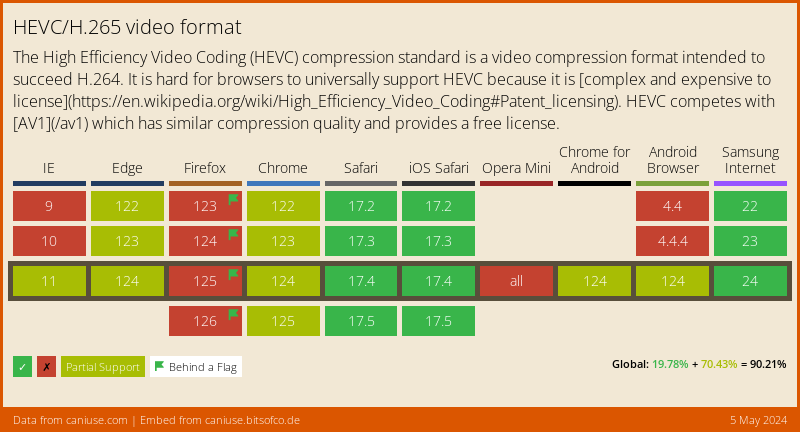
Here's an abridged version of the data from caniuse, for a Global audience:
MPEG-4/H.264
WebM
Ogg/Theora
AV1
HEVC/H.265
Example
import'package:video_player/video_player.dart';
import'package:flutter/material.dart';
voidmain() => runApp(VideoApp());
classVideoAppextendsStatefulWidget{
@override_VideoAppStatecreateState() => _VideoAppState();
}
class_VideoAppStateextendsState<VideoApp> {
VideoPlayerController _controller;
@overridevoidinitState() {
super.initState();
_controller = VideoPlayerController.network(
'https://test-streams.mux.dev/x36xhzz/x36xhzz.m3u8')
..initialize().then((_) {
// Ensure the first frame is shown after the video is initialized, even before the play button has been pressed.setState(() {});
});
}
@overrideWidgetbuild(BuildContext context) {
returnMaterialApp(
title: 'Video Demo',
home: Scaffold(
body: Center(
child: _controller.value.initialized
? AspectRatio(
aspectRatio: _controller.value.aspectRatio,
child: VideoPlayer(_controller),
)
: Container(),
),
floatingActionButton: FloatingActionButton(
onPressed: () {
setState(() {
_controller.value.isPlaying
? _controller.pause()
: _controller.play();
});
},
child: Icon(
_controller.value.isPlaying ? Icons.pause : Icons.play_arrow,
),
),
),
);
}
@overridevoiddispose() {
super.dispose();
_controller.dispose();
}
}