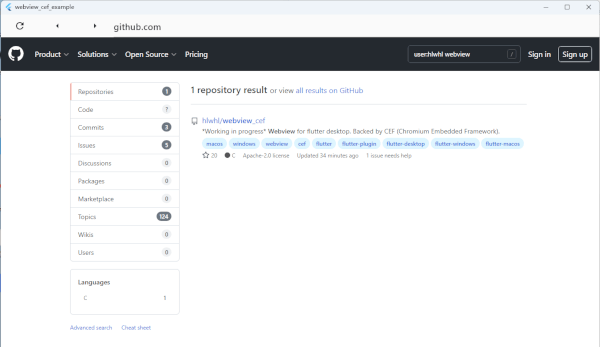
연결된 소스 저장소의 README 원문 스냅샷입니다. 최신 내용은 저장소에서 확인하세요.
WebView CEF




English · 简体中文
A Flutter desktop WebView backed by CEF (Chromium Embedded Framework). It renders a full Chromium browser off-screen and presents it inside a Flutter Texture, so the web content composes natively with the rest of your Flutter UI on Windows, macOS, and Linux.
Built on CEF 149 (Chromium 149).
Features
- 🌐 Full Chromium engine — modern web standards, WebGL, HTML5 video, and more.
- ⚡ GPU zero-copy rendering (Windows & macOS) — frames go straight from Chromium's GPU output to Flutter via a shared texture (a D3D11 texture on Windows, an IOSurface on macOS), with no per-frame CPU color-swizzle or CPU→GPU upload. Linux still uses the software path.
- 🎞️ Adaptive frame rate (Windows & macOS) — frame production is driven by the display's vblank (
IDXGIOutput::WaitForVBlank on Windows, CVDisplayLink on macOS), so the webview tracks your monitor's real refresh rate (e.g. 120/144 Hz) instead of being capped at 60 fps. Static content stays idle.
- ⌨️ Real-time CJK/IME input — native composition pipeline; Chinese/Japanese/Korean preedit appears live and commits correctly.
- 🔌 JavaScript bridge — call into Dart from JS and evaluate JS from Dart.
- 🍪 Cookie management — read, set, and delete cookies.
- 🪟 Multiple instances — run several independent webviews at once.
- 📜 User-script injection — inject JS/CSS at document start or end.
- 🛠️ DevTools, mouse & trackpad input, navigation, and load/title/url events.
Supported platforms
| Platform |
Minimum version |
Architectures |
| Windows |
Windows 10 |
x64 |
| macOS |
macOS 12.0 |
arm64, x86_64, or universal (arm64 + x86_64) |
| Linux |
— |
x64, arm64 |
| eLinux |
— |
x64, arm64 |
Requirements
- Flutter >= 3.27.0, Dart >= 3.6.0 (tested against the latest stable Flutter, 3.44.x).
- A C++20 toolchain for the native side (required by CEF 149) — recent MSVC / Clang / GCC.
Upgrading from ≤ 0.2.2
0.5.0 is a large upgrade (Flutter 3.44 + CEF 149) with breaking changes on every platform. If you are coming from an older release, do the following:
- Toolchain — upgrade to Flutter ≥ 3.27.0 / Dart ≥ 3.6.0 (was 2.5.0 / 2.17.1). The native build now requires C++20 (CEF 149); make sure your app doesn't force the plugin target to an older C++ standard.
- Removed Dart API —
WebviewCefPlatform, MethodChannelWebviewCef, and getPlatformVersion() were removed (along with the plugin_platform_interface dependency). They were never the intended API and have no replacement (getPlatformVersion returned a demo value). Import only package:webview_cef/webview_cef.dart and use WebviewManager / WebViewController.
- Windows —
initCEFProcesses changed signature. Update windows/runner/main.cpp: it now takes the HINSTANCE and returns a sub-process exit code that must be returned immediately, as the first statement in wWinMain (see the Windows install snippet below). The minimum OS is now Windows 10.
- macOS — raise the deployment target to 12.0: set
platform :osx, '12.0' in macos/Podfile and the Runner target's macOS Deployment Target in Xcode (CEF 149's framework is built for 12.0). To enable multi-process rendering, add the one-line post_install hook to macos/Podfile (see the macOS install section). Builds target the host architecture by default (arm64 or x86_64); set WEBVIEW_CEF_MACOS_ARCH=universal before pod install for a universal (arm64 + x86_64) app.
Installation
Windows
-
Add the dependency:
flutter pub add webview_cef
-
Edit windows/runner/main.cpp. Because of Chromium's multi-process architecture and to route input/IME and method-channel calls onto the Flutter engine thread, two hooks are required:
#include "webview_cef/webview_cef_plugin_c_api.h"
int APIENTRY wWinMain(_In_ HINSTANCE instance, _In_opt_ HINSTANCE prev,
_In_ wchar_t *command_line, _In_ int show_command) {
int exit_code = initCEFProcesses(instance);
if (exit_code >= 0) {
return exit_code;
}
In the message loop, forward messages to CEF (enables keyboard input and lets CEF post to the Flutter engine thread):
::MSG msg;
while (::GetMessage(&msg, nullptr, 0, 0)) {
  ::TranslateMessage(&msg);
  ::DispatchMessage(&msg);
  handleWndProcForCEF(msg.hwnd, msg.message, msg.wParam, msg.lParam);
}
IME is wired up automatically by the plugin — no extra runner code needed.
On the first build, the official CEF Standard Distribution (~330 MB, from https://cef-builds.spotifycdn.com) is downloaded into third/cef and libcef_dll_wrapper is compiled from source, so the first build takes noticeably longer.
macOS
Requires macOS 12.0 or newer — CEF 149 ships a framework with a 12.0 deployment target, so your app's macOS deployment target must be ≥ 12.0 (set it in macos/Podfile (platform :osx, '12.0') and the Runner target). Older targets fail to link cleanly.
-
Add the dependency:
flutter pub add webview_cef
-
Enable multi-process (recommended) by adding the helper hook to your macos/Podfile's existing post_install:
post_install do |installer|
  installer.pods_project.targets.each do |target|
    flutter_additional_macos_build_settings(target)
  end
  # webview_cef: embed the CEF helper sub-process apps (multi-process).
  require File.expand_path(
    'Flutter/ephemeral/.symlinks/plugins/webview_cef/macos/embed_cef_helpers.rb', __dir__)
  WebviewCEF.install_helper_phase(installer)
end
Then pod install (run automatically by flutter run). This installs an "Embed CEF Helpers" build phase that clones the prebuilt helper into the five CEF sub-process .app bundles inside your app — no manual Xcode target needed. Without this hook the plugin still works but falls back to single-process (an unsupported Chromium mode: no crash isolation, V8 proxy resolver disabled, etc.).
macOS uses CocoaPods, which does not run the CMake download path. Instead the podspec's prepare_command runs macos/scripts/download_cef.sh on pod install, which mirrors the Windows/Linux flow: it downloads the official CEF Standard Distribution for the selected architecture (from https://cef-builds.spotifycdn.com, version pinned by CEF_VERSION in third/download.cmake), compiles libcef_dll_wrapper from source, lays the framework out as a versioned macOS bundle, and installs everything into the (git-ignored) macos/third/cef. The first pod install therefore takes noticeably longer; subsequent runs are a no-op once the pinned version is present.
Requirements: cmake (and ninja, otherwise make is used) must be on PATH to build the wrapper — brew install cmake ninja.
The wrapper is built Debug by default to match flutter run / flutter build macos --debug. For a release build set CEF_WRAPPER_BUILD_TYPE=Release before pod install (debug and release builds need a wrapper compiled in the matching configuration — #if DCHECK_IS_ON() changes its ABI).
Choosing the architecture
WEBVIEW_CEF_MACOS_ARCH selects which slices are prepared. It is read by both the download script and the podspec, so the CEF binaries and the EXCLUDED_ARCHS of your app always agree.
| Value |
Result |
host (default) |
the build machine's architecture |
arm64 |
Apple Silicon only |
x86_64 |
Intel only |
universal |
both, merged with lipo |
WEBVIEW_CEF_MACOS_ARCH=universal pod install
cd .. && flutter build macos --release
A universal build downloads both CEF distributions and compiles the wrapper twice, so it takes about twice as long and needs roughly 8 GB of free scratch space. The framework binary, the ANGLE/SwiftShader dylibs beside it, libcef_dll_wrapper.a, and the helper executable are merged with lipo, then each is checked for the expected slices. Chromium's V8 startup snapshot is architecture specific (v8_context_snapshot.<arch>.bin), so both are copied into the framework's Resources and the right one is picked at runtime; the "Embed CEF Helpers" build phase fails the build if the helper does not cover every architecture the app is being built for. The selected value is recorded in macos/third/cef/version.txt, so changing it re-prepares macos/third/cef on the next pod install.
Linux
flutter pub add webview_cef
CEF is downloaded automatically on the first build (x64 and arm64 supported). Make sure the usual Flutter Linux desktop toolchain is installed (clang, cmake, ninja-build, libgtk-3-dev, pkg-config).
Quick start
import 'package:flutter/material.dart';
import 'package:webview_cef/webview_cef.dart';
class MyWebView extends StatefulWidget {
const MyWebView({super.key});
@override
State<MyWebView> createState() => _MyWebViewState();
}
class _MyWebViewState extends State<MyWebView> {
late final WebViewController _controller;
@override
void initState() {
super.initState();
_controller = WebviewManager().createWebView(
loading: const Center(child: CircularProgressIndicator()),
);
_init();
}
Future<void> _init() async {
await WebviewManager().initialize();
_controller.setWebviewListener(WebviewEventsListener(
onUrlChanged: (url) => debugPrint('url => $url'),
onLoadEnd: (controller, url) => debugPrint('loaded => $url'),
));
await _controller.initialize('https://flutter.dev');
}
@override
void dispose() {
_controller.dispose();
WebviewManager().quit();
super.dispose();
}
@override
Widget build(BuildContext context) {
return ValueListenableBuilder<bool>(
valueListenable: _controller,
builder: (_, ready, __) =>
ready ? _controller.webviewWidget : _controller.loadingWidget,
);
}
}
A full-featured example (navigation bar, cookies, JS bridge, DevTools) lives in example/.
Usage
Lifecycle
await WebviewManager().initialize(userAgent: 'my-app/1.0');
final controller = WebviewManager().createWebView(loading: const Text('…'));
await controller.initialize('https://example.com');
controller.dispose();
WebviewManager().quit();
Navigation
controller.loadUrl('https://example.com');
controller.reload();
controller.goBack();
controller.goForward();
controller.openDevTools();
Events
controller.setWebviewListener(WebviewEventsListener(
  onTitleChanged: (title) {},
  onUrlChanged: (url) {},
  onLoadStart: (controller, url) {},
  onLoadEnd: (controller, url) {},
  onConsoleMessage: (level, message, source, line) {},
));
JavaScript bridge
controller.executeJavaScript("document.title = 'set from Dart'");
final result = await controller.evaluateJavascript("1 + 1");
controller.setJavaScriptChannels({
JavascriptChannel(
name: 'Print',
onMessageReceived: (msg) {
debugPrint(msg.message);
controller.sendJavaScriptChannelCallBack(
false, "{'code':'200'}", msg.callbackId, msg.frameId);
},
),
});
Cookies
await WebviewManager().setCookie('example.com', 'key', 'value');
await WebviewManager().deleteCookie('example.com', 'key');
final all = await WebviewManager().visitAllCookies();
final some = await WebviewManager().visitUrlCookies('example.com', false);
User-script injection
final scripts = InjectUserScripts()
  ..add(UserScript("console.log('at document start')", ScriptInjectTime.LOAD_START))
  ..add(UserScript("console.log('at document end')", ScriptInjectTime.LOAD_END));

final controller = WebviewManager().createWebView(injectUserScripts: scripts);
eLinux 🐧
For eLinux, this plugin supports Wayland and DRM-GBM backends using a decoupled architecture that avoids GTK/X11 dependencies.
Runtime Dependencies
Ensure the target eLinux system has the following libraries installed:
libnss3libnspr4libfontconfig1libasound2
CEF Binary Compatibility
- Sandbox: CEF's sandbox is disabled by default (
--no-sandbox) to avoid SUID permission issues common on embedded filesystems.
- Architecture: While this project supports x64, ensure you have the correct CEF binaries for your target architecture (ARM64 support requires corresponding CEF builds).
Setup
- Ensure your eLinux toolchain is correctly configured.
- Use the
flutter-elinux SDK to build your application.
- The plugin will automatically use the
elinux/ port which implements an efficient pixel buffer rendering pipeline.
TO RUN
cd example/
flutter-elinux pub get
flutter-elinux build elinux --release
./build/elinux/x64/release/bundle/webview_cef_example -b .
Windows build options
These CMake options can be set on the plugin target (defaults shown):
| Option |
Default |
Effect |
WEBVIEW_CEF_GPU_TEXTURE |
ON |
Zero-copy GPU rendering (CEF OnAcceleratedPaint → Flutter GPU surface texture). Set OFF to fall back to the software pixel-buffer path. |
WEBVIEW_CEF_USE_DEBUG_CEF |
OFF |
Link/bundle the CEF Debug binaries even in Debug builds. By default Debug builds use the Release CEF binaries, because CEF's Debug DCHECKs crash off-screen rendering during IME. Turn ON only to step into CEF itself. |
Updating CEF
The CEF/Chromium version is pinned in one place — CEF_VERSION in third/download.cmake. Bump it to update CEF on all three platforms: Windows and Linux download it automatically, and macOS reads the same CEF_VERSION (via macos/scripts/download_cef.sh, run by the podspec's prepare_command) and re-downloads on the next pod install — no manual placement needed.
Demo

Screenshots
Roadmap
- [x] Windows / macOS / Linux support
- [x] Multiple instances
- [x] JavaScript bridge & cookie management
- [x] IME support (Windows / macOS / Linux; tested with Chinese IMEs)
- [x] Mouse & trackpad input
- [x] DevTools
- [x] GPU zero-copy rendering & adaptive frame rate (Windows & macOS)
- [x] Easier macOS multi-process helper-bundle integration (one-line Podfile hook)
- [x] Universal (arm64 + x86_64) macOS builds
- [ ] Tear-free GPU sync (keyed-mutex) on Windows
Pull requests are welcome. Every PR runs build + flutter analyze CI on Windows, macOS, and Linux.
Credits
Inspired by flutter_webview_windows.
License
Apache License 2.0.
Star History