WS는 Flutter용 가볍고 효율적인 WebSocket 라이브러리로, 앱에서 실시간 통신을 위해 설계되었습니다. 다양한 플랫폼 간에 WebSocket 연결을 원활하게 설정하고 관리하며 자동 재연결 기능을 제공합니다. 성능과 단순성에 중점을 두어 Android, iOS, Web, macOS, Windows, Linux를 지원하며, 실시간 데이터 피드, 채팅 애플리케이션 및 실시간 대시보드에 적합합니다. 신뢰성과 낮은 오버헤드를 우선시하며 개발자가 최소한의 노력으로 양방향 통신을 쉽게 통합할 수 있도록 깔끔한 API를 제공합니다.
사용 사례
실시간 채팅 애플리케이션
실시간 데이터 스트리밍
사물인터넷 장치 통신
온라인 게임
실시간 분석 대시보드
주요 기능
자동 재연결
낮은 메모리 사용량
크로스 플랫폼 지원
간단한 API
효율적인 메시지 처리
보안 WebSocket (wss) 지원
적합한 대상
실시간 기능을 구축하는 개발자
지속적인 연결을 필요로 하는 앱
고성능 메시징 시스템
다중 플랫폼 실시간 앱
고려 사항
불안정한 네트워크에서는 오류 처리에 주의가 필요합니다
제한된 내장 직렬화
WebSocket 프로토콜 외에는 적합하지 않습니다
연결 상태 수동 관리
외부 JSON 또는 메시지 파싱 라이브러리에 의존합니다
원본 README
연결된 소스 저장소의 README 원문 스냅샷입니다. 최신 내용은 저장소에서 확인하세요.
WS: Cross-platform WebSocket client
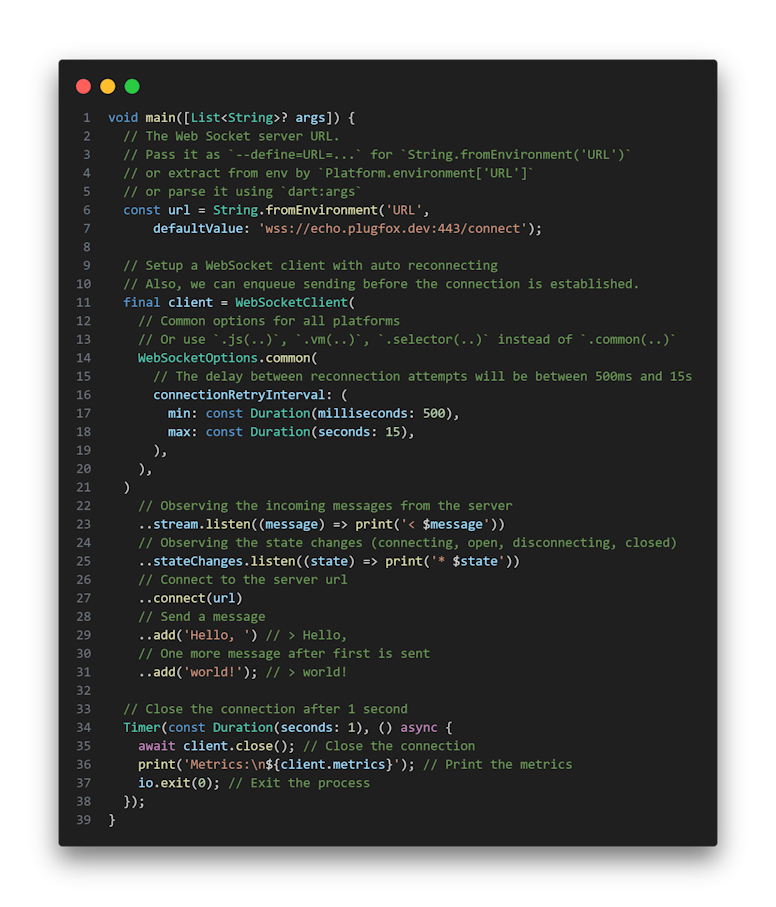
The ws package provides a cross-platform WebSocket client for both Dart and Flutter applications. It allows you to connect to a WebSocket server, send and receive messages, and handle the connection state changes.
Installation
Add the following dependency to your pubspec.yaml file:
dependencies:ws:<version>
Properties
reconnectTimeout: A read-only property that returns the reconnect timeout. The default value is 5 seconds.
state: A read-only property that returns the current WebSocket connection state.
stateChanges: A read-only property that returns a stream of WebSocket connection state changes.
stream: A read-only property that returns a stream of message events handled by the WebSocket.
metrics: A read-only property that returns a WebSocketMetrics object with metrics about the WebSocket connection.
Methods
connect(String url): Connects to the WebSocket server specified by the URL argument.
disconnect([int? code = 1000, String? reason = 'NORMAL_CLOSURE']): Closes the WebSocket connection. You can optionally pass a numeric code and a reason string to the method to send close information to the remote peer.
add(Object data): Sends data on the WebSocket connection. The data can be either a String or a List of integers holding bytes.
close([int? code = 1000, String? reason = 'NORMAL_CLOSURE']): Permanently stops the WebSocket connection and frees all resources. After calling this method, the WebSocket client is no longer usable.
Options
The WebSocketOptions class provides a configurable set of options for setting up a WebSocket connection on both VM (Virtual Machine) and JS (JavaScript) platforms. This class supports a variety of settings including connection retry strategies, subprotocols, timeouts, message interceptors, and platform-specific configurations.
To use WebSocketOptions, instantiate it directly with the desired configuration for your platform. Use the .vm() factory for VM platform settings and .js() factory for JS platform settings. The .selector() factory can be used to construct options depending on the current platform, allowing for flexible configuration across different environments.
Common Options
Common configuration options applicable across VM and JS platforms:
Option
Description
connectionRetryInterval
Specifies the Backoff full jitter strategy for reconnecting. Allows tweaks for the reconnect backoff algorithm (min delay, max delay). If not specified, reconnecting is disabled.
protocols
Specifies the subprotocols the client is willing to speak.
timeout
Specifies the maximum time to wait for the connection to be established. Defaults to 30 seconds if not specified.
afterConnect
Specifies the callback function to be called after the connection is established, but before the client is allowed to send user messages.
interceptors
Specifies the interceptors for WebSocket messages.
VM Platform Options
Specific to VM (Mobile, Desktop, Server, Console) platform. Not to be used on the web platform.
Includes all common options.
headers: Specifies additional HTTP headers for setting up the connection. Certain headers are controlled by the WebSocket connection process and will be ignored if passed.
compression: If provided, configures the WebSocket to negotiate with the specified CompressionOptions.
customClient: Allows specifying a custom HttpClient.
userAgent: Allows specifying a custom UserAgent.
JS Platform Options
Specific to JS (Browser) platform. Not to be used on the VM platform.
Includes all common options.
useBlobForBinary: Specifies if Uint8List should be sent as Blob or as typed data. Defaults to sending as typed data.
The ws package provides a cross-platform WebSocket client that supports automatic reconnection in case of connection loss. The client automatically tries to reconnect to the server when the connection is lost. To handle reconnection-related events, you can register listeners for the stateChanges stream, which notifies you about changes in the connection state. When the connection is closed, the client tries to reconnect with a delay, which increases exponentially with each unsuccessful attempt to prevent overloading the server.
Metrics
The ws package provides a cross-platform WebSocket client that supports metrics. The client automatically collects metrics about the number of sent and received messages, as well as the number of sent and received bytes. To get the metrics, you can use the metrics property, which returns a WebSocketMetrics object. The metrics are updated on demand, so you can get the latest values at any time.
JSON
The ws package provides a cross-platform WebSocket client that supports JSON. The client automatically decodes incoming messages from JSON to Dart objects. To get the decoded messages, you can use the client.stream.json property, which returns a Stream<Map<String, Object?>> of decoded messages.
Features and Roadmap
✅ Cross-platform WebSocket client for Dart and Flutter
We appreciate any form of support, whether it's a financial donation or just a star on GitHub. It helps us to continue developing and improving our library. Thank you for your support!