패키지, 저장소 및 앱 카테고리 검색

패키지 상세v0.2.2

your_splash

스플래시 스크린의 플러터 구현입니다. 안드로이드와 iOS를 지원합니다.

30일 다운로드
28
좋아요
7
Pub 점수
40

패키지 설치

flutter pub add your_splash

패키지 개요

공개 정보를 바탕으로 생성한 선택 가이드입니다.

YourSplash는 Android 및 iOS 플랫폼용으로 간단하고 효과적인 스플래시 화면을 제공하는 Flutter 패키지입니다. 앱 초기화 중에 사용자 정의 가능한 스플래시 화면을 표시할 수 있어 시작 시 사용자 경험을 향상시킵니다. 이 패키지는 Flutter 프로젝트에 원활하게 통합되며 플랫폼별 구성 설정을 지원합니다. 최소한의 설정으로 스플래시 화면에서 메인 앱 인터페이스로의 부드러운 전환을 보장합니다.

사용 사례

  • 앱 온보딩 화면
  • 초기 로딩 상태 표시
  • 앱 런칭 중 브랜딩
  • 이동 전 자산을 미리 로드합니다
  • 부드러운 앱 시작 경험

주요 기능

  • 크로스 플랫폼 지원 (Android 및 iOS)
  • Flutter와의 간편한 통합
  • 사용자 정의 가능한 스플래시 표시
  • 메인 화면으로 자동 전환
  • 필수 최소 구성

적합한 대상

  • 새로운 Flutter 프로젝트
  • 브랜드 스플래시 화면이 필요한 앱
  • 경량 스플래시 솔루션을 찾는 개발자
  • 자산 미리로드가 필요한 프로젝트
  • 간단한 시작 화면 구현

고려 사항

  • 웹 플랫폼을 지원하지 않습니다
  • 기본 스타일링을 넘어서는 사용자 정의가 제한적
  • 내장 애니메이션 컨트롤 없음
  • 전환을 수동 타이밍에 의존합니다
  • 최상의 결과를 얻으려면 적절한 자산 관리가 필요합니다

원본 README

연결된 소스 저장소의 README 원문 스냅샷입니다. 최신 내용은 저장소에서 확인하세요.

your_splash

pub package license build codecov Say Thanks!

A Flutter implementation of splash screen. Supports Android and IOS.

Features

  • Supports splash screen with the Future callback
  • Supports splash screen with timer

Getting Started

To use this library, add your_splash as a dependency in your pubspec.yaml file:

dependencies:
  ...
  your_splash:

In your library add the following import:

import 'package:your_splash/your_splash.dart';
Constructors

This package comes with 2 kinds of splash screen actions:

  • FuturedSplashScreen
  • TimedSplashScreen

You can create a splash screen in two different ways:

  • by calling FuturedSplashScreen or TimedSplashScreen constructor and passing required arguments.
  • by calling SplashScreen.futured or SplashScreen.timed constructor respectively.

A FuturedSplashScreen requires next arguments:

Parameter Description
future This is your Future callback for delay
route This is a dynamic argument. Can be String name of route or PageRoute instance
body This is a body of your splash screen

A TimedSplashScreen requires next arguments:

Parameter Description
seconds This is a duration in seconds for how long your splash screen will be displayed
route This is a dynamic argument. Can be String name of route or PageRoute instance
body This is a body of your splash screen
Examples

Quick start example:

import 'package:flutter/material.dart';
import 'package:your_splash/your_splash.dart';

void main() {
  runApp(MyApp());
}

class MyApp extends StatelessWidget {
  @override
  Widget build(BuildContext context) {
    return MaterialApp(
      debugShowCheckedModeBanner: false,
      home: SplashScreen.timed(
        seconds: 3,
        route: MaterialPageRoute(builder: (_) => Home()),
        body: Scaffold(
          body: InkWell(
            child: Container(
              decoration: const BoxDecoration(
                image: DecorationImage(
                  fit: BoxFit.cover,
                  image: NetworkImage('https://bit.ly/3hD5Tj8'),
                ),
              ),
            ),
          ),
        ),
      ),
    );
  }
}

class Home extends StatelessWidget {
  @override
  Widget build(BuildContext context) {
    return Scaffold(
      appBar: AppBar(
        title: Text("Home screen!"),
      ),
      body: Center(
        child: Text(
          "Welcome!",
          style: TextStyle(fontWeight: FontWeight.bold, fontSize: 40.0),
        ),
      ),
    );
  }
}

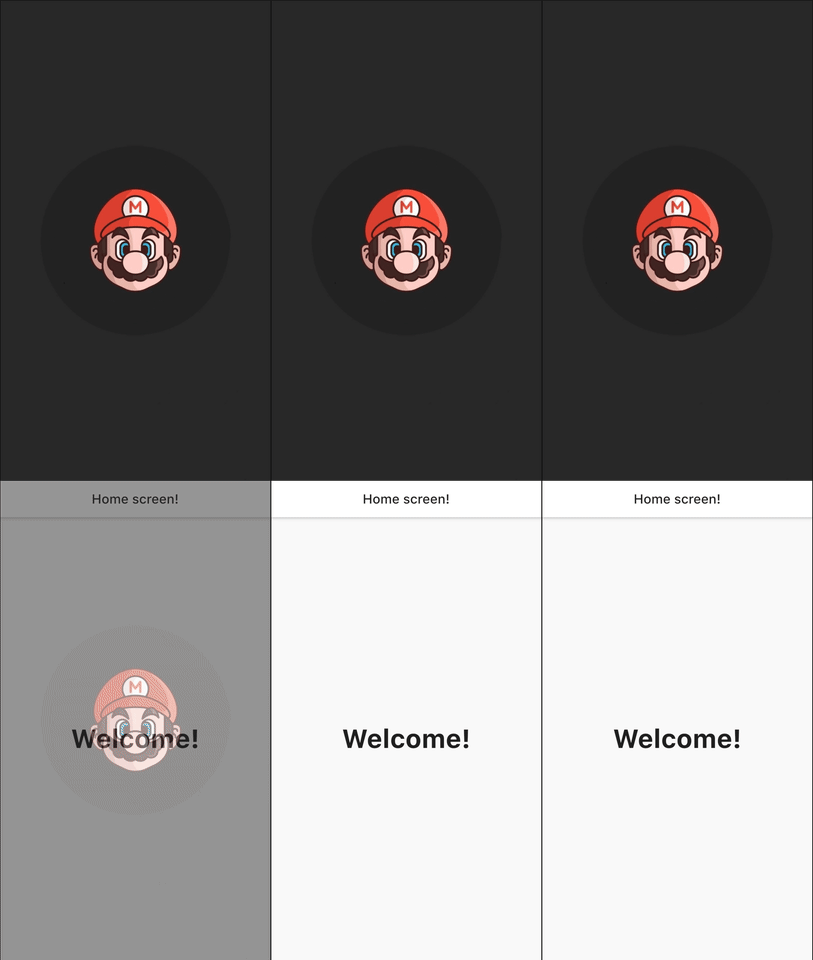
How can I animate transition between the splash screen and navigation page?

Overview

route: PageRouteBuilder(
  pageBuilder: (context, animation, secondaryAnimation) => Home(),
  transitionDuration: Duration(seconds: 1),
  transitionsBuilder: (_, animation, secAnim, child) {
    var tween = Tween(begin: 0.0, end: 1.0).chain(
      CurveTween(curve: Curves.easeInOutCirc),
    );
    return FadeTransition(
        opacity: animation.drive(tween), child: child);
  },

You can see all examples here

카테고리

소스 저장소

이 패키지를 사용하는 프로젝트

아직 데이터가 없습니다.