Buscar pacotes, repositórios e categorias de apps

Capa de flutter_slidable
Detalhes do pacotev5.2.0

flutter_slidable

Uma implementação do Flutter de item de lista deslizável com ações de deslize direcionais que podem ser fechadas.

AndroidiOSWebmacOSWindowsLinux
Downloads em 30 dias
807 mil
Curtidas
6,2 mil
Pontos Pub
150

Instalar pacote

flutter pub add flutter_slidable

Visão geral do pacote

Orientação gerada a partir de informações públicas. Apenas para referência.

flutter_slidable é um pacote Flutter que permite itens de lista interativos com ações deslizáveis, permitindo que os usuários revelem botões de ação ao deslizar para a esquerda ou direita. Ele suporta deslizes em ambas as direções e gestos de descarte, tornando-o ideal para implementar funcionalidades como excluir, arquivar ou marcar como lido em listas. O pacote se integra suavemente com ListView e outros widgets rolagens, oferecendo animações e layouts personalizáveis. Funciona em todas as principais plataformas, incluindo Android, iOS, Web, macOS, Windows e Linux.

Casos de uso

  • Implementando o deslize para excluir em listas de tarefas
  • Adicionando ações contextuais a contatos ou mensagens
  • Criando interfaces interativas de tarefas
  • Habilitar ações rápidas em um feed ou caixa de entrada
  • Suporte a notificações descartáveis
  • Construindo interações de itens de lista responsivas

Principais recursos

  • Deslize para a esquerda/direita para revelar ações
  • Suporte integrado ao gesto de descarte
  • Botões de ação personalizáveis
  • Animações suaves no deslize
  • Compatibilidade multiplataforma
  • Configuração de layout flexível

Indicado para

  • Desenvolvedores construindo listas interativas
  • Aplicativos que exigem ações do usuário baseadas em deslize
  • Projetos com comportamentos dinâmicos de itens da lista
  • Equipes que priorizam a experiência do usuário consistente entre plataformas
  • Usuários em busca de pacotes leves e bem mantidos

Considerações

  • Pode exigir manipulação cuidadosa de eventos de toque em visualizações de rolagem aninhadas
  • O posicionamento do botão de ação deve ser testado em diferentes tamanhos de tela
  • Impacto no desempenho em grandes listas sem otimização
  • Opções de tematização embutidas limitadas além do estilo básico
  • Não projetado para interações complexas de arrastar e soltar

README original

Snapshot do README original do repositório-fonte vinculado. Consulte o repositório para o conteúdo mais recente.

Pub BuyMeACoffee

Slidable is a Flutter Favorite package!

flutter_slidable

A Flutter implementation of slidable list item with directional slide actions that can be dismissed.

Sponsors

Our top sponsors are shown below! [Become a Sponsor]


Try the Flutter Chat Tutorial  💬

Your complete platform for sending notifications

Migration from 0.6.0

You can read this small guide to migrate from the 0.6 to the 1.0 version: https://github.com/letsar/flutter_slidable/wiki/Migration-from-version-0.6.0-to-version-1.0.0

Features

  • Accepts start (left/top) and end (right/bottom) action panes.
  • Can be dismissed.
  • 4 built-in action panes.
  • 2 built-in slide action widgets.
  • 1 built-in dismiss animation.
  • You can easily create custom layouts and animations.
  • You can use a builder to create your slide actions if you want special effects during animation.
  • Closes when a slide action has been tapped (overridable).
  • Closes when the nearest Scrollable starts to scroll (overridable).
  • Option to disable the slide effect easily.

Install

In the pubspec.yaml of your flutter project, add the following dependency:

dependencies:
  flutter_slidable: <latest_version>

In your library add the following import:

import 'package:flutter_slidable/flutter_slidable.dart';

Getting started

Example:

Slidable(
  // Specify a key if the Slidable is dismissible.
  key: const ValueKey(0),

  // The start action pane is the one at the left or the top side.
  startActionPane: ActionPane(
    // A motion is a widget used to control how the pane animates.
    motion: const ScrollMotion(),

    // A pane can dismiss the Slidable.
    dismissible: DismissiblePane(onDismissed: () {}),

    // All actions are defined in the children parameter.
    children: const [
      // A SlidableAction can have an icon and/or a label.
      SlidableAction(
        onPressed: doNothing,
        backgroundColor: Color(0xFFFE4A49),
        foregroundColor: Colors.white,
        icon: Icons.delete,
        label: 'Delete',
      ),
      SlidableAction(
        onPressed: doNothing,
        backgroundColor: Color(0xFF21B7CA),
        foregroundColor: Colors.white,
        icon: Icons.share,
        label: 'Share',
      ),
    ],
  ),

  // The end action pane is the one at the right or the bottom side.
  endActionPane: const ActionPane(
    motion: ScrollMotion(),
    children: [
      SlidableAction(
        // An action can be bigger than the others.
        flex: 2,
        onPressed: doNothing,
        backgroundColor: Color(0xFF7BC043),
        foregroundColor: Colors.white,
        icon: Icons.archive,
        label: 'Archive',
      ),
      SlidableAction(
        onPressed: doNothing,
        backgroundColor: Color(0xFF0392CF),
        foregroundColor: Colors.white,
        icon: Icons.save,
        label: 'Save',
      ),
    ],
  ),

  // The child of the Slidable is what the user sees when the
  // component is not dragged.
  child: const ListTile(title: Text('Slide me')),
),

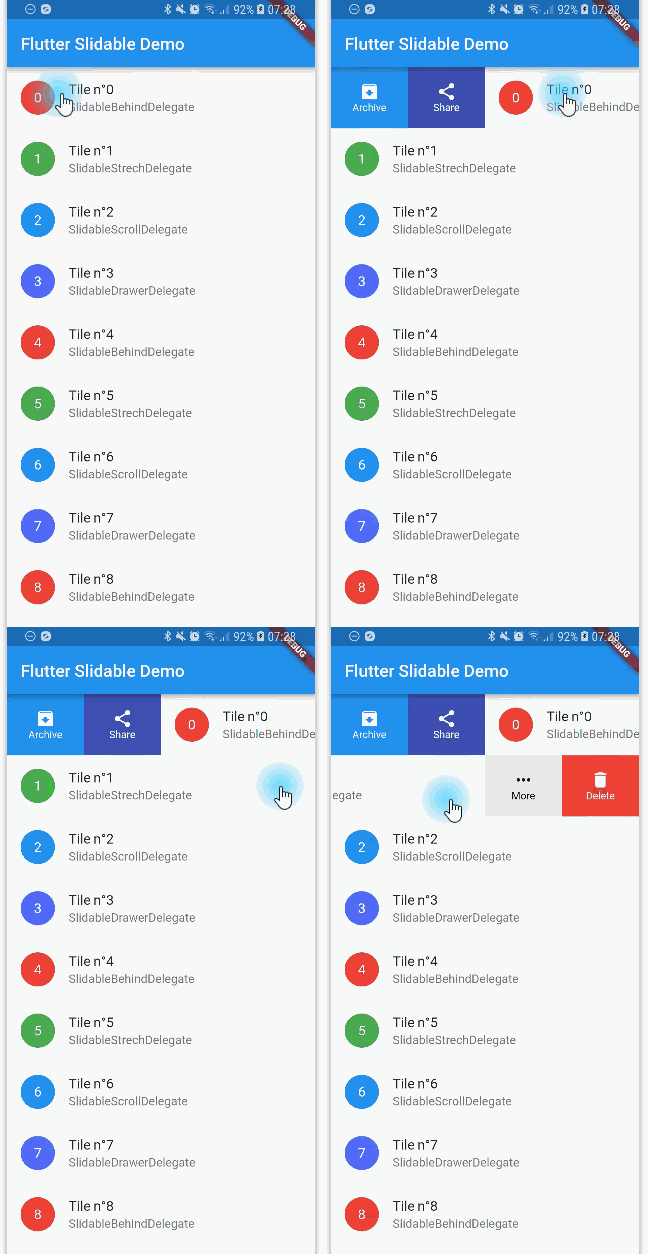
Motions

Any ActionPane has a motion parameter which allow you to define how the pane animates when the user drag the Slidable.

Behind Motion

The actions appear as if they where behind the Slidable:

Behind Motion

Drawer Motion

Animate the actions as if they were drawers, when the Slidable is moving:

Drawer Motion

Scroll Motion

The actions follow the Slidable while it's moving:

Scroll Motion

Stretch Motion

Animate the actions as if they were streched while the Slidable is moving:

Stretch Motion

Controller

You can use SlidableController to open or close the actions programmatically:

final controller = SlidableController();

// ...

Slidable(
  controller: controller,
  // ...
);

// ...

// Open the actions
void _handleOpen() {
  controller.openEndActionPane();
  // OR
  //controller.openStartActionPane();
}

void _handleOpen() {
  controller.close();
}

FAQ

You can read the FAQ here: https://github.com/letsar/flutter_slidable/wiki/FAQ

Sponsoring

I'm working on my packages on my free-time, but I don't have as much time as I would. If this package or any other package I created is helping you, please consider to sponsor me so that I can take time to read the issues, fix bugs, merge pull requests and add features to these packages.

Contributions

Feel free to contribute to this project.

If you find a bug or want a feature, but don't know how to fix/implement it, please fill an issue.
If you fixed a bug or implemented a feature, please send a pull request.

Categorias

Dependências

Lista de dependências 1 itens

Repositório-fonte

Projetos que usam este pacote

Rankings