सार्वजनिक जानकारी से बना चयन मार्गदर्शन। केवल संदर्भ हेतु।
एक शुद्ध डार्ट में लिखा गया फ्लटर प्लगइन जो उपयोगकर्ताओं को डिवाइस की गैलरी से एक साथ कई छवियों का चयन और संपादन करने या कैमरे का उपयोग करके नई तस्वीरें लेने की अनुमति देता है, सभी एक ही इंटरफ़ेस में। एंड्रॉइड और आईओएस दोनों पर बिना किसी नेटिव कोड के बिना चित्र प्रबंधन को निरंतर बनाए रखने के लिए डिज़ाइन किया गया है। यह प्लगइन बैच ऑपरेशन का समर्थन करता है और लचीले चित्र इनपुट की आवश्यकता वाले ऐप्स में आसानी से एकीकृत होता है। यह सोशल मीडिया ऐप्स, प्रोफ़ाइल संपादक या किसी भी ऐप के लिए आदर्श है जिसमें समृद्ध मीडिया संग्रह की आवश्यकता हो।
उपयोग
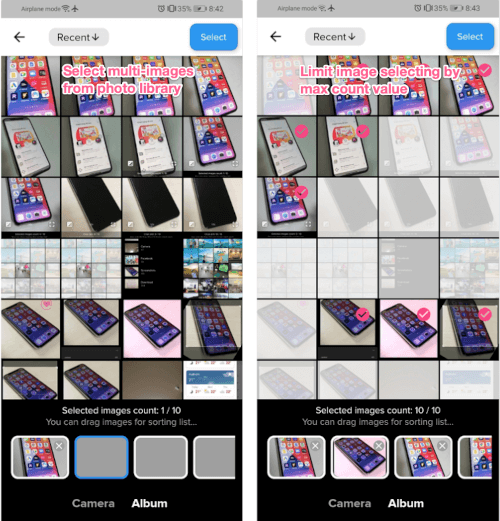
गैलरी से बहुचित्र चयन
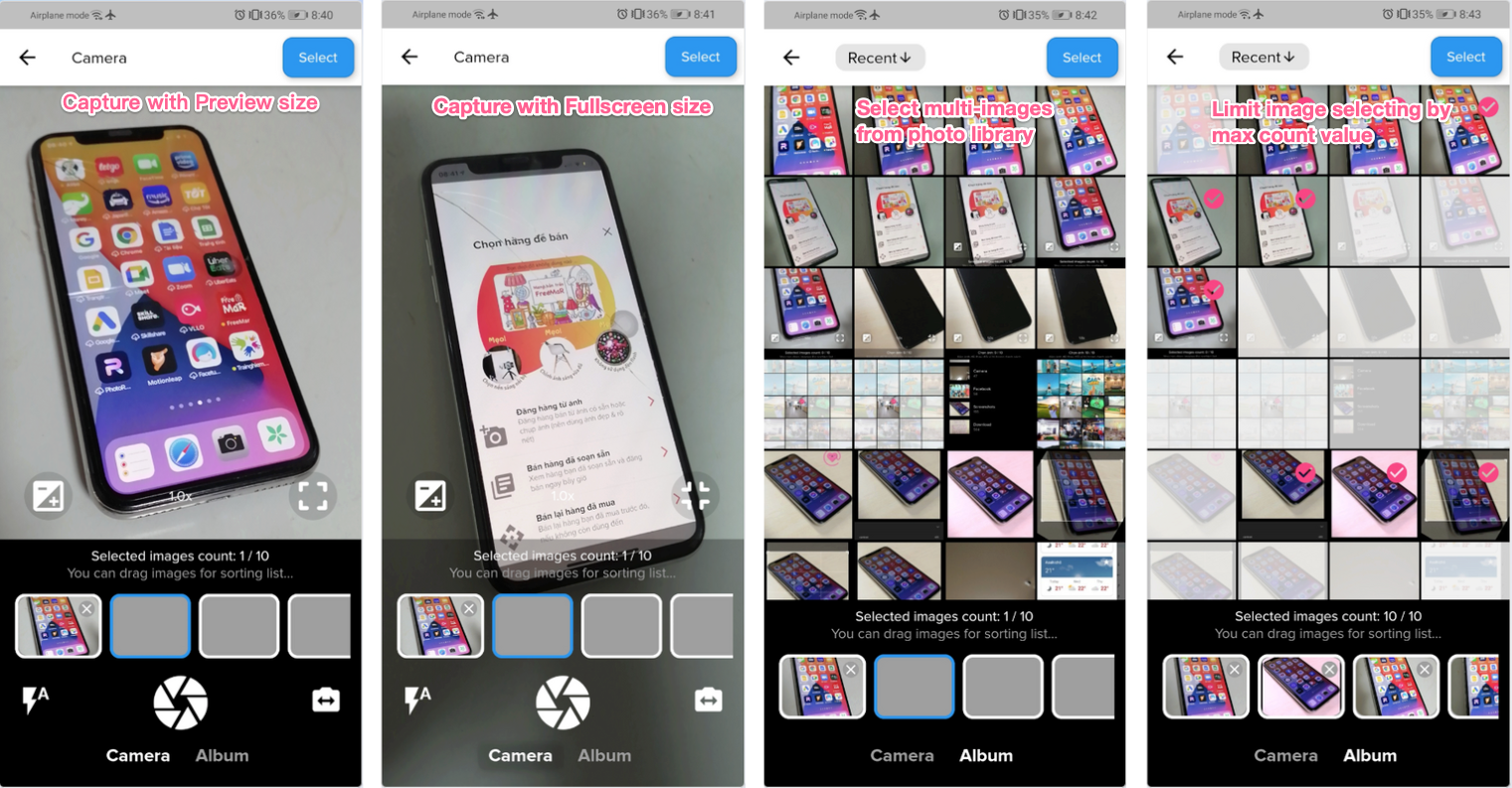
नए कैप्चर के लिए कैमरा इंटीग्रेशन
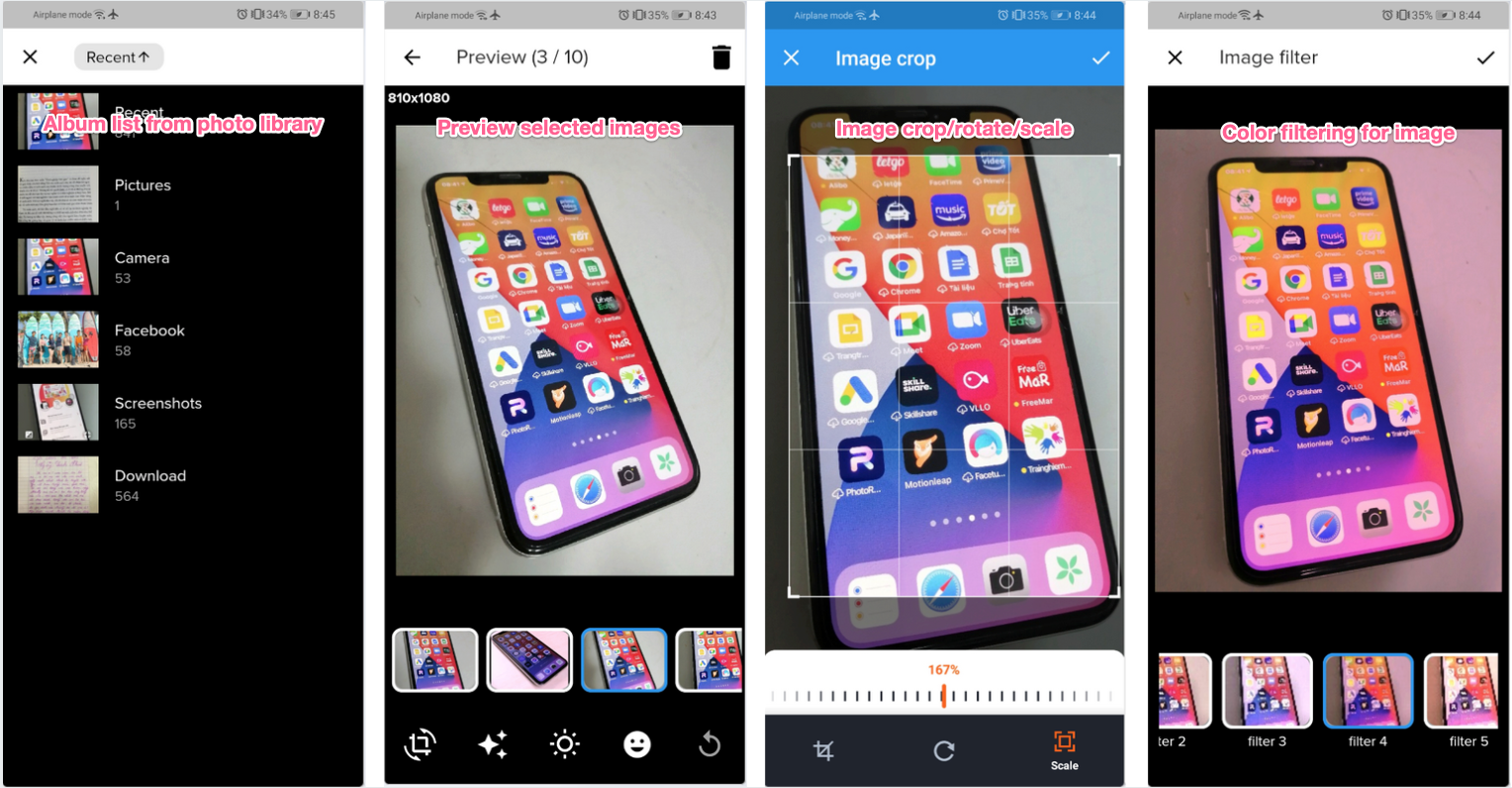
बैच छवि संपादन
प्रोफ़ाइल फ़ोटो अपलोड
सामग्री निर्माण उपकरण
मुख्य विशेषताएँ
शुद्ध Dart कार्यान्वयन
गैलरी और कैमरा दोनों का समर्थन करता है
बहुत छवि चयन
एप में छवि संपादन
क्रॉस-प्लेटफॉर्म संगतता
इनके लिए उपयुक्त
सोशल मीडिया एप्लिकेशन
उपयोगकर्ता प्रोफ़ाइल प्रबंधन
ई-कॉमर्स उत्पाद अपलोड
फोटो एडिटिंग ऐप्स
सामग्री प्रबंधन प्रणाली
विचार योग्य बातें
प्लेटफ़ॉर्म-विशिष्ट अनुमतियाँ आवश्यक हैं
मूलभाव एडिटिंग सुविधाओं तक सीमित
कोई निर्मित संपीड़न विकल्प नहीं
UI कस्टमाइजेशन के लिए अतिरिक्त स्टाइलिंग की आवश्यकता हो सकती है
उन्नत संपादन के लिए बाहरी निर्भरताओं पर निर्भर है
मूल README
संबंधित सोर्स रिपॉज़िटरी के मूल README का स्नैपशॉट। नवीनतम सामग्री के लिए रिपॉज़िटरी देखें।
advance_image_picker
Flutter plugin for selecting multiple images from the Android and iOS image library, taking new pictures with the camera, and edit them before using such as rotating, cropping, adding sticker/filters.
This is an advanced version of image_picker plugin.
Key Features
Display live camera preview in a widget
Adjust exposure
Zoom camera preview
Capture photo without saving into device library
Capture with preview size mode & full screen size mode
Select photos from device library by browsing photo albums
Preview selected images
Support button label & text translation
Easy image editing features, such as rotation, cropping, adding sticker/filters
Allow user add external image editors for editing selected images.
Support for displaying object detection & OCR result on selected image view
<key>NSCameraUsageDescription</key>
<string>Can I use the camera please?</string><key>NSMicrophoneUsageDescription</key><string>Can I use the mic please?</string><key>NSPhotoLibraryUsageDescription</key><string>App need your agree, can visit your album</string>
Modify TOCropViewController version in snapshot (ios/Podfile.lock) to 2.6.1
TOCropViewController (2.6.1)
Android
Change the minimum Android sdk version to 21 (or higher), and compile sdk to 31 (or higher) in your android/app/build.gradle file (refer example project).
compileSdkVersion 31
minSdkVersion 21
Change kotlin version to 1.5.21 or later in your android/build.gradle file (refer example project).
ext.kotlin_version = '1.5.21'
Add activity and uses-permissions to your AndroidManifest.xml, just like next.
// Setup image picker configs (global settings for app)var configs = ImagePickerConfigs();
configs.appBarTextColor = Colors.black;
configs.stickerFeatureEnabled = false; // ON/OFF features
configs.translateFunc = (name, value) => Intl.message(value, name: name); // Use intl function// Add plugin's string inside lib/l10n/intl_**.arb of your project to use translation// For example about english messages, declared inside intl_en.arb
{
"app_title": "FreeMar - Share your things",
"image_picker_exit_without_selecting": "Do you want to exit without selecting images?",
"image_picker_select_images_title": "Selected images count",
"image_picker_select_images_guide": "You can drag images for sorting list...",
"image_picker_camera_title": "Camera",
"image_picker_album_title": "Album",
"image_picker_preview_title": "Preview",
"image_picker_confirm_delete": "Do you want to delete this image?",
"image_picker_confirm_reset_changes": "Do you want to clear all changes for this image?",
"image_picker_no_images": "No images...",
"image_picker_image_crop_title": "Image crop",
"image_picker_image_filter_title": "Image filter",
"image_picker_image_edit_title": "Image edit",
"image_picker_select_button_title": "Select",
"image_picker_image_sticker_title": "Image sticker",
"image_picker_image_addtext_title": "Image add text",
"image_picker_image_sticker_guide": "You can click on below icons to add into image, double click to remove it from image",
"image_picker_edit_text": "Edit text",
"suitcase": "Suitcase",
"handbag": "Handbag",
"bottle": "Bottle",
"tie": "Tie",
...
}
// Or you can simply write your own translate function like this// configs.translateFunc = (name, value) => Intl.message(value, name: name);
configs.translateFunc = (name, value) {
switch (name) {
case'image_picker_select_images_title':
return'Le immagini selezionate contano';
case'image_picker_select_images_guide':
return'È possibile trascinare le immagini per lelenco di ordinamento...';
case'image_picker_camera_title':
return'Telecamera';
case'image_picker_album_title':
return'Album';
// ... Declare all your strings heredefault:
return value;
}
}
Sample for adding external image editors.
(You can replace ImageEdit widget by your owned image editor widget, that output file after editing finised)
// Get max 5 imagesList<ImageObject> objects =
awaitNavigator.of(context).push(
PageRouteBuilder(pageBuilder:
(context, animation, __) {
returnImagePicker(maxCount: 5);
}));
if (objects.length > 0) {
setState(() {
imageFiles.addAll(objects
.map((e) => e.modifiedPath)
.toList());
});
}
Credits
This software uses the following open source packages:
camera
photo_manager
photo_view
image
image_cropper
image_editor
flutter_native_image
path_provider
Support
If this plugin was useful to you, helped you to deliver your app, saved you a lot of time, or you just want to support the project, I would be very grateful if you buy me a cup of coffee.