पैकेज, रिपॉज़िटरी और ऐप श्रेणियाँ खोजें

christian_picker_image कवर
पैकेज विवरणv2.0.0

christian_picker_image

Android और iOS छवि पुस्तकालय से छवियाँ चुनने और कैमरे के साथ नई छवियाँ लेने के लिए Flutter प्लगइन।

AndroidiOS
30-दिन डाउनलोड
131
लाइक
44
Pub अंक
140

पैकेज इंस्टॉल करें

flutter pub add christian_picker_image

पैकेज अवलोकन

सार्वजनिक जानकारी से बना चयन मार्गदर्शन। केवल संदर्भ हेतु।

च्रिस्टियन पिकर इमेज एक फ्लटर प्लगइन है जो एंड्रॉइड और आईओएस दोनों पर डिवाइस की गैलरी से छवियां चुनने या कैमरे का उपयोग करके नई तस्वीरें खींचने की अनुमति देता है। यह फ्लटर एप्लिकेशन में छवि इनपुट के लिए एक सहज, क्रॉस-प्लेटफॉर्म समाधान प्रदान करता है। प्लगइन में नेटिव छवि चयन कार्यक्षमता को एक सरल API के साथ एकीकृत किया गया है, जिससे फोटो अपलोड या मीडिया संग्रह की आवश्यकता वाले एप्लिकेशन में आसानी से लागू किया जा सकता है। यह एकल और बहुत छवि चयन के लिए समर्थन प्रदान करता है, और चयनकर्ता इंटरफ़ेस को कस्टमाइज करने के विकल्प भी उपलब्ध हैं। जटिल सेटअप के बिना विश्वसनीय छवि हैंडलिंग की तलाश करने वाले डेवलपर्स के लिए डिज़ाइन किया गया है, यह प्लेटफॉर्म के बीच मीडिया एकीकरण को आसान बनाता है।

उपयोग

  • इमेज अपलोड फॉर्म
  • उपयोगकर्ता प्रोफ़ाइल छवि चयन
  • ऐप्स में फोटो संग्रहण
  • सोशल मीडिया सामग्री साझाकरण
  • दस्तावेज स्कैनिंग कार्य प्रवाह

मुख्य विशेषताएँ

  • क्रॉस-प्लेटफ़ॉर्म समर्थन (Android और iOS)
  • कैमरा और गैलरी एकीकरण
  • बहुत छवि चयन
  • त्वरित कार्यान्वयन के लिए सरल API
  • कस्टमाइज़ करने योग्य पिकर यूआई

इनके लिए उपयुक्त

  • मोबाइल ऐप विकासकर्ता
  • उपयोगकर्ता फोटो अपलोड की आवश्यकता वाले ऐप
  • मीडिया इनपुट की आवश्यकता वाले फॉर्म
  • सामग्री निर्माण उपकरण
  • उपयोगकर्ता प्रमाणीकरण प्रवाह

विचार योग्य बातें

  • प्लेटफ़ॉर्म-विशिष्ट अनुमतियाँ आवश्यक हैं
  • iOS के लिए अतिरिक्त कॉन्फ़िगरेशन की आवश्यकता हो सकती है
  • केवल छवि का चयन सीमित
  • कोई निर्मित छवि संपादन नहीं है
  • मूल छवि चयनकारी व्यवहार पर निर्भर करता है

मूल README

संबंधित सोर्स रिपॉज़िटरी के मूल README का स्नैपशॉट। नवीनतम सामग्री के लिए रिपॉज़िटरी देखें।

christian_picker_image

Flutter plugin that allows you to upload multi image picker on iOS & Android.

Getting Started

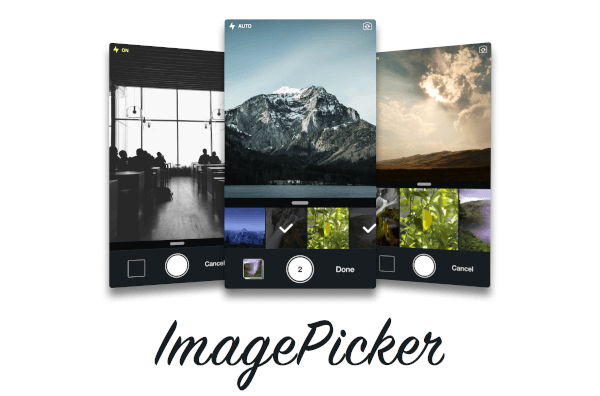
ChristianImagePicker is an all-in-one camera solution for your iOS app. It lets your users select images from the library and take pictures at the same time. As a developer you get notified of all the user interactions and get the beautiful UI for free, out of the box, it's just that simple.

ImagePicker has been optimized to give a great user experience, it passes around referenced images instead of the image itself which makes it less memory consuming. This is what makes it smooth as butter.

Demo

iOS

Add the following keys to your Info.plist file, located in <project root>/ios/Runner/Info.plist:

  • NSPhotoLibraryUsageDescription - describe why your app needs permission for the photo library. This is called Privacy - Photo Library Usage Description in the visual editor.
  • NSCameraUsageDescription - describe why your app needs access to the camera. This is called Privacy - Camera Usage Description in the visual editor. visual editor.
Example
import 'package:christian_picker_image/christian_picker_image.dart';

class MyHomePage extends StatefulWidget {
  @override
  _MyHomePageState createState() => _MyHomePageState();
}

class _MyHomePageState extends State<MyHomePage> {
  
  void takeImage(BuildContext context) async {
    List<File> images  = await ChristianPickerImage.pickImages(maxImages: 5);
    print(images);
    Navigator.of(context).pop();
  }

  Future _pickImage(BuildContext context) async {

    showDialog<Null>(
      context: context,
      barrierDismissible: false,
      builder: (BuildContext context) {
        takeImage(context);
        return Center();
    });

  }

  @override
  Widget build(BuildContext context) {
    return MaterialApp(
      home: Scaffold(
        appBar: AppBar(
          title: const Text('Plugin example app'),
        ),
        body: Text("Christian Picker Image Demo"),
        floatingActionButton: Column(
          mainAxisAlignment: MainAxisAlignment.end,
          children: <Widget>[
            Padding(
              padding: const EdgeInsets.only(top: 16.0),
              child: FloatingActionButton(
                onPressed: () {
                  _pickImage(context);
                },
                tooltip: 'Take a Photo',
                child: const Icon(Icons.photo_library),
              ),
            ),
          ],
        )
      ),
    );
  }

}

श्रेणियाँ

सोर्स रिपॉज़िटरी

इस पैकेज का उपयोग करने वाले प्रोजेक्ट

अभी कोई डेटा उपलब्ध नहीं है।