पैकेज, रिपॉज़िटरी और ऐप श्रेणियाँ खोजें

पैकेज विवरणv1.0.2

cube_transition

आपके PageView और PageRoute संक्रमण के लिए एक अच्छा 3D घन प्रभाव।

30-दिन डाउनलोड
47
लाइक
70
Pub अंक
40

पैकेज इंस्टॉल करें

flutter pub add cube_transition

पैकेज अवलोकन

सार्वजनिक जानकारी से बना चयन मार्गदर्शन। केवल संदर्भ हेतु।

CubeTransition एक Flutter पैकेज है जो PageView और PageRoute ट्रांज़िशन के लिए एक चिकनी 3D क्यूब एनिमेशन प्रभाव प्रदान करता है। यह स्क्रीन या पेज के बीच नेविगेशन में गहराई और दृश्य आकर्षण जोड़कर उपयोगकर्ता अनुभव को बढ़ाता है। पैकेज Flutter की रेंडरिंग क्षमताओं का उपयोग करके एक अंतर्मुखी, कार्ड-जैसे फ्लिपिंग एनिमेशन बनाता है जो वास्तविक क्यूब के 3D अंतरिक्ष में घूमने का अनुकरण करता है। जटिल कार्यान्वयन के बिना आधुनिक, आकर्षक ट्रांज़िशन चाहने वाले ऐप्स के लिए आदर्श है। यह मौजूदा Flutter नेविगेशन पैटर्न के साथ बिना किसी दिक्कत के एकीकृत होता है।

उपयोग

  • PageView पेज संक्रमण
  • PageRoute नेविगेशन प्रभाव
  • इंटरैक्टिव ऐप ऑनबोर्डिंग
  • टैब स्विच के दौरान दृश्य प्रतिक्रिया
  • मोबाइल ऐप में UI की चमक बढ़ाना

मुख्य विशेषताएँ

  • 3D घन रोटेशन एनिमेशन
  • चिकन और कस्टमाइज़ेबल ट्रांज़िशन
  • PageView और PageRoute के साथ काम करता है
  • हल्का और एकीकरण में आसान
  • दिशात्मक उलटने का समर्थन करता है

इनके लिए उपयुक्त

  • आधुनिक UI एनीमेशन की तलाश में विकासकर्ता
  • इंटरैक्टिव नेविगेशन वाले ऐप्स
  • डिज़ाइन-केंद्रित Flutter परियोजनाएं
  • उपयोगकर्ता भागीदारी पर बल देने वाले मोबाइल ऐप्स

विचार योग्य बातें

  • केवल 3D घन शैली तक सीमित
  • कम शक्तिशाली उपकरणों पर प्रदर्शन प्रभावित हो सकता है
  • घन आकार या टेक्सचर के लिए कोई निर्मित कस्टमाइज़ेशन नहीं है
  • संक्रमण अवस्थाओं को हस्तक्षेप से संभालने की आवश्यकता है
  • अन्योपयोगी नहीं है गैर-इंटरैक्टिव या न्यूनतम UI डिज़ाइन के लिए

मूल README

संबंधित सोर्स रिपॉज़िटरी के मूल README का स्नैपशॉट। नवीनतम सामग्री के लिए रिपॉज़िटरी देखें।

Cube Transition

pub package

A 3D Cube transition for your PageView and PageRoute.

Aeyrium Inc. is a provider of innovative software solutions for the business and commercial aviation

Features

  • Use the cube transition between the navigation of your pages.
  • Add cube transitions to your PageView.
  • Add custom transformation in your items of your PageView.

Getting started

You should ensure that you add the dependency in your flutter project.

dependencies:
  cube_transition: "^1.0.0"

You should then run flutter packages upgrade or update your packages in IntelliJ.

Import the package:

import 'package:cube_transition/cube_transition.dart';

Example Project

There is a example project in the example folder. Check it out. Otherwise, keep reading to get up and running.

Usage

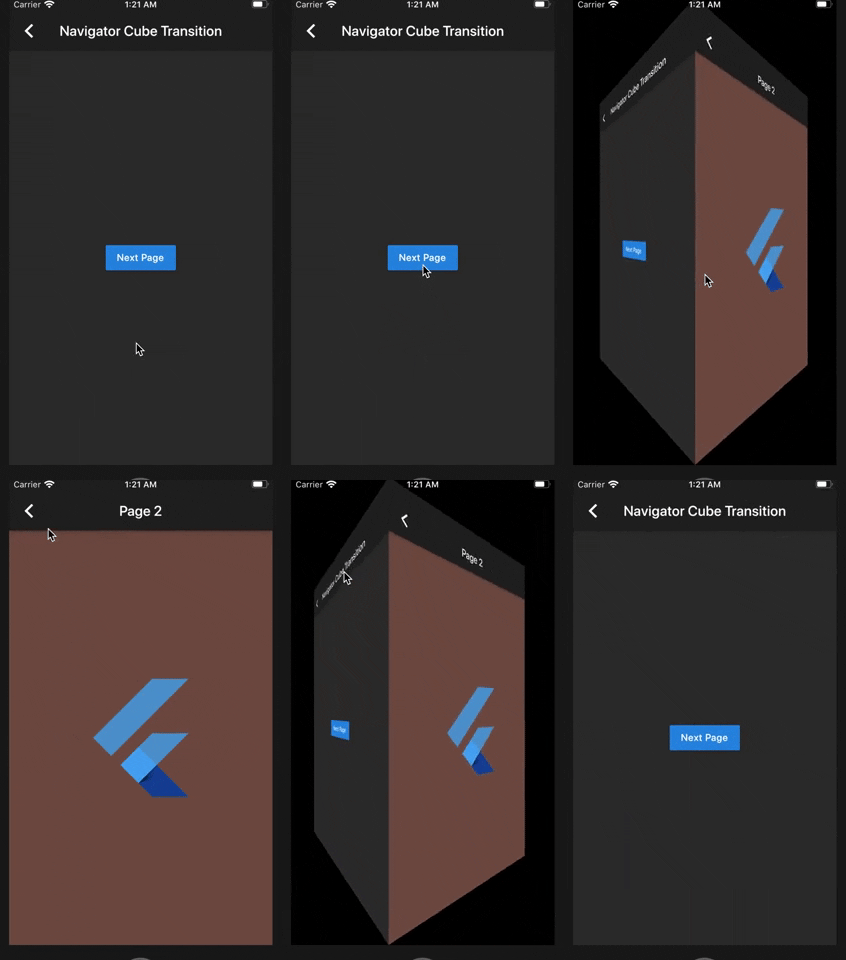
Navigator Cube Transition

class Sample1 extends StatelessWidget {
  @override
  Widget build(BuildContext context) {
    return Scaffold(
      appBar: AppBar(
        title: Text('Navigator Cube Transition'),
      ),
      body: Center(
        child: RaisedButton(
          child: Text('Next Page'),
          onPressed: () {
            Navigator.of(context).push(
              CubePageRoute(
                enterPage: Sample1NextPage(),
                exitPage: this,
                duration: const Duration(milliseconds: 900),
              ),
            );
          },
        ),
      ),
    );
  }
}

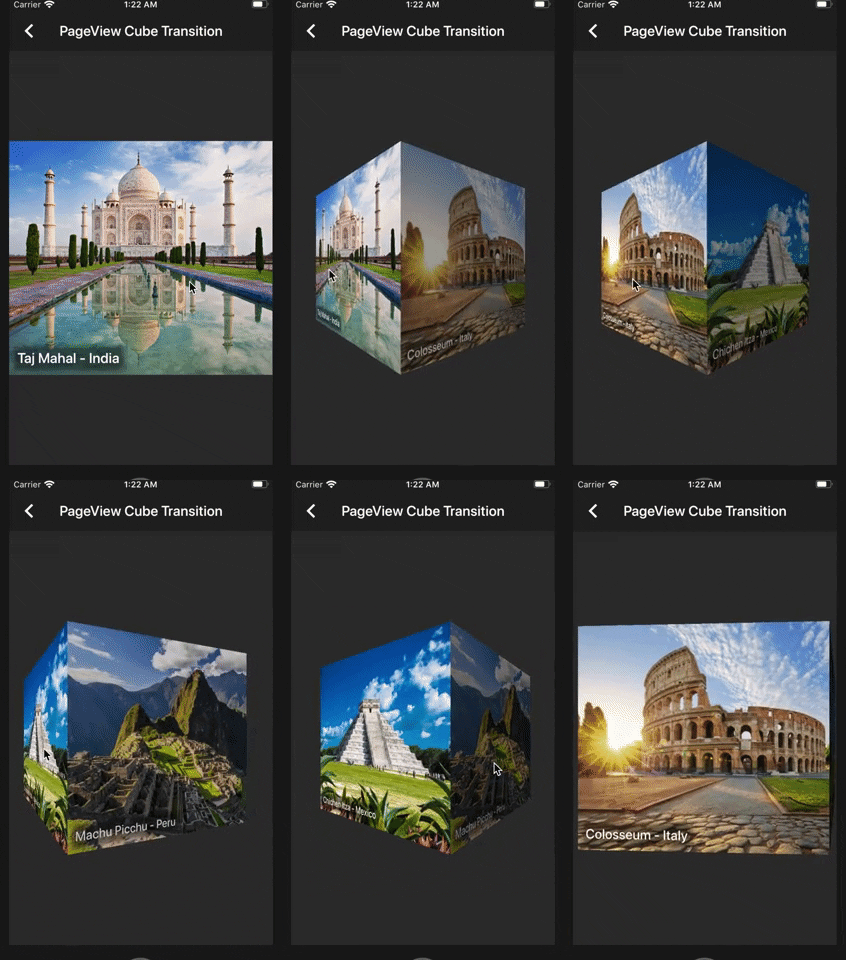
PageView Cube Transition (default)

class Sample2 extends StatelessWidget {
  @override
  Widget build(BuildContext context) {
    final height = MediaQuery.of(context).size.height / 2;
    return Scaffold(
      appBar: AppBar(
        title: Text('PageView Cube Transition'),
      ),
      body: Center(
        child: SizedBox(
          height: height,
          child: CubePageView(
            children: places
                .map(
                  (item) =>  Image.network(
                        item.url,
                        height: height,
                        fit: BoxFit.cover,
                      ),
                )
                .toList(),
          ),
        ),
      ),
    );
  }
}

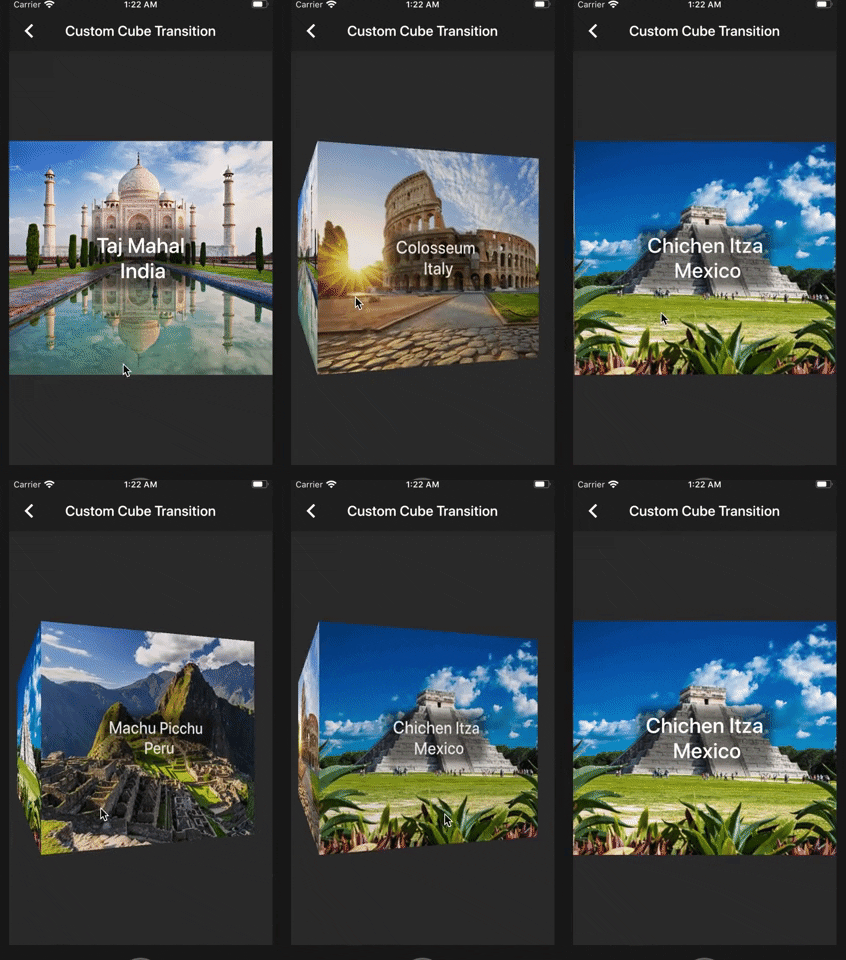
PageView Cube Transition Custom (If you want more control over the items inside the CubePageView)

class Sample3 extends StatelessWidget {
  @override
  Widget build(BuildContext context) {
    final height = MediaQuery.of(context).size.height / 2;
    return Scaffold(
      appBar: AppBar(
        title: Text('Custom Cube Transition'),
      ),
      body: Center(
        child: SizedBox(
          height: height,
          child: CubePageView.builder(
            itemCount: places.length,
            itemBuilder: (context, index, notifier) {
              final item = places[index];
              final transform = Matrix4.identity();
              final t = (index - notifier).abs();
              final scale = lerpDouble(1.5, 0, t);
              transform.scale(scale, scale);
              return CubeWidget(
                index: index,
                pageNotifier: notifier,
                child: Stack(
                  children: [
                    Image.network(
                      item.url,
                      height: height,
                      fit: BoxFit.cover,
                    ),
                    Transform(
                      alignment: Alignment.center,
                      transform: transform,
                      child: Center(
                        child: Padding(
                          padding: const EdgeInsets.all(12.0),
                          child: Container(
                            decoration: BoxDecoration(boxShadow: [
                              BoxShadow(
                                color: Colors.black45,
                                spreadRadius: 5,
                                blurRadius: 5,
                              ),
                            ]),
                            child: Text(
                              item.name.split('-').join('\n'),
                              textAlign: TextAlign.center,
                              style: Theme.of(context).textTheme.title,
                            ),
                          ),
                        ),
                      ),
                    ),
                  ],
                ),
              );
            },
          ),
        ),
      ),
    );
  }
}

Copyright Aeyrium Inc

You can follow me on twitter @diegoveloper

श्रेणियाँ

सोर्स रिपॉज़िटरी

इस पैकेज का उपयोग करने वाले प्रोजेक्ट

अभी कोई डेटा उपलब्ध नहीं है।