पैकेज, रिपॉज़िटरी और ऐप श्रेणियाँ खोजें

cupertino_tabbar कवर
पैकेज विवरणv2.0.0

cupertino_tabbar

एक उच्च स्तर पर कस्टमाइज़ेबल और सरल विजेट जो iOS 13 शैली के टैब बार के लिए है।

AndroidiOSWebmacOSWindowsLinux
30-दिन डाउनलोड
2.5 हज़ार
लाइक
72
Pub अंक
140

पैकेज इंस्टॉल करें

flutter pub add cupertino_tabbar

पैकेज अवलोकन

सार्वजनिक जानकारी से बना चयन मार्गदर्शन। केवल संदर्भ हेतु।

एक कस्टमाइज़ेबल और सीधा Flutter विजेट जो iOS 13-शैली के टैब बार की प्रतिलिपि बनाता है, जो प्लेटफॉर्म के बीच मूल अनुभव प्रदान करता है। यह चिकनी एनीमेशन, कस्टम आइकन, लेबल और स्टाइलिंग विकल्पों का समर्थन करता है जो आधुनिक iOS डिज़ाइन सिद्धांतों के अनुरूप हैं। विजेट हल्का है और आसानी से एकीकृत किया जा सकता है, जिससे यह Android और अन्य प्लेटफॉर्म पर सुसंगत iOS अस्तित्व के लिए आदर्श है। यह ऐसे नेविगेशन-भारी एप्लिकेशन के लिए विशेष रूप से उपयोगी है जिन्हें साफ और न्यूनतम टैब इंटरफेस की आवश्यकता होती है।

उपयोग

  • क्रॉस-प्लेटफॉर्म ऐप्स में iOS-शैली का नेविगेशन
  • एनिमेटेड ट्रांजिशन के साथ कस्टम टैब बार
  • सरल लेकिन शानदार बॉटम नेविगेशन
  • iOS उपयोगकर्ता अनुभव सामंजस्य के लिए ऐप्स
  • डिफ़ॉल्ट टैब बार को सुधारित दृश्य प्रभाव के साथ बदलें

मुख्य विशेषताएँ

  • iOS 13 डिज़ाइन मिमिक्री
  • बहुत कस्टमाइज़ेबल दिखावट
  • स्मूथ एनिमेशन समर्थन
  • आइकन और लेबल का समर्थन करता है
  • प्लेटफॉर्म के अनुकूलता
  • मौजूदा Flutter प्रोजेक्ट्स के साथ आसान एकीकरण

इनके लिए उपयुक्त

  • iOS-नेटिव यूआई घटकों की तलाश कर रहे विकासकर्ता
  • न्यूनतम टैब नेविगेशन की आवश्यकता वाले प्रोजेक्ट्स
  • iOS डिज़ाइन केंद्रित क्रॉस-प्लेटफॉर्म एप्स
  • दृश्य सुसंगतता को प्राथमिकता देने वाली टीमें
  • Flutter शुरुआती टैब बार कस्टमाइजेशन का अन्वेषण कर रहे हैं

विचार योग्य बातें

  • आईओएस 13 अस्थायी शैली तक सीमित
  • गैर-iOS प्लेटफॉर्म के लिए अतिरिक्त स्टाइलिंग की आवश्यकता हो सकती है
  • जटिल टैब लेआउट के लिए उपयुक्त नहीं
  • CupertinoTheme के साथ उपयोग करने पर सबसे अच्छा है
  • बहुत सारे टैब के साथ संभावित प्रदर्शन प्रभाव

मूल README

संबंधित सोर्स रिपॉज़िटरी के मूल README का स्नैपशॉट। नवीनतम सामग्री के लिए रिपॉज़िटरी देखें।

cupertino_tabbar

Cosmos Software

Pub License

A highly customisable and simple widget for having iOS 13 style tab bars.

It is highly recommended to read the documentation and run the example project on a real device to fully understand and inspect the full range of capabilities.

Media | Description | Installation | How-to-Use

Recent

  • [useShadow] is added. If set to true, a shadow will be displayed under the indicator that is much more similar to the actual iOS version. See Media for examples.

  • [allowScrollable], [fittedWhenScrollable], [animateWhenScrollable], [animateUntilScrolled], [outerHorizontalPadding] and [outerVerticalPadding] are added. These all work towards making an easy-to-use scrollable tab bar. Please refer to the documentation and the examples for instructions and see Media for examples.


Warning

  • Variables previously named as [horizontalPadding], [verticalPadding] and [expand] are now named [innerHorizontalPadding], [innerVerticalPadding] and [allowExpand].

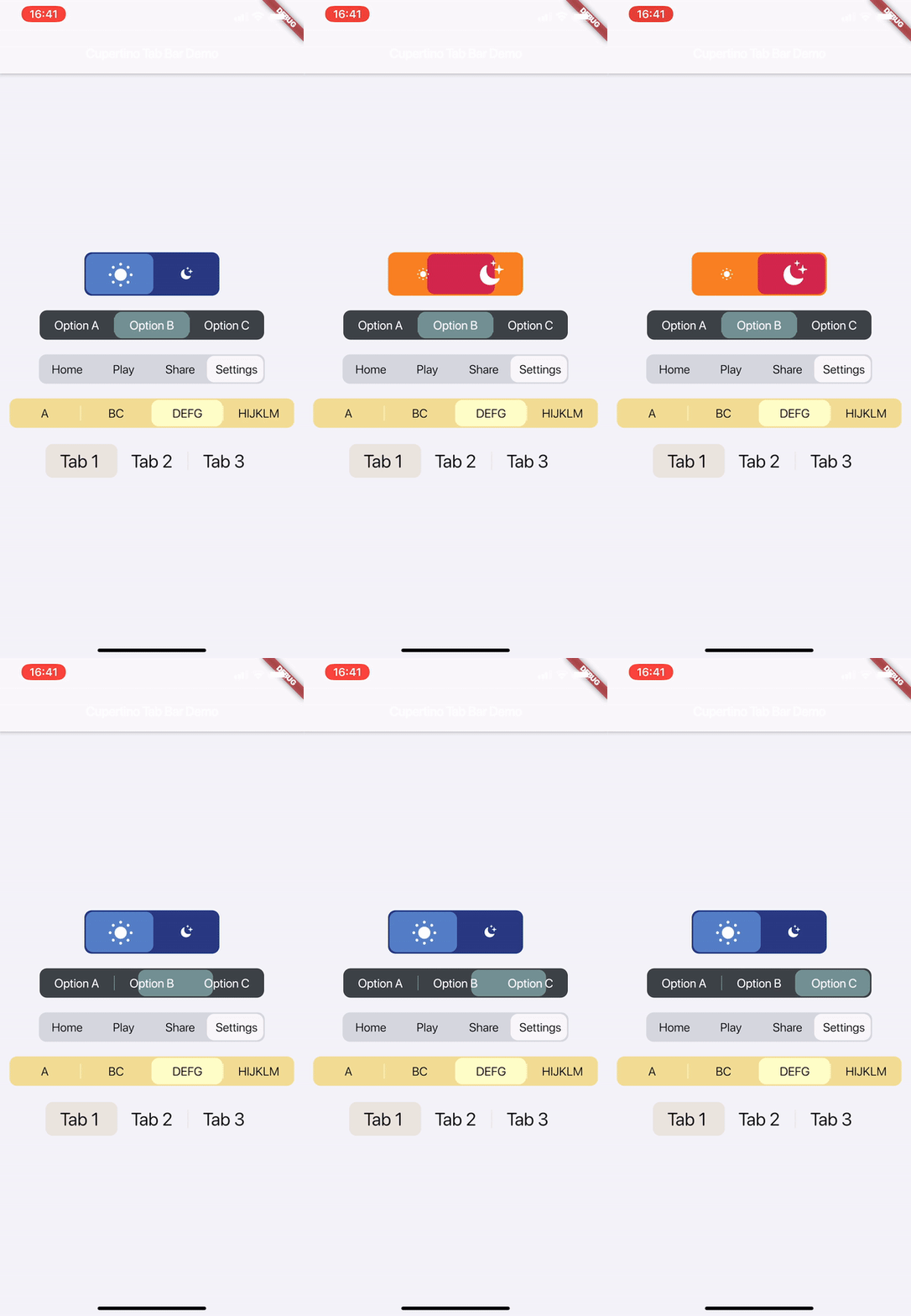
Media

Watch on Youtube:

v1.1.0

v1.0.0


Description

This is a highly customisable and simple widget for having iOS 13 style tab bars.

How-to-Use

Simply create a CupertinoTabBar as shown in the example:

CupertinoTabBar(
  Colors.black                  //_backgroundColor
  Colors.white                  //_foregroundColor
  [...],                        //_widgets
  cupertinoTabBarValueGetter,   //_valueGetter
  (int index) {                 //_onTap
    setState(() {
      cupertinoTabBarValue = index;
    });
  },
  {Key key,
  useSeparators             : false,
  innerHorizontalPadding    : 10.0,
  innerVerticalPadding      : 10.0,
  borderRadius              : const BorderRadius.all(const Radius.circular(10.0)),
  curve                     : Curves.linearToEaseOut,
  duration                  : const Duration(milliseconds: 350),
  allowExpand               : false,
  allowScrollable           : false,
  fittedWhenScrollable      : false,
  animateWhenScrollable     : false,
  animateUntilScrolled      : false,
  outerHorizontalPadding    : 10.0,,
  outerVerticalPadding      : 0})
)

int cupertinoTabBarValue = 0;
int cupertinoTabBarValueGetter() => cupertinoTabBarValue;

Further Explanations:

For a complete set of descriptions for all parameters and methods, see the documentation.

  • Do not set both [allowExpand] and [allowScrollable] to true.

Notes

Any help, suggestion or criticism is appreciated!

Cheers.


श्रेणियाँ

सोर्स रिपॉज़िटरी

इस पैकेज का उपयोग करने वाले प्रोजेक्ट

अभी कोई डेटा उपलब्ध नहीं है।