सार्वजनिक जानकारी से बना चयन मार्गदर्शन। केवल संदर्भ हेतु।
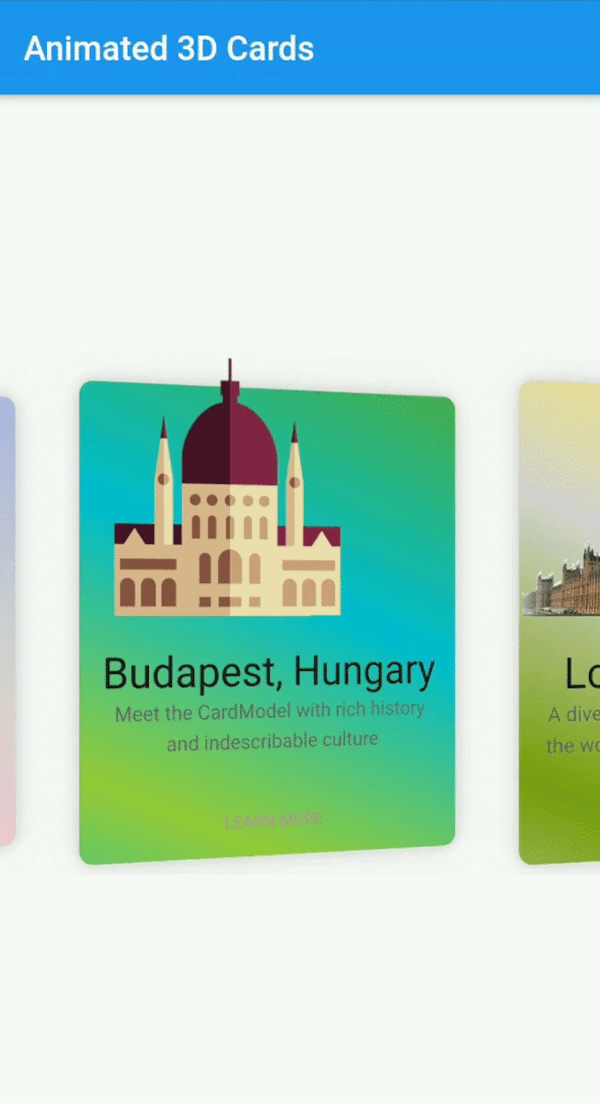
Flutter Animated Cards एक कस्टमाइज़ेबल विजेट है जो 3D एनीमेशन के साथ दृश्य रूप से आकर्षक कार्ड बनाने के लिए उपयोग किया जाता है, जिसे एंड्रॉइड और iOS पर उपयोगकर्ता अंतरक्रिया को बढ़ावा देने के लिए डिज़ाइन किया गया है। यह स्मूथ ट्रांज़िशन और डायनामिक प्रभावों का समर्थन करता है, जिससे यह आधुनिक ऐप इंटरफ़ेस के लिए आदर्श है। पैकेज हल्का है और आसानी से एकीकृत किया जा सकता है, जिससे डेवलपर्स को डिज़ाइन और व्यवहार में लचीलापन मिलता है। इसकी एनीमेशन गुणवत्ता और क्रॉस-प्लेटफॉर्म संगतता पर ध्यान केंद्रित करने के कारण, यह कार्ड-आधारित लेआउट में गहराई और अंतरक्रिया लाता है।
उपयोग
इंटरैक्टिव उत्पाद प्रदर्शन
एनिमेटेड नेविगेशन कार्ड
गेमिफाइड यूआई तत्व
गतिशील सामग्री कैरोसेल
ऑनबोर्डिंग स्क्रीन्स
मुख्य विशेषताएँ
3D कार्ड एनिमेशन
पूरी तरह से कस्टमाइज़ किया गया दिखावट
क्रॉस-प्लेटफ़ॉर्म समर्थन (Android और iOS)
स्मूथ ट्रांजिशन प्रभाव
pub के माध्यम से आसान एकीकरण
प्रतिक्रियाशील डिज़ाइन संभालना
इनके लिए उपयुक्त
दृश्य आकर्षण की तलाश में UI डिजाइनर
इंटरैक्टिव डैशबोर्ड बनाने वाले डेवलपर्स
आकर्षक ओनबोर्डिंग अनुभव की आवश्यकता वाले एप्लिकेशन
उत्पाद कार्ड वाले ई-कॉमर्स ऐप्स
एनिमेटेड इंटरफेस के प्रोटोटाइपिंग
विचार योग्य बातें
कम शक्ति वाले उपकरणों पर प्रदर्शन पर प्रभाव पड़ सकता है
जटिल एनीमेशन के लिए सावधानीपूर्वक अनुकूलन आवश्यक है
मूल उपयोग के अलावा सीमित दस्तावेज़न
स्थिर या न्यूनतम डिज़ाइन के लिए उपयुक्त नहीं
मध्यम एनिमेशन कठिनाई के साथ सबसे अच्छा उपयोग किया जाता है
मूल README
संबंधित सोर्स रिपॉज़िटरी के मूल README का स्नैपशॉट। नवीनतम सामग्री के लिए रिपॉज़िटरी देखें।
flutter_animated_cards
A Fully customizable animated cards widget that has feature of 3D animation and much more. This widget works on both Android & iOS.
Installation
Add following dependency in pubspec.yaml file. And add this import to your file.
// Add AnimatedCards to the widget tree
child: FlutterAnimatedCards(
list: _cardList,
model: _cardModel,
),
Card Model
classCardModel{
finalString title; /// requiredfinalString imagePath; /// required i.e "assets/images/image.png"finalString description; /// (Optional)finalColor color; /// (Optional) add this parameter if you want to have different color on each cardfinalList<Color> colorList; /// (Optional) add this parameter if you want to apply different gradient on each card
}
FlutterAnimatedCards made through model class
If you add Color parameter in your model class and assign each list item a new different color then your widget look like this.
Cards with ModelColor
Cards with Model Gradient
1-
   CardModel(
           title: 'Colors, Vibrant',
           description:'Gardening is how I relax. It\'s another form of creating and playing with colors.',
           color: Color(0xfff9d9e2),  // add color of your choice, add different colors in every list item
           imagePath: "assets/images/colors.png"),

2-
   CardModel(
          title: 'Budapest, Hungary',
          description:'Meet the CardModel with rich history and indescribable culture',
          colorList: [Color(0xFF4CAF50),  // add gradient of your choice, add different gradient in every list item
            Color(0xFF00BCD4),
            Color(0xFF99ca3d)],
          imagePath: "assets/images/city_image.png"),
FlutterAnimatedCards without passing any color in model class
This is another way to give colors or gradient to your card. Now you need to add 'cardWithSingleColor' or 'cardWithGradientColors' as shown below
Cards with Single Color
Cards with Single Gradient
1-
child: FlutterAnimatedCards(
list: _cardList,
model: _cardModel,
cardWithSingleColor: Color(0xfff9d9e2), // you are not asked to add this parameter, but you can this if you want to display your cards withany other single color. By default cards will appear as it is shown in Screenshot
),
2-
child: FlutterAnimatedCards(
list: _cardList,
model: _cardModel,
cardWithGradientColors: [Color(0xffacb6e5), // this parameter is needs to be added to add gradient, there is no default gradient available in lib
Color(0xFFD5D2D2),
Color(0xFFfbc7d4)],
),
Custom Usage
There are several options that allow for more control:
Properties
Description
model
This is the required parameter. You need to pass a model class somehow similar to the one shown in example, you can add more arguments in your class but 'name', 'description', 'image' is necessary
list
This is also the required parameter. You need to pass a list of your model class, this list can not be null or empty
cardHeight
set card height according to your requirement.
cardWidth
set card width according to your requirement.
isRotatingCards
by default it's 'true', you can set it 'false' if you don't want to add 3D rotation in your cards.
cardWithSingleColor
if you want to give all your cards one single color, use this property. You can also give each card a different color through model class
cardWithGradientColors
it takes List as a parameter, this property allows you to apply the same gradient on all of your cards. You can also give each card a different gradient through model class
moreText
by default I have set it to 'LEARN MORE', but you can change it to any text according to your choice.
onMoreBtnPressed
this is a click event, currently it performs nothing you can use it according to your choice.