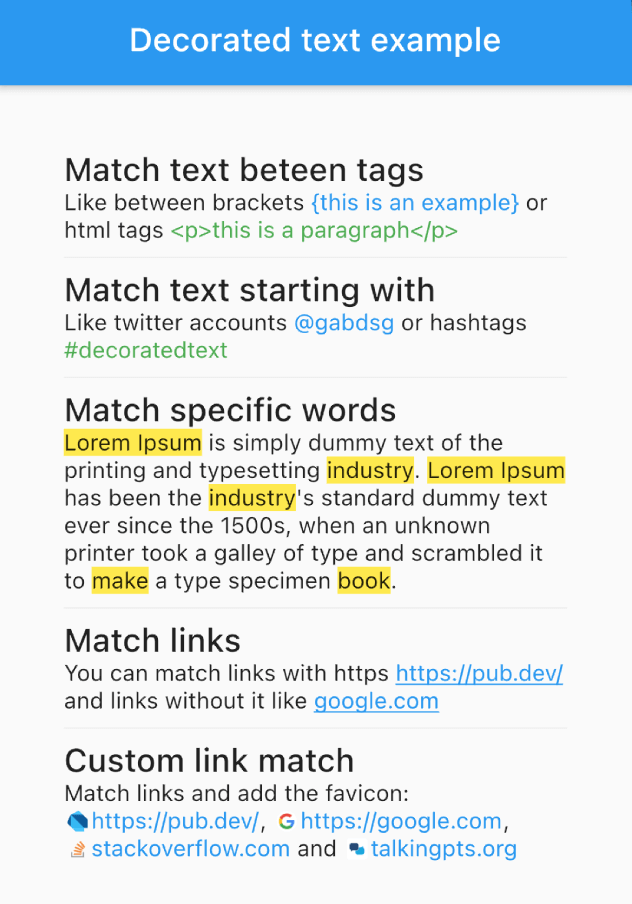
नियमों के आधार पर एक टेक्स्ट के हिस्सों को स्टाइल और इंटरैक्ट करने के लिए एक विजेट। शब्द, वाक्यांश या पैटर्न को मैच करें और कस्टम स्टाइल या कार्रवाई लागू करें।
सार्वजनिक जानकारी से बना चयन मार्गदर्शन। केवल संदर्भ हेतु।
एक फ्लटर पैकेज जो निर्दिष्ट नियमों का उपयोग करके टेक्स्ट के विशिष्ट हिस्सों के स्टाइलिंग और इंटरैक्शन की अनुमति देता है। यह शब्दों, वाक्यांशों या पैटर्न को मैच करने और कस्टम स्टाइल या क्रियाओं (जैसे onTap इवेंट) लागू करने की अनुमति देता है। ध्यान आकर्षित करने वाले कीवर्ड, लिंक एम्बेड करने या कुछ टेक्स्ट सेगमेंट्स के लिए एनिमेशन जोड़ने जैसे डायनामिक फॉर्मेटिंग के साथ रिच टेक्स्ट डिस्प्ले बनाने के लिए आदर्श है। मोबाइल, वेब और डेस्कटॉप सहित सभी प्रमुख प्लेटफॉर्म पर काम करता है।
उपयोग
पाठ में कीवर्ड को हाइलाइट करना
टैप क्रियाकलाप के साथ इंटरएक्टिव टेक्स्ट बनाना
पैराग्राफ में स्टाइल्ड लिंक्स एम्बेड करना
विशिष्ट पाठ खंड में एनीमेशन जोड़ना
गतिशील नियमों के साथ प्रदर्शित स्वरूपित सामग्री
चैट या आर्टिकल ऐप में फ़िर टेक्स्ट रेंडरिंग
मुख्य विशेषताएँ
पैटर्न-आधारित पाठ मिलान
मैच के अनुसार कस्टम स्टाइल लागू करें
इंटरैक्टिव कॉलबैक (उदाहरण के लिए onTap)
एक साथ बहुत सारे नियमों का समर्थन
क्रॉस-प्लेटफॉर्म संगतता
मौजूदा Text विजेट्स के साथ आसान एकीकरण
इनके लिए उपयुक्त
समृद्ध पाठ इंटरफेस बना रहे विकासकर्ता
कीवर्ड हाइलाइटिंग की आवश्यकता वाले ऐप्स
चैट या संदेश एप्लिकेशन
सामग्री-समृद्ध शैक्षिक या समाचार ऐप
गतिशील टेक्स्ट प्रारूपण की आवश्यकता वाले UIs की आवश्यकता
इंटरैक्टिव टेक्स्ट तत्वों की आवश्यकता वाले प्रोजेक्ट्स
विचार योग्य बातें
प्रदर्शन बड़े पाठ ब्लॉक्स को प्रभावित कर सकता है
जटिल नियमित व्यंजक पैटर्न के लिए सावधानीपूर्वक परीक्षण की आवश्यकता होती है
मूल शैली के अतिरिक्त सीमित निर्मित इमोजी समर्थन
पाठ पैटर्न मैचिंग की समझ आवश्यक है
नेस्टेड या ओवरलैपिंग मैच के लिए अतिरिक्त तर्क की आवश्यकता हो सकती है
पूर्ण-सुविधा वाले रिच टेक्स्ट संपादक के लिए नहीं बनाया गया है
मूल README
संबंधित सोर्स रिपॉज़िटरी के मूल README का स्नैपशॉट। नवीनतम सामग्री के लिए रिपॉज़िटरी देखें।
Flutter DecoratedText
The DecoratedText widget allows you to style and interact with different parts of a text string based on predefined rules. It's versatile, easy-to-use, and can handle different scenarios such as matching specific words, phrases, or patterns, allowing you to style the matched text differently.
Features
Selectable Text: Enable the selectable property (selectable: true) to allow text selection in the DecoratedText widget.
Predefined Rules: These are used to match different elements within the text. These rules include:
Matching words.
Matching text starting with a particular prefix.
Matching text between specific tags.
Matching links (URLs).
Interactive: Each rule can include an onTap callback, which returns the matched text, allowing you to implement interactive behavior such as opening a link when a URL is tapped.
Performance Optimized: RegExp patterns are cached internally, decoration results are memoized in text controllers, and tag deduplication uses an efficient O(n log n) algorithm.
Usage Examples
Match Text Between Tags
DecoratedText(
    text: "Like between brackets {this is an example} or html tags <p>this is a paragraph</p>",
    rules: [
        DecoratorRule.between(
            start: "{",
            end: "}",
            style: TextStyle(
                color: Colors.blue,
            ),
        ),
        DecoratorRule.between(
            start: "<p>",
            end: "</p>",
            style: TextStyle(
                color: Colors.green,
            ),
        ),
    ],
);
DecoratedText(
    text: "Lorem Ipsum is simply dummy text of the printing and typesetting industry. Lorem Ipsum has been the industry's standard dummy text ever since the 1500s, when an unknown printer took a galley of type and scrambled it to make a type specimen book.",
    rules: [
        DecoratorRule.words(
            words: ["lorem ipsum", "industry", "book", "make"],
            onTap: (match) {
                print(match);
            },
            style: TextStyle(
                background: Paint()..color = Colors.yellow,
            ),
        ),
    ],
);
Match URLs
DecoratedText(
    text: "You can match links with https https://pub.dev/ and links without it like google.com",
    rules: [
        DecoratorRule.url(
            onTap: (url) {
                print(url);
            },
            style: TextStyle(
                color: Colors.blue,
                decoration: TextDecoration.underline,
            ),
        ),
    ],
);
DecoratedText(
text: "I love Flutter! 😍",
rules: [
DecoratorRule(
regExp: RegExp(r'(\p{Emoji_Presentation})', unicode: true),
style: constTextStyle(
fontSize: 30.0,
),
onTap: (emoji) {
debugPrint('You tapped on the emoji: $emoji');
},
),
],
);
Performance Tips
For best performance when using custom RegExp patterns, cache them outside the build() method:
// Cache at the class or file level — avoid creating inside build()final _myRegExp = RegExp(r'my-pattern');
@overrideWidgetbuild(BuildContext context) {
returnDecoratedText(
text: "...",
rules: [
DecoratorRule(regExp: _myRegExp, style: TextStyle(...)),
],
);
}
Built-in rules like DecoratorRule.words(), DecoratorRule.url(), etc. handle caching automatically.
Remember, with the DecoratedText widget, you can style your text based on predefined rules, add interactivity, and handle complex matching scenarios with ease. Happy coding!