पैकेज, रिपॉज़िटरी और ऐप श्रेणियाँ खोजें

flutter_gradient_animation_text कवर
पैकेज विवरणv1.0.2

flutter_gradient_animation_text

प्रतिक्रिया लेने के लिए पाठ, रंग और एनीमेशन की अवधि के रूप में इनपुट लेकर बहुत आसानी से एनीमेटेड ग्रेडिएंट टेक्स्ट बनाएं।

AndroidiOSWebmacOSWindowsLinux
30-दिन डाउनलोड
1.1 हज़ार
लाइक
42
Pub अंक
140

पैकेज इंस्टॉल करें

flutter pub add flutter_gradient_animation_text

पैकेज अवलोकन

सार्वजनिक जानकारी से बना चयन मार्गदर्शन। केवल संदर्भ हेतु।

एक फ्लटर पैकेज जो विकासकर्ताओं को सामग्री, रंग और एनीमेशन अवधि के निर्देशन के साथ आसानी से एनीमेटेड ग्रेडिएंट टेक्स्ट बनाने की अनुमति देता है। यह विभिन्न मंचों पर ऐप में दृश्यात्मक रूप से आकर्षक, गतिशील टेक्स्ट प्रभाव जोड़ने की प्रक्रिया को सरल बनाता है। पैकेज हल्का है और अपने अस्तित्व में फ्लटर प्रोजेक्ट में न्यूनतम सेटअप के साथ बिना किसी दिक्कत के एकीकृत होता है। जटिल कस्टम एनीमेशन के बिना उपयोगकर्ता इंटरफेस को आकर्षक टाइपोग्राफी के साथ बढ़ाने के लिए आदर्श है।

उपयोग

  • एनिमेटेड ग्रेडिएंट शीर्षक जोड़ें
  • ध्यान खींचने वाले ऐप हेडर बनाना
  • स्प्लैश स्क्रीन को बढ़ावा देना
  • इंटरैक्टिव यूआई तत्वों का डिज़ाइन करना
  • ऑनबोर्डिंग फ्लो में एनिमेटिंग टेक्स्ट

मुख्य विशेषताएँ

  • सरल API जिसमें पाठ और रंग के इनपुट हैं
  • कस्टमाइज़ किए गए एनीमेशन अवधि
  • क्रॉस-प्लेटफ़ॉर्म समर्थन
  • स्मूथ धीरे-धीरे प्रवाह
  • न्यूनतम बॉलरप्लेट कोड

इनके लिए उपयुक्त

  • दृश्य आकर्षण की तलाश में UI डिज़ाइनर
  • आधुनिक एप्लिकेशन इंटरफ़ेस बनाने वाले डेवलपर्स
  • एनिमेटेड टाइपोग्राफी की आवश्यकता वाले प्रोजेक्ट
  • Flutter एनिमेशन सीखने वाले शुरुआती लोग
  • गतिशील या इंटरैक्टिव टेक्स्ट तत्व वाले एप्स

विचार योग्य बातें

  • बहुत सारे एनिमेटेड टेक्स्ट के साथ प्रदर्शन प्रभाव
  • घ्राफिक और अवधि के अलावा सीमित कस्टमाइजेशन
  • निम्न-स्तर के उपकरणों के लिए अनुकूलन की आवश्यकता हो सकती है
  • प्लेटफॉर्म के बीच एनिमेशन व्यवहार में हल्के अंतर हो सकते हैं
  • स्थिर पाठ डिज़ाइन के लिए उपयुक्त नहीं

मूल README

संबंधित सोर्स रिपॉज़िटरी के मूल README का स्नैपशॉट। नवीनतम सामग्री के लिए रिपॉज़िटरी देखें।

Static Badge Static Badge Static Badge Static Badge

This package lets you make animated gradient texts without any hassle. Just pass the text, colors, the duration of the animation and you're done! Using the transform and reverse, you can achieve amazing effects. For More info read the docs below.

Getting started

Install the package using the following command:

flutter pub add flutter_gradient_animation_text

Import the package in your dart file using the following code:

import 'package:flutter_gradient_animation_text/flutter_gradient_animation_text.dart';

And you are good to go!

Usage

Create your animated gradient text. The 3 required arguments are:

  1. text(Text): The text.
  2. colors(List<Colors>): List of colors you want in your gradient.
  3. duration(Duration): Duration for which a single gradient animation runs.
// rainbow text
GradientAnimationText(
    text: Text(
        'Rainbow Text 1',
        style: TextStyle(
            fontSize: 50,
        ),
    ),
    colors: [
        Color(0xff8f00ff),  // violet
        Colors.indigo,
        Colors.blue,
        Colors.green,
        Colors.yellow,
        Colors.orange,
        Colors.red,
    ],
    duration: Duration(seconds: 5),
),

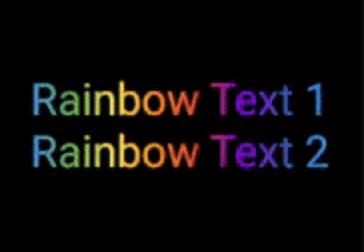
Rainbow Text 1

Reverse the animation. This plays the animation backwards when a single iteration of the forward animation is completed. You set reverse to true to enable this.

// rainbow text with reverse
GradientAnimationText(
    text: Text(
        'Rainbow Text 1',
        style: TextStyle(
            fontSize: 50,
        ),
    ),
    colors: [
        Color(0xff8f00ff),  // violet
        Colors.indigo,
        Colors.blue,
        Colors.green,
        Colors.yellow,
        Colors.orange,
        Colors.red,
    ],
    duration: Duration(seconds: 5),
    reverse: true,  // reverse
),

Rainbow Text 2

Play with colors. It is possible to use the same color more than once to increase the area it covers. Gold Text Example: The following 2 Gold Text animations have different number of Colors.amber color.

// gold text 1
GradientAnimationText(
    text: Text(
        'Gold Text 1',
        style: TextStyle(
            fontSize: 50,
            fontWeight: FontWeight.bold,
        ),
    ),
    colors: [
        Colors.amber,   // 1
        Colors.white,
    ],
    duration: Duration(seconds: 5),
    reverse: true,
),
// gold text 2
GradientAnimationText(
    text: Text(
        'Gold Text 2',
        style: TextStyle(
            fontSize: 50,
            fontWeight: FontWeight.bold,
        ),
    ),
    colors: [
        Colors.amber,   // 1
        Colors.amber,   // 2
        Colors.amber,   // 3
        Colors.white,
    ],
    duration: Duration(seconds: 5),
    reverse: true,
),

Gold Text

Transform your gradient. You can transform your gradient using transform property. Use GradientTranform classes such as SweepGradient, and GradientRotation to tranform.

// Tranform Text
GradientAnimationText(
    text: Text(
    'Tranform Text',
        style: TextStyle(
            fontSize: 90,
            fontWeight: FontWeight.bold,
        ),
    ),
    colors: [
        Color(0xFF061A9C),
        Color(0xff92effd),
    ],
    duration: Duration(seconds: 5),
    transform: GradientRotation(math.pi / 4),   // tranform
),

Tranform Text

Available Properties

Property Type Description
text Text The text to be used in the animation.
colors List Colors of the animation.
duration Duration Duration for which a single gradient animation runs.
reverse bool? If you want to reverse the animation.
transform GradientTransform? You can transform your gradient.

Author

This package is developed by Sahil Shah.

श्रेणियाँ

सोर्स रिपॉज़िटरी

इस पैकेज का उपयोग करने वाले प्रोजेक्ट

अभी कोई डेटा उपलब्ध नहीं है।