सार्वजनिक जानकारी से बना चयन मार्गदर्शन। केवल संदर्भ हेतु।
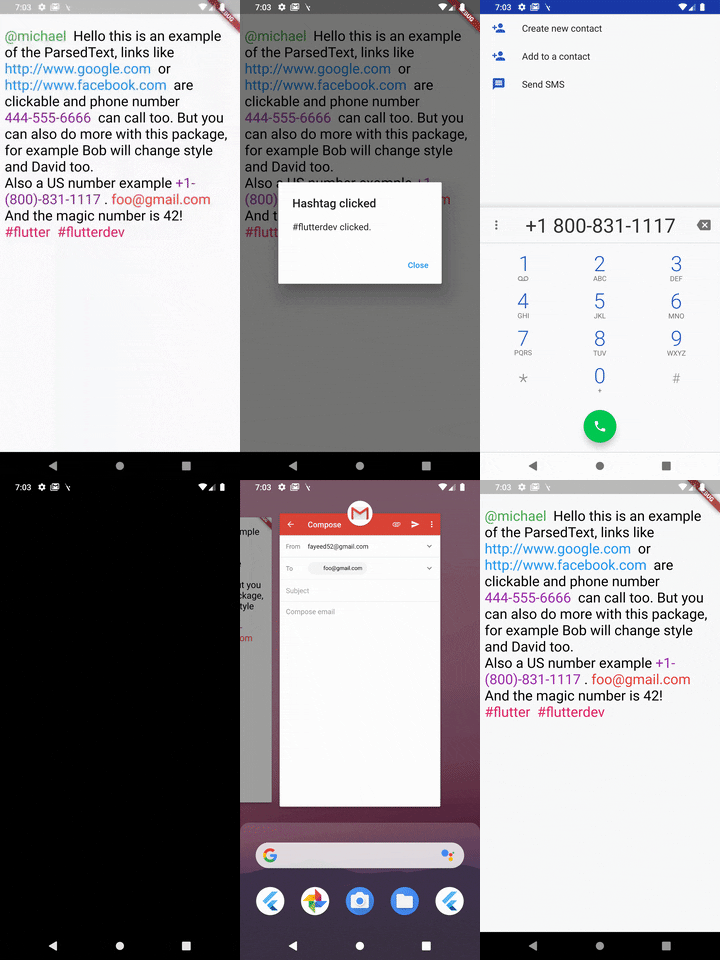
एक फ्लटर पैकेज जो टेक्स्ट के विशेष पैटर्न—जैसे URL, ईमेल, या हैशटैग—को स्वचालित रूप से इंटरैक्टिव टेक्स्ट विजेट में परिवर्तित करने की अनुमति देता है। यह क्लिक करने योग्य तत्वों वाले प्रारूपित टेक्स्ट को दिखाने की प्रक्रिया को सरल बनाता है, डायनामिक कंटेंट दिखाने वाले ऐप्स में उपयोगकर्ता अनुभव को बढ़ाता है। यह पैकेज कई प्लेटफॉर्मों का समर्थन करता है और मौजूदा फ्लटर प्रोजेक्ट में आसानी से एकीकृत होता है। यह चैट इंटरफेस, सोशल मीडिया फीड या किसी भी UI के लिए आदर्श है जिसमें धन्यवाद टेक्स्ट पार्सिंग की आवश्यकता हो।
उपयोग
चैट संदेशों में URL का विश्लेषण करना
हैशटैग और उल्लेख को हाइलाइट करना
क्लिक करने योग्य ईमेल लिंक बनाएं
सोशल फीड में रिच टेक्स्ट का निर्माण
प्रारूपित उपयोगकर्ता-उत्पादित सामग्री प्रदर्शित कर रहा है
मुख्य विशेषताएँ
URL, ईमेल और हैशटैग का स्वचालित निर्धारण
पार्स किए गए टेक्स्ट के लिए कस्टमाइज़ किया गया स्टाइलिंग
बहुत अधिक प्लेटफॉर्म लक्ष्यों का समर्थन करता है
मौजूदा Text विजेट्स के साथ आसान एकीकरण
विस्तार्य प्रतिलिपि मैचिंग प्रणाली
इनके लिए उपयुक्त
चैट और संदेश ऐप
सोशल मीडिया एप्लिकेशन
गतिशील पाठ के साथ सामग्री-समृद्ध यूआई
इंटरैक्टिव टेक्स्ट तत्वों की आवश्यकता वाले ऐप्स
हल्के टेक्स्ट पार्सिंग की तलाश में विकासकर्ता
विचार योग्य बातें
उन्नत पैटर्न के लिए कस्टम रेगेक्स की आवश्यकता हो सकती है
बहुत लंबे पाठ के साथ प्रदर्शन प्रभाव
जटिल प्रारूपण के लिए सीमित आंतरिक समर्थन
नेस्टेड टेक्स्ट संरचनाओं के साथ सावधानीपूर्वक निपटना आवश्यक है
वास्तविक समय प्रवाहित टेक्स्ट के लिए अनअनुकूलित
मूल README
संबंधित सोर्स रिपॉज़िटरी के मूल README का स्नैपशॉट। नवीनतम सामग्री के लिए रिपॉज़िटरी देखें।
🔗 Flutter Parsed text
A Flutter package to parse text and extract parts using predefined types like url, phone and email and also supports Regex.
ParsedText can receive this paramters & all the RichText parameters:
text: Text that will be parsed and rendered.
style: It takes a TextStyle object as it's property to style all the non links text objects.
parse: Array of MatchText object - used for defining structure for pattern matching .
MatchText(
  type: ParsedType.EMAIL, // predefined type can be any of this ParsedTypes
  style: TextStyle(
    color: Colors.red,
    fontSize: 24,
  ), // custom style to be applied to this matched text
  onTap: (url) {
    // do something here with passed url
  }, // callback funtion when the text is tapped on
),
You can also define a custom pattern like this:
MatchText(
  pattern: r"\B#+([\w]+)\b", // a custom pattern to match
  style: TextStyle(
    color: Colors.pink,
    fontSize: 24,
  ), // custom style to be applied to this matched text
  onTap: (url) async {
  // do something here with passed url
  }, // callback funtion when the text is tapped on
)
You can also set RegexOption for the custom regex pattern like so:
MatchText(
  pattern: r"\B#+([\w]+)\b", // a custom pattern to match
  regexOptions: RegexOptions(
    multiLine : false,
    caseSensitive : false,
    unicode : false,
    dotAll : false
  ),
  style: TextStyle(
    color: Colors.pink,
    fontSize: 24,
  ), // custom style to be applied to this matched text
  onTap: (url) async {
  // do something here with passed url
  }, // callback funtion when the text is tapped on
)
A boolean that show a diffrent text and passes a diffrent text to the callback
eg: Your str is "Mention [@michel:5455345]" where 5455345 is ID of this user which will be passed as parameter to the callback funtion and @michel the value to display on interface. Your pattern for ID & username extraction : /\[(@[^:]+):([^\]]+)\]/i
Displayed text will be : Mention ^^@michel^^
MatchText(
pattern: r"\[(@[^:]+):([^\]]+)\]",
style: TextStyle(
color: Colors.green,
fontSize: 24,
),
// you must return a map with two keys// [display] - the text you want to show to the user// [value] - the value underneath it
renderText: ({String str, String pattern}) {
Map<String, String> map = Map<String, String>();
RegExp customRegExp = RegExp(pattern);
Match match = customRegExp.firstMatch(str);
map['display'] = match.group(1);
map['value'] = match.group(2);
return map;
},
onTap: (url) {
// do something here with passed url
},
),
ParsedText(
  text:
    "[@michael:51515151] Hello this is an example of the ParsedText, links like http://www.google.com or http://www.facebook.com are clickable and phone number 444-555-6666 can call too. But you can also do more with this package, for example Bob will change style and David too. foo@gmail.com And the magic number is 42! #react #react-native",
  parse: <MatchText>[
    MatchText(
      type: ParsedType.EMAIL,
      style: TextStyle(
        color: Colors.red,
        fontSize: 24,
      ),
      onTap: (url) {
        launch("mailto:" + url);
      },
    ),
  ],
)
Found this project useful? ❤️
If you found this project useful, then please consider giving it a ⭐️ on Github and sharing it with your friends via social media.