पैकेज, रिपॉज़िटरी और ऐप श्रेणियाँ खोजें

flutter_stripe_payment कवर
पैकेज विवरणv0.0.18

flutter_stripe_payment

Payment Intents के साथ मजबूत SCA 3DS सुरक्षा के साथ अपने Flutter ऐप में कार्ड भुगतान स्वीकार करने के लिए Stripe जोड़ें।

AndroidiOS
30-दिन डाउनलोड
85
लाइक
57
Pub अंक
125

पैकेज इंस्टॉल करें

flutter pub add flutter_stripe_payment

पैकेज अवलोकन

सार्वजनिक जानकारी से बना चयन मार्गदर्शन। केवल संदर्भ हेतु।

flutter_stripe_payment एक Flutter पैकेज है जो मोबाइल एप्लिकेशन में Stripe के भुगतान प्रोसेसिंग को बिना किसी दिक्कत के एकीकृत करने में सक्षम बनाता है। इसमें Payment Intents के माध्यम से कार्ड भुगतान का समर्थन है, जिससे स्ट्रॉंग कस्टमर ऑथेंटिकेशन (SCA) और 3D सिक्योर (3DS) की आवश्यकताओं का पालन किया जाता है। Android और iOS के लिए डिज़ाइन किया गया, यह पैकेज टोकनाइज़ेशन और वास्तविक समय में भुगतान पुष्टि के लिए एकीकृत समर्थन के साथ सुरक्षित लेनदेन के हैंडलिंग को सरल बनाता है। डेवलपर्स संवेदनशील कार्ड डेटा को सीधे प्रबंधित किए बिना मजबूत, PCI-संगत भुगतान प्रवाह लागू कर सकते हैं। SDK जटिल प्रमाणीकरण प्रवाहों को संभालता है, जिससे चेकआउट सफलता दर में सुधार होता है जबकि उच्च सुरक्षा मानकों को बनाए रखा जाता है।

उपयोग

  • एप्लिकेशन इन-परचेज़
  • ई-कॉमर्स चेकआउट
  • सब्सक्रिप्शन बिलिंग
  • डिजिटल सेवा भुगतान
  • ऑनलाइन दान

मुख्य विशेषताएँ

  • SCA और 3DS के अनुरूप
  • भुगतान इरादे समर्थन
  • सुरक्षित कार्ड टोकनाइजेशन
  • वास्तविक समय के भुगतान पुष्टि
  • क्रॉस-प्लेटफॉर्म (Android & iOS)

इनके लिए उपयुक्त

  • मोबाइल ई-कॉमर्स ऐप्स
  • सब्सक्रिप्शन-आधारित सेवाएं
  • सुरक्षित भुगतान की आवश्यकता वाले ऐप्स
  • Stripe का उपयोग करने वाले विकासकर्मी
  • SCA अनुपालन की आवश्यकता वाले प्रोजेक्ट

विचार योग्य बातें

  • स्ट्राइप खाता सेटअप की आवश्यकता है
  • भुगतान इंटेंट बनाने के लिए पीछे की ओर की आवश्यकता है
  • स्ट्राइप के भुगतान विधियों तक सीमित
  • नेटवर्क कनेक्टिविटी पर निर्भर
  • परीक्षण वातावरण के लिए अतिरिक्त कॉन्फ़िगरेशन की आवश्यकता हो सकती है

मूल README

संबंधित सोर्स रिपॉज़िटरी के मूल README का स्नैपशॉट। नवीनतम सामग्री के लिए रिपॉज़िटरी देखें।

flutter_stripe_payment

Add Stripe to your Flutter Application to Accept Card Payments using Payment Intents and the Latest SCA Compliance 3DS Requirements

Getting Started

Strong Customer Authentication (SCA), a new rule coming into effect on September 14, 2019, as part of PSD2 regulation in Europe, will require changes to how your European customers authenticate online payments. Card payments will require a different user experience, namely 3D Secure, in order to meet SCA requirements. Transactions that don’t follow the new authentication guidelines may be declined by your customers’ banks.

The Payment Intents API is a new way to build dynamic payment flows. It tracks the lifecycle of a customer checkout flow and triggers additional authentication steps when required by regulatory mandates, custom Radar fraud rules, or redirect-based payment methods.

Initialize

final _stripePayment = FlutterStripePayment();
_stripePayment.onCancel = (){
  print("User Cancelled the Payment Method Form");
};

Setup Stripe Environment


_stripePayment.setStripeSettings(
        appConfig.values.stripePublishableKey,
        appConfig.values.applePayMerchantId);

Show Payment Form

var paymentResponse = await _stripePayment.addPaymentMethod();
if(paymentResponse.status == PaymentResponseStatus.succeeded)
  {
    print(paymentResponse.paymentMethodId);
  }

Create Payment Intent On Server

var intent = PaymentIntent();
    intent.amount = widget.order.cart.total;
    intent.isManual = true;
    intent.isConfirmed = false;
    intent.paymentMethodId = paymentResponse.paymentMethodId;
    intent.currency = "usd";
    intent.isOnSession = true;
    intent.isSuccessful = false;
    intent.statementDescriptor = "Dorm Mom, Inc";
    var response = await widget.clientDataStore.createPaymentIntent(intent);

Confirm Payment Intent to Kick Off 3D Authentication

var intentResponse = await _stripePayment.confirmPaymentIntent(
          response.clientSecret, paymentResponse.paymentMethodId, widget.order.cart.total);

      if (intentResponse.status == PaymentResponseStatus.succeeded) {
        widget.order.paymentIntentId = intentResponse.paymentIntentId;
        widget.order.paymentMethodId = paymentResponse.paymentMethodId;
        _submitOrder();
      } else if (intentResponse.status == PaymentResponseStatus.failed) {
        setState(() {
          hideBusy();
        });
        globals.Utility.showAlertPopup(
            context, "Error Occurred", intentResponse.errorMessage);
      } else {
        setState(() {
          hideBusy();
        });
      }

Setup Payment Intent For Future Payments

var intentResponse = await _stripePayment.setupPaymentIntent(
        response.clientSecret, paymentResponse.paymentMethodId);

    if (intentResponse.status == PaymentResponseStatus.succeeded) {
      await _addCardToAccount(paymentResponse.paymentMethodId);
    } else if (intentResponse.status == PaymentResponseStatus.failed) {
      setState(() {
        hideBusy();
      });
      globals.Utility.showAlertPopup(
          context, "Error Occurred", intentResponse.errorMessage);
    } else {
      setState(() {
        hideBusy();
      });
    }

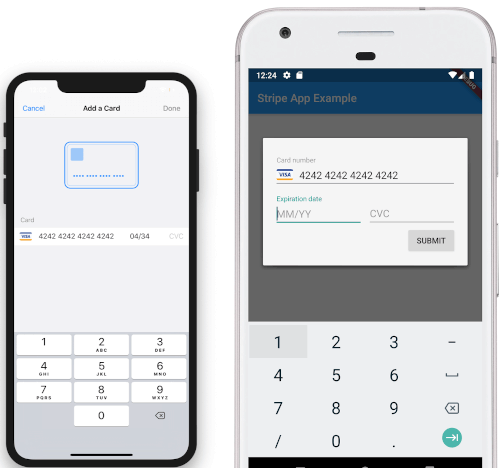
Screenshots

iOS View Android View

To Do

  • [DONE]Android Implementation
  • STPaymentCardTextField Inline Embedding

श्रेणियाँ

सोर्स रिपॉज़िटरी

इस पैकेज का उपयोग करने वाले प्रोजेक्ट

अभी कोई डेटा उपलब्ध नहीं है।