पैकेज, रिपॉज़िटरी और ऐप श्रेणियाँ खोजें

google_map_custom_windows कवर
पैकेज विवरणv1.1.0

google_map_custom_windows

एक कस्टमाइज़ेबल गूगल मैप मार्कर इन्फो विंडो। आप अपने गूगल मैप दृश्य में कई जानकारी विंडो दिखा सकते हैं।

AndroidiOS
30-दिन डाउनलोड
1.5 हज़ार
लाइक
2
Pub अंक
160

पैकेज इंस्टॉल करें

flutter pub add google_map_custom_windows

पैकेज अवलोकन

सार्वजनिक जानकारी से बना चयन मार्गदर्शन। केवल संदर्भ हेतु।

एक कस्टमाइज़ेबल गूगल मैप मार्कर इन्फो विंडो पैकेज जो गूगल मैप दृश्य पर कई इन्फो विंडो दिखाने की अनुमति देता है। यह मार्कर कार्यक्षमता को विस्तारित करता है, जिससे डेवलपर्स प्रत्येक मार्कर के लिए कस्टम, इंटरैक्टिव पॉपअप बनाने और प्रबंधित करने में सक्षम होते हैं। विस्तृत स्थान डेटा, छवियाँ या बटन जैसे धाराप्रवाह सामग्री की आवश्यकता वाले एप्लिकेशन के लिए आदर्श। यह पैकेज Android और iOS प्लेटफॉर्म का समर्थन करता है और Flutter के Google Maps प्लगइन के साथ बिना किसी दिक्कत के एकीकृत होता है।

उपयोग

  • मानचित्र पर एकाधिक कस्टम जानकारी विंडोज दिखाना
  • मार्कर में चित्र और बटन जैसी समृद्ध सामग्री को दिखाना
  • इंटरैक्टिव स्थान विवरण पैनल बनाना
  • कस्टम मार्कर पॉपअप के साथ उपयोगकर्ता अनुभव में सुधार
  • विस्तृत मार्कर जानकारी के साथ स्थान-आधारित एप्लिकेशन बनाना

मुख्य विशेषताएँ

  • एक साथ कई जानकारी विंडो का समर्थन करता है
  • सूचना विंडो के लिए उच्चतर अनुकूलन योग्य UI
  • Android और iOS के साथ संगत
  • Google Maps प्लगइन के साथ आसान एकीकरण
  • सूचना विंडो के भीतर इंटरैक्टिव तत्वों की अनुमति देता है

इनके लिए उपयुक्त

  • जटिल मानचित्र इंटरफेस बना रहे विकासकर्ता
  • समृद्ध चिन्ह सामग्री की आवश्यकता वाले ऐप्स
  • विस्तृत जानकारी के साथ स्थान-आधारित सेवाएँ
  • Google Maps का उपयोग करने वाले Flutter प्रोजेक्ट
  • लचीले मार्कर कस्टमाइजेशन चाहने वाली टीमें

विचार योग्य बातें

  • Google Maps API की के साथ सही सेटअप की आवश्यकता है
  • बहुत सारे ओवरलैपिंग इनफो विंडो के साथ प्रदर्शन पर प्रभाव पड़ सकता है
  • कस्टम स्टाइलिंग को फ्लटर विजेट्स के साथ परिचय की आवश्यकता होती है
  • मूल उपयोग के अतिरिक्त सीमित दस्तावेज़न
  • बाहरी GitHub भंडार की स्थिरता पर निर्भर करता है

मूल README

संबंधित सोर्स रिपॉज़िटरी के मूल README का स्नैपशॉट। नवीनतम सामग्री के लिए रिपॉज़िटरी देखें।

google map custom info window

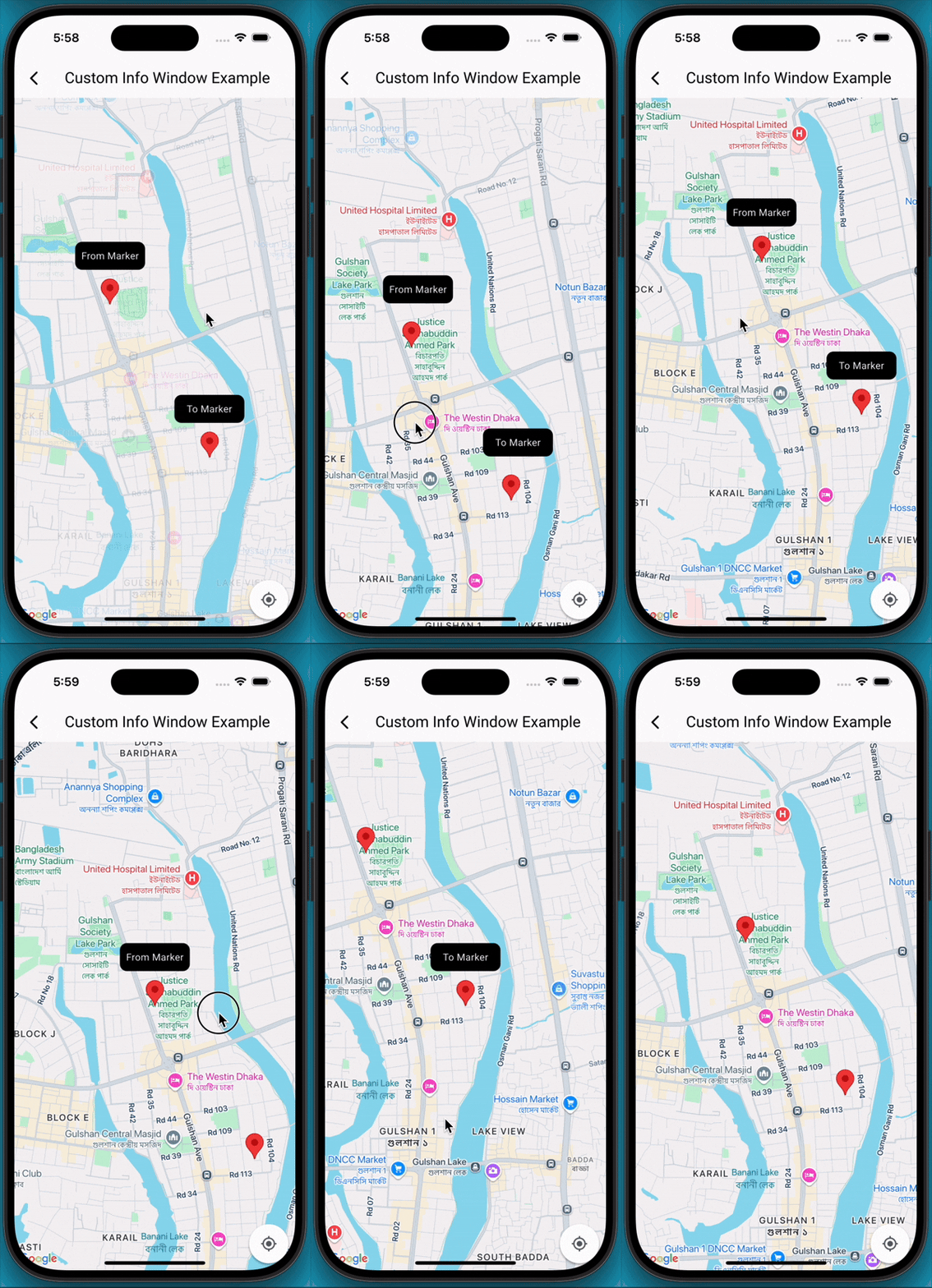
A Flutter package that extends the capabilities of google_maps_flutter by allowing developers to display fully customizable info windows for markers, including the ability to show multiple info windows simultaneously on the map.

✨Features

  • Customizable Info Windows: Design your info window using any Flutter widget.
  • Multiple Info Windows: Display several info windows at once, ideal for showing details of nearby locations or clustered markers.
  • Highly Flexible: Control the content, styling, and behavior of each info window independently.
  • Easy Integration: Seamlessly integrates with your existing Maps_flutter implementation.

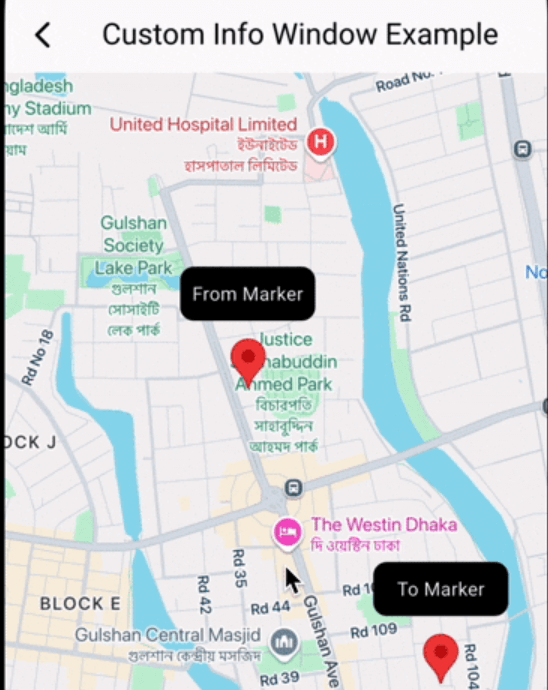
📸 Demo screen recording

🚀 Getting Started

  1. Add Dependencies First, ensure you have google_maps_flutter integrated into your project. Then, add google_map_custom_windows to your pubspec.yaml:

     dependencies:
       google_map_custom_windows: ^1.0.1
    

    Run flutter pub get to fetch the new dependencies.

  2. Import

     import 'package:google_map_custom_windows/google_map_custom_windows.dart';
    
  3. Usage To use the custom info windows, you'll primarily interact with the GoogleMapCustomWindowController and the CustomMapInfoWindow widget.

  • Initialize GoogleMapCustomWindowController, Create an instance of GoogleMapCustomWindowController in your StatefulWidget's initState.
    late GoogleMapCustomWindowController _googleMapCustomWindowController;
    
    @override
    void initState() {
     super.initState();
     _googleMapCustomWindowController = GoogleMapCustomWindowController();
    }
    
  • Need to create your custom info window widget for view. You can create multiple window as your requirement.
    class MyCustomInfoWidget extends StatelessWidget {
    final String title;
    const MyCustomInfoWidget({super.key, required this.title});
    
    @override
    Widget build(BuildContext context) {
     return Container(
       decoration: BoxDecoration(
         borderRadius: BorderRadius.circular(10),
         color: Colors.black,
       ),
       alignment: Alignment.center,
       child: Text(
         title,
         style: TextStyle(color: Colors.white, fontSize: 14),
       ),
     );
    }
    }
    
  • Declare list of info window and same size of list LatLng.
    List<Widget> infoWidgets = [
    MyCustomInfoWidget(title: 'From Marker'),
    MyCustomInfoWidget(title: 'To Marker'),
    ];
    
    List<LatLng> infoPositions = [
    LatLng(23.798054, 90.413459),
    LatLng(23.789451, 90.419584),
    ];
    
  • Use Stack widget for using custom info window.
    @Stack(
         children: [
           GoogleMap(
             mapType: MapType.normal,
             markers: markers,
             initialCameraPosition: CameraPosition(target: initPosition, zoom: 15),
             onMapCreated: (GoogleMapController controller) {
               _setFromToMarker();
               _googleMapCustomWindowController.googleMapController = controller;
               _googleMapCustomWindowController.addInfoWindow!(infoWidgets, infoPositions);
             },
             onTap: (position) {
               _googleMapCustomWindowController.hideInfoWindow!();
             },
             onCameraMove: (CameraPosition cameraPosition) {
               _googleMapCustomWindowController.onCameraMove!();
             },
           ),
    
           CustomMapInfoWindow(
             controller: _googleMapCustomWindowController,
             offset: const Offset(0, 50),
             height: 40,
             width: 100,
           ),
         ],
       )
    
  1. Don't forget to dispose _googleMapCustomWindowController
    @override
      void dispose() {
        _googleMapCustomWindowController.dispose();
        super.dispose();
      }
    

🤝 Contributing

Contributions are welcome! If you find a bug or have a feature request, please open an issue on GitHub. If you'd like to contribute code, please fork the repository and submit a pull request.

श्रेणियाँ

निर्भरताएँ

निर्भरता सूची 1 आइटम

सोर्स रिपॉज़िटरी

इस पैकेज का उपयोग करने वाले प्रोजेक्ट

अभी कोई डेटा उपलब्ध नहीं है।