सार्वजनिक जानकारी से बना चयन मार्गदर्शन। केवल संदर्भ हेतु।
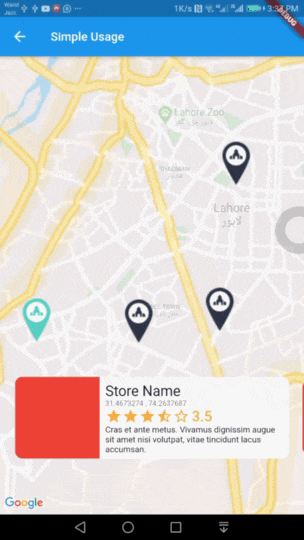
इंटरैक्टिव मैप्स मार्कर एक फ्लटर पैकेज है जो इंटरैक्टिव डिटेल कार्ड के साथ एनीमेटेड मैप मार्कर प्रदान करता है। सरलता के लिए डिज़ाइन किया गया, यह विकासकर्ताओं को स्टोर लोकेटर या आकर्षण बिंदु प्रदर्शन जैसे स्थान-आधारित फीचर्स को आसानी से एम्बेड करने में सक्षम बनाता है। मार्कर टैप करने पर एनीमेट होता है, और अतिरिक्त जानकारी के साथ एक कस्टमाइज़ करने योग्य कार्ड प्रकट होता है। उपयोगकर्ता अनुभव को बढ़ावा देने के लिए बिना जटिल सेटअप के चिकनी ट्रांज़िशन और रिस्पॉन्सिव डिज़ाइन का समर्थन करता है।
उपयोग
स्टोर लोकेटर एप्लिकेशन
आकर्षण बिंदु हाइलाइटिंग
ईवेंट स्थल ढूंढने वाले
पर्यटन और यात्रा मार्गदर्शिका
रियल-टाइम स्थान ट्रैकिंग इंटरफेस
मुख्य विशेषताएँ
एनिमेटेड मार्कर ट्रांजिशन
कस्टमाइज़ करने योग्य विवरण कार्ड
Google Maps के साथ सरल एकीकरण
टैप-टू-रिवील इंटरैक्शन
प्रतिक्रियाशील उपयोगकर्ता इंटरफेस घटक
हल्का और कॉन्फ़िगर करने में आसान
इनके लिए उपयुक्त
स्थान-आधारित एप्लिकेशन बना रहे डेवलपर्स
त्वरित मानचित्र फीचर के लिए आवश्यक स्टार्टअप
उपयोगकर्ता-मित्रात्मक नेविगेशन पर केंद्रित ऐप्स
मानचित्र इंटरैक्शन के लिए न्यूनतम कोड की आवश्यकता वाले प्रोजेक्ट
Flutter शुरुआती लोकेशन की खोज कर रहे हैं
विचार योग्य बातें
पूर्ण कार्यक्षमता के लिए Google Maps API की की की आवश्यकता होती है
Android और iOS के सीमित (कोई वेब समर्थन उल्लेख नहीं किया गया)
कस्टम स्टाइलिंग के लिए अतिरिक्त डार्ट ज्ञान की आवश्यकता हो सकती है
बाहरी मानचित्र रेंडरिंग प per लाइब्रेरी पर निर्भर करता है
उच्च घनत्व चिन्ह समूहों के लिए अनअनुकूलित
मूल README
संबंधित सोर्स रिपॉज़िटरी के मूल README का स्नैपशॉट। नवीनतम सामग्री के लिए रिपॉज़िटरी देखें।
interactive_maps_marker for Flutter
Easy to use Animated Maps Markers with detail card. Use it for store or any place locator.
Demo
Usage
Add this package to your pubspec.yaml in dependencies: section
dependencies:interactive_maps_marker:^0.0.2
This package depends upon google_maps_flutter so first setup this by following This Guide
Update dependencies
flutter pub get
You can now add a InteractiveMapsMarker widget to your widget tree.
Simple Usage
In your widget import the package and use InteractiveMapsMarker Widget
Use this widget inside a stateful widget and update the markers list state with new data. An example can be found in stateful_example.dart file in example project.
Customise with parameters
You can customise it by passing various parameter values. Details about all parameters is as follows.
Parameter
Type
Default Value
Description
items
List<MarkerItem>
none
List of Markers with type of MarkerItem. This parameter is required and cannot be null.
itemContent
IndexedWidgetBuilder
none
This is builder function which will receive context and index. You must return a Widget which will show on a pre designed container. This is exactly like you use ListView Builder. Not applicable when using itemBuilder
center
LatLng
LatLng(0.0, 0.0)
Center point for initial map display.
zoom
double
12.0
Default zoom value for initial map screen.
itemHeight
double
116.0
Height of your detail item. Not applicable when using itemBuilder
itemPadding
EdgeInsetsGeometry
EdgeInsets.only(bottom: 80.0)
Padding for item detail card. Mainly used for bottom padding.
itemPadding
Alignment
Alignment.bottomCenter
Alignment for content slider.
itemBuilder
IndexedWidgetBuilder
null
If you don't want default container and want to build the bottom widget yourself, you can use this builder instead of itemContent and have full control over UI. This is builder function which will receive context and index. You must return a Widget.
controller
InteractiveMapsController
null
A controller if you want to add the markers later and then call rebuild() or change the index of marker to animate with your action via setCurrentIndex(int index).