सार्वजनिक जानकारी से बना चयन मार्गदर्शन। केवल संदर्भ हेतु।
ncscolor एक Dart पैकेज है जो NCS (प्राकृतिक रंग प्रणाली) रंगों के बीच निर्विघ्न रूप से रूपांतरण की अनुमति देता है, जैसे कि RGB, HSL और HEX। यह डिज़ाइन और विकास कार्यप्रवाह में सटीक रंग प्रतिनिधित्व के लिए आवश्यक सटीक रंग परिवर्तन प्रदान करता है। पैकेज में RGB संशोधन के लिए सहायक उपकरण भी शामिल हैं, जो इसकी उपयोगिता को UI/UX अनुप्रयोगों में बढ़ाते हैं। क्रॉस-प्लेटफॉर्म उपयोग के लिए डिज़ाइन किया गया है, यह Android, iOS, Web, macOS, Windows और Linux का समर्थन करता है।
उपयोग
डिज़ाइन सिस्टम कार्यान्वयन
डिजिटल इंटरफेस में रंग मैचिंग
रचनात्मक उपकरण विकास
एक्सेसिबिलिटी-संगत रंग चयन
UI प्रोटोटाइपिंग
मुख्य विशेषताएँ
NCS से RGB/HSL/HEX रूपांतरण
RGB उपयोगिता कार्य
उच्च शुद्धता रंग कैलकुलेशन
प्लेटफॉर्म के अनुकूलता
सरल API एकीकरण
इनके लिए उपयुक्त
NCS रंग मानकों का उपयोग करने वाले डिज़ाइनर
रंग चुनने वाले डेवलपर्स
सटीक रंग अनुवाद की आवश्यकता वाले एप्लिकेशन
डिज़ाइन सिस्टम के साथ काम कर रही फ्रंटएंड टीमें
नस्तिक सॉफ्टवेयर एनसीएस के साथ एकीकरण
विचार योग्य बातें
NCS रंग मॉडल की समझ आवश्यक है
रंग प्रारूप रूपांतरण के लिए सीमित
निर्मित रंग चयनकर्ता UI नहीं है
डिज़ाइन टूल्स के साथ सबसे अच्छा उपयोग किया जाता है
वास्तविक समय रंग संपादन के लिए अनअनुकूलित
मूल README
संबंधित सोर्स रिपॉज़िटरी के मूल README का स्नैपशॉट। नवीनतम सामग्री के लिए रिपॉज़िटरी देखें।
NCSColor 🎨
A comprehensive Dart package for converting NCS (Natural Color System) colors to RGB, HSL, and HEX formats, with additional RGB conversion utilities. Perfect for Flutter apps and Dart projects that need to work with NCS color specifications.
Experience NCSColor in action with our live Flutter web demo! Test color conversions, explore the NCS color system, and see real-time previews of your color transformations.
✨ Features
🎯 NCS to RGB conversion - Convert NCS color codes to RGB values
🌈 NCS to HSL conversion - Get HSL representation of NCS colors
🎨 NCS to HEX conversion - Generate hex color codes from NCS
🔄 RGB to HSL conversion - Convert RGB values to HSL format
🔄 RGB to HEX conversion - Convert RGB values to hex format
✅ Input validation - Proper NCS format validation with clear error messages
📱 Flutter ready - Works seamlessly with Flutter Color widgets
🚀 Modern Dart - Built with latest Dart features and null safety
🚀 Installation
Add this to your package's pubspec.yaml file:
dependencies:ncscolor:^1.0.0
Then run:
flutter pub get
📖 Usage
Import the package
import'package:ncscolor/ncscolor.dart';
NCS Color Conversions
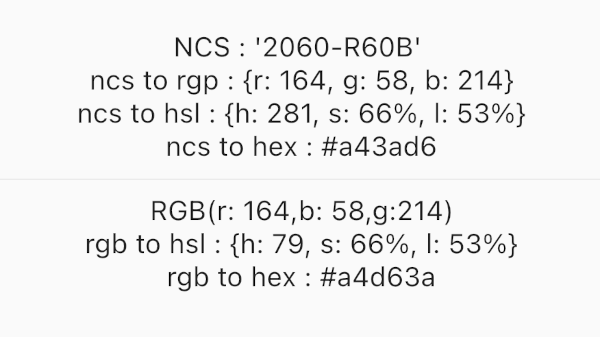
// Create an NCS color instancefinal ncsColor = NCSColor(ncsCode: '2060-R60B');
// Convert to RGBfinal rgb = ncsColor.toRgb();
print(rgb); // {r: 164, g: 58, b: 214}// Convert to HSLfinal hsl = ncsColor.toHsl();
print(hsl); // {h: 281, s: 66%, l: 53%}// Convert to HEXfinal hex = ncsColor.toHex();
print(hex); // #a43ad6
Map<String, String> rgbToHsl({required int r, required int g, required int b})
String rgbToHex({required int r, required int g, required int b})
⚠️ Error Handling
The package provides clear error messages for invalid NCS codes:
try {
  final ncsColor = NCSColor(ncsCode: 'invalid-code');
  final rgb = ncsColor.toRgb();
} catch (e) {
  print(e); // ArgumentError: Invalid NCS color format...
}
🧪 Testing
Run the test suite:
flutter test
🤝 Contributing
Contributions are welcome! Please feel free to submit a Pull Request. For major changes, please open an issue first to discuss what you would like to change.
Fork the repository
Create your feature branch (git checkout -b feature/amazing-feature)
Commit your changes (git commit -m 'Add some amazing feature')
Push to the branch (git push origin feature/amazing-feature)