सार्वजनिक जानकारी से बना चयन मार्गदर्शन। केवल संदर्भ हेतु।
OptimalWrapText एक Flutter विजेट है जो बहु-पंक्ति पाठ को बुद्धिमानी से लपेटकर दिखाने में सुधार करता है, जिससे समान लंबाई की दृश्य रूप से संतुलित पंक्तियाँ बनती हैं। मानक Text विजेट के विपरीत, यह असमान पंक्ति तोड़ने को कम करता है, जिससे छोटे पैराग्राफ या लेबल वाले UI में पठनीयता और आकर्षकता में सुधार होता है। यह ऐसे इंटरफेस के लिए उपयुक्त है जहाँ टाइपोग्राफिक समझौता महत्वपूर्ण होता है, जैसे डैशबोर्ड, कार्ड या फॉर्म। यह पैकेज सभी प्रमुख प्लेटफॉर्म का समर्थन करता है और मौजूदा Flutter प्रोजेक्ट में आसानी से एकीकृत होता है।
उपयोग
टेक्स्ट-भारी यूआई में दृश्य संतुलन में सुधार करना
संक्षिप्त लेआउट में पठनीयता में सुधार करना
लेबल और कार्ड में स्थिर लाइन लंबाई बनाएं
प्रतिक्रियाशील डिज़ाइन में पाठ प्रदर्शन को अनुकूलित करना
डैशबोर्ड और डेटा सारांश में उपयोग करना
मुख्य विशेषताएँ
स्मार्ट लाइन लंबाई को संतुलित करता है
असहज लाइन ब्रेक को कम करता है
सभी फ्लटर प्लेटफॉर्म को समर्थन करता है
मौजूदा Text विजेट्स के साथ सरल एकीकरण
मूल पाठ सामग्री और शैली को बनाए रखता है
इनके लिए उपयुक्त
प्रतिष्ठापन समन्वय को तरजीह देने वाले डिज़ाइनर
प्रतिक्रियाशील UI विकसित करने वाले डेवलपर्स
घने पाठ सामग्री वाले ऐप्स
प्रस्तुति के लिए सजाई हुई पाठ की आवश्यकता वाले प्रोजेक्ट्स
उपयोगकर्ता अनुभव पर ध्यान केंद्रित टीम विवरण
विचार योग्य बातें
रेंडरिंग कठिनाई में थोड़ी वृद्धि हो सकती है
प्रदर्शन के कारण बहुत लंबे पाठ के लिए उपयुक्त नहीं
लाइन संतुलन के आगे सीमित कस्टमाइजेशन
विभिन्न स्क्रीन आकारों पर ध्यान से परीक्षण की आवश्यकता होती है
लघु से मध्यम लंबाई वाले पाठ ब्लॉक्स के साथ सबसे अच्छा उपयोग किया जाता है
मूल README
संबंधित सोर्स रिपॉज़िटरी के मूल README का स्नैपशॉट। नवीनतम सामग्री के लिए रिपॉज़िटरी देखें।
Optimal Wrap Text
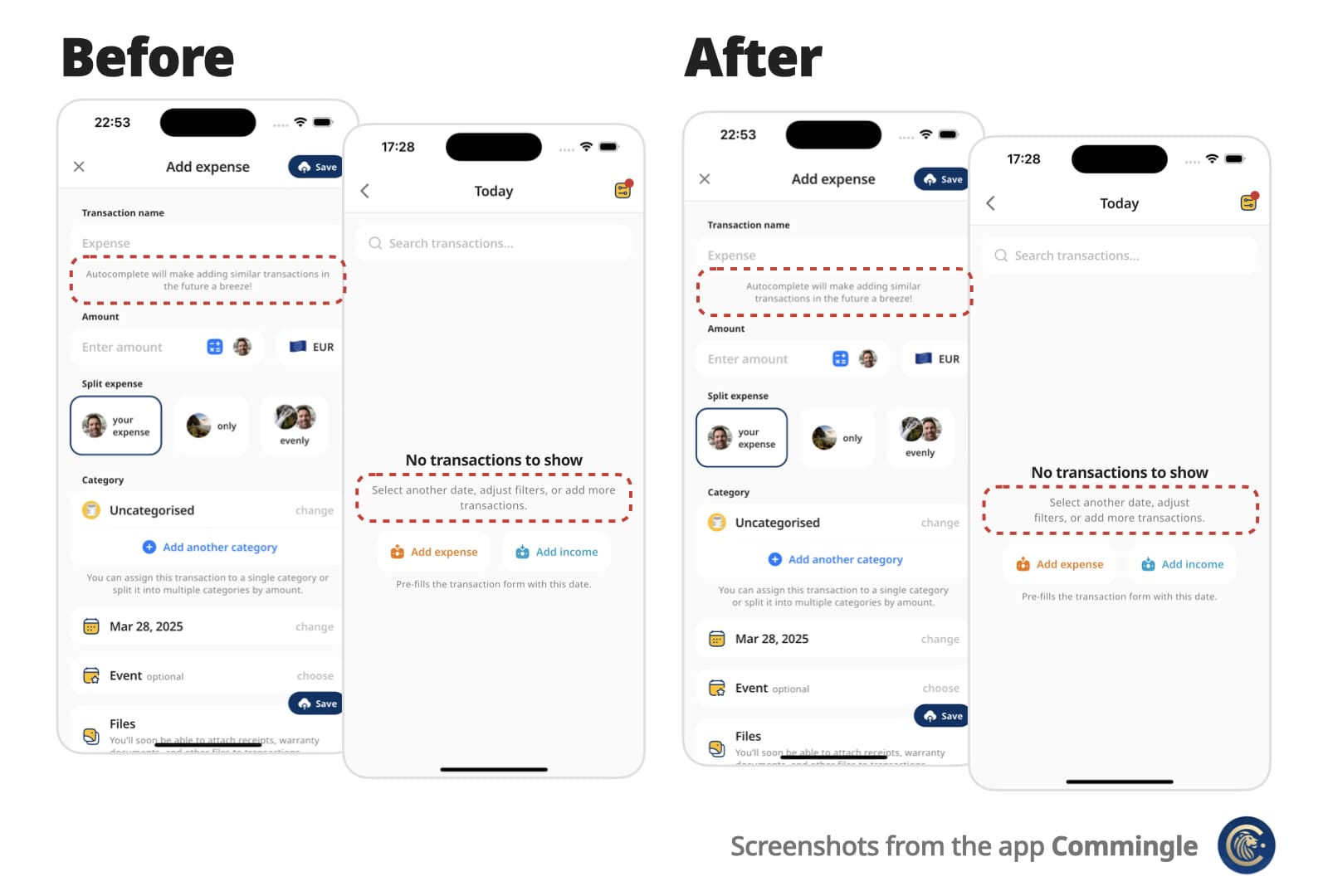
A Flutter Text replacement that wraps short multi-line text over similarly sized lines for better visual balance.
Instead of awkward standard line breaks like these:
My slightly longer text that will span 2 or
3 lines

My slightly longer text that will span 2 or
                  3 lines
You get cleaner, balanced output like these:
My slightly longer text that
will span 2 or 3 lines

        My slightly longer text that
           will span 2 or 3 lines
Perfect for small, informative footnotes or short multi-line messages that deserve to look good.
✨ Features
Drop-in replacement for the Text widget
Supports all Text attributes, including style, textDirection (RTL), textHeightBehavior…
Rich text via OptimalWrapRichText, including WidgetSpan (icons and other inline widgets)
Automatically finds optimal line breaks — no more manual \n
Optional minLines to wrap onto at least that many lines when there are enough words
Adjusts to different screen sizes and text scaling
📌 For centered or right-aligned text, you may still want to wrap it in a Center, Align, or Row, just like with a regular Text widget.
Use minLines to wrap onto at least that many lines when the text has enough
words. A single unbreakable word is never forced to break.
OptimalWrapText(
  'Hello there friend',
  minLines: 2,
  textAlign: TextAlign.center,
)
Use shrinkWrap: true when the parent should hug the optimally wrapped width
(for example a chip or speech bubble). By default the widgets expand to the
available width via Align, matching typical full-width text layout.
For custom rich-text children, wrap them with the exported OptimalWrapChild
primitive instead.
🧠 How does it work?
Optimal Wrap Text uses TextPainter to determine how many lines your text will take at full available width in the given widget tree.
It runs a binary search to find the narrowest width that still fits in the same number of lines — ensuring optimal wrapping. With minLines, that target is raised so the text wraps onto at least that many lines when there are enough words.
e.g.
300px → 2 lines (width from the current BuildContext)
150px → 4 lines ❌
225px → 2 lines ✅
188px → 3 lines ❌
206px → 2 lines ✅
... and so on
Worst-case scenario for mobile screen widths (e.g. iPhone) is about 9 iterations, but typical cases resolve in 6 attempts.
It wraps the final Text in a SizedBox constrained to that optimal width.
⚠️ Known Limitations
It uses LayoutBuilder to get width in the given widget tree, which doesn’t work inside some slivers, such as SliverFillRemaining, which rely on intrinsic sizing.
For OptimalWrapRichText with WidgetSpans, prefer intrinsically sized inline children (icons, small badges, fixed-size boxes). Same as Flutter’s Text.rich, each inline widget is constrained by the paragraph’s max width — very wide or full-bleed children can prevent meaningful narrowing.
💡 You can work around this by passing a manual width:
CustomScrollView(
  slivers: [
    ...,
    SliverFillRemaining(
      child: Padding(
        padding: EdgeInsets.only(left: 15, right: 30),
        child: OptimalWrapText(
          'My slightly longer text that will span 2 or 3 lines',
          width: MediaQuery.sizeOf(context).width - 15 - 30
        ),
      )
    ),
  ]
)
📄 Copyright and License
Optimal Wrap Text is maintained by Chris Rutkowski as part of the Commingle app, and open-sourced under the MIT License.