पैकेज, रिपॉज़िटरी और ऐप श्रेणियाँ खोजें

page_animator कवर
पैकेज विवरणv1.0.1

page_animator

एक फ्लटर पैकेज जो कस्टमाइज़ेबल प्रभाव के साथ चिकनी पृष्ठ संक्रमण और एनीमेशन प्रदान करता है। क्षैतिज पृष्ठ नेविगेशन के साथ आकर्षक उपयोगकर्ता इंटरफेस बनाने के लिए आदर्श।

AndroidiOSWebmacOSWindowsLinux
30-दिन डाउनलोड
14
लाइक
9
Pub अंक
160

पैकेज इंस्टॉल करें

flutter pub add page_animator

पैकेज अवलोकन

सार्वजनिक जानकारी से बना चयन मार्गदर्शन। केवल संदर्भ हेतु।

PageAnimator एक Flutter पैकेज है जिसका उद्देश्य क्षैतिज नेविगेशन के लिए सुचारू, कस्टमाइज़ करने योग्य पृष्ठ ट्रांज़िशन और एनीमेशन प्रदान करना है। यह तरल दृश्य प्रभावों के माध्यम से उपयोगकर्ता इंटरफ़ेस को बढ़ावा देता है, जिससे ऐप नेविगेशन अधिक आकर्षक और स्पष्ट हो जाता है। ऑनबोर्डिंग फ्लो, डैशबोर्ड या बहु-चरण प्रक्रियाओं जैसे ऐप्स के लिए आदर्श है। यह पैकेज सभी प्रमुख प्लेटफॉर्म जैसे Android, iOS, Web, macOS, Windows और Linux का समर्थन करता है, जिससे उपकरणों के बीच सुसंगत प्रदर्शन सुनिश्चित होता है।

उपयोग

  • ऑनबोर्डिंग स्क्रीन्स
  • डैशबोर्ड नेविगेशन
  • बहु-चरण फॉर्म
  • इंटरैक्टिव ट्यूटोरियल
  • स्वाइप करने योग्य सामग्री
  • एनीमेटेड टैब संक्रमण

मुख्य विशेषताएँ

  • कस्टमाइज़ किए गए संक्रमण प्रभाव
  • चिकने क्षैतिज पृष्ठ एनीमेशन
  • क्रॉस-प्लेटफॉर्म संगतता
  • PageView के साथ आसान एकीकरण
  • गतिशील नेविगेशन के लिए समर्थन
  • निर्धारित अवधि और वक्र

इनके लिए उपयुक्त

  • एनिमेटेड नेविगेशन की तलाश में विकासकर्ता
  • स्वाइप करने योग्य इंटरफेस वाले ऐप्स
  • डिज़ाइन-केंद्रित यूआई कार्यान्वयन
  • समृद्ध इंटरैक्शन वाले मोबाइल और वेब एप्लिकेशन
  • उपयोगकर्ता अनुभव पर बल देने वाली टीमें

विचार योग्य बातें

  • जटिल एनिमेशन के साथ प्रदर्शन पर प्रभाव पड़ सकता है
  • उत्तम उपयोगकर्ता अनुभव के लिए सावधानीपूर्वक ट्यूनिंग की आवश्यकता होती है
  • सीमित निर्मित पूर्व-सेट (कस्टमाइज़ेशन की आवश्यकता है)
  • सरल स्थिर पृष्ठों के लिए उपयुक्त नहीं
  • मध्यम एनिमेशन जटिलता के लिए सबसे उपयुक्त

मूल README

संबंधित सोर्स रिपॉज़िटरी के मूल README का स्नैपशॉट। नवीनतम सामग्री के लिए रिपॉज़िटरी देखें।

Page Animator

A Flutter package that provides smooth page transitions and animations with customizable effects. Perfect for creating engaging user interfaces with horizontal page navigation.

Features

  • Multiple animation types for page transitions, switchable in realtime
  • Infinite scrolling in both directions, with ability to set bounds in realtime
  • Animated switcher - tap on a page, and it will zoom out, similar to Kindle reader
  • Immersive mode support

Animation Types

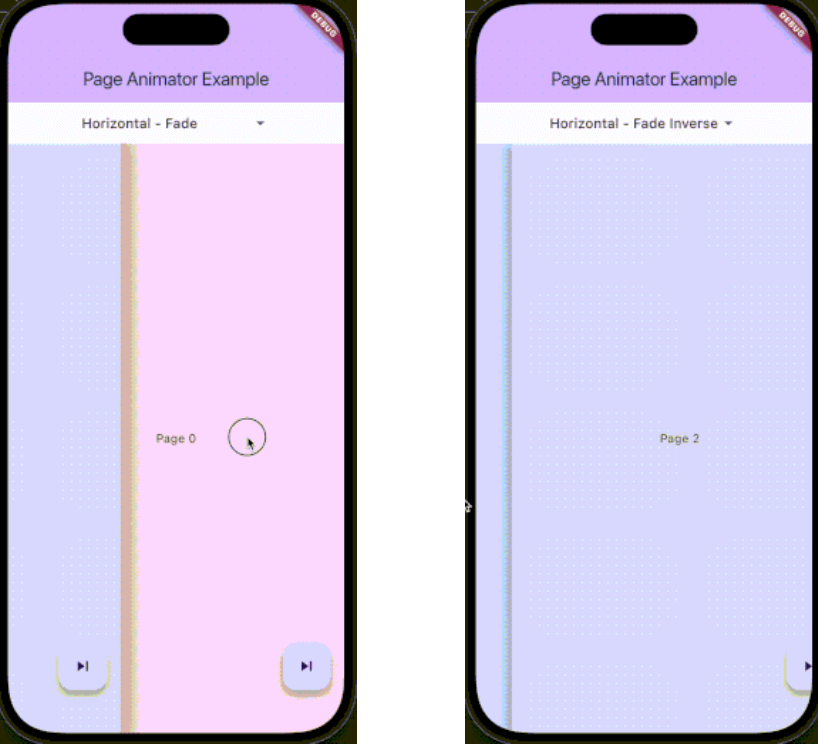
The package supports various animation types through PageAnimatorType. Here's a comprehensive list of all available animations:

Preview Preview Preview
Uncompressed gif
animatedSwitcher - Animated switcher transition
Uncompressed gif
noAnimation - No animation effect, instant page switch
Uncompressed gif
horizontalSimple - Simple horizontal slide transition
Uncompressed gif
horizontalFade - Horizontal slide with fade effect
Uncompressed gif
horizontalFadeInverse - Horizontal slide with inverse fade effect
Uncompressed gif
verticalSimple - Simple vertical slide transition
Uncompressed gif
verticalFade - Vertical slide with fade effect
Uncompressed gif
verticalFadeInverse - Vertical slide with inverse fade effect

You can change the animation type dynamically using the controller:

pageAnimatorController.type.value = PageAnimatorType.verticalFade;

Installation

Add this to your package's pubspec.yaml file:

dependencies:
  page_animator: ^1.0.0

Usage

  1. Import the package:
import 'package:page_animator/page_animator.dart';
  1. Create a PageAnimatorController:
final pageAnimatorController = PageAnimatorController(
  type: PageAnimatorType.horizontalFade,
);
  1. Use the PageAnimator widget:
PageAnimator(
  controller: pageAnimatorController,
  onPageChanged: (int currentPage) {
    print('Page offset: $currentPage');
  },
  leftMostIndex: -3,
  rightMostIndex: 3,
  children: [
    // Your page widgets here
  ],
  enableImmersiveSwitch: true,
)
Page Bounds

The PageAnimator widget allows you to set bounds for page navigation using leftMostIndex and rightMostIndex parameters:

  • leftMostIndex: The minimum page offset that can be reached by swiping left
  • rightMostIndex: The maximum page offset that can be reached by swiping right

These bounds can be changed in realtime, allowing you to dynamically control the navigation range. For example:

// Initially allow navigation indefinitelly
PageAnimator(
  leftMostIndex: null,
  rightMostIndex: null,
  // ... other parameters
)

// Later, you can update the bounds
PageAnimator(
  leftMostIndex: -3,
  rightMostIndex: 3,
  // ... other parameters
)

When a bound is reached, the page will stop scrolling in that direction, providing a natural end to the navigation.

Example

Here's a complete example showing how to use the package:

class MyPage extends StatefulWidget {
  @override
  State<MyPage> createState() => _MyPageState();
}

class _MyPageState extends State<MyPage> {
  final pageAnimatorController = PageAnimatorController(
    type: PageAnimatorType.horizontalFade,
  );

  @override
  Widget build(BuildContext context) {
    return Scaffold(
      body: PageAnimator(
        controller: pageAnimatorController,
        onPageChanged: (int currentPage) {
          print('Page offset: $currentPage');
        },
        leftMostIndex: -3,
        rightMostIndex: 3,
        children: [
          for (final page in List.generate(3, (index) => index))
            _buildPage(page),
        ],
        enableImmersiveSwitch: true,
      ),
    );
  }

  Widget _buildPage(int page) {
    return Scaffold(
      body: Center(
        child: Text('Page $page'),
      ),
      floatingActionButton: FloatingActionButton(
        onPressed: () => pageAnimatorController.animateToOffset(1),
        child: const Icon(Icons.skip_next),
      ),
    );
  }
}

Controller Methods

The PageAnimatorController provides several methods to control page transitions:

  • animateToOffset(int offset): Animate to a specific page offset
  • type: Change the animation type dynamically
  • switcherActive: Control the page switcher state

Contributing

Contributions are welcome! Please feel free to submit a Pull Request.

License

This project is licensed under the MIT License - see the LICENSE file for details.

Parameters

  • children: List of widgets to display as pages
  • onPageChanged: Callback when page is changed
  • leftMostIndex: The first page user can go to
  • rightMostIndex: The last page user can go to
  • controller: PageAnimatorController instance
  • enableImmersiveSwitch: Optional boolean that controls whether to enable immersive mode while switcher is inactive, and automatically disable it when user enters switcher. If not specified, defaults to true.
  • onDragStart: Optional callback when drag starts
  • onDragEnd: Optional callback when drag ends
  • onDragAnimationStart: Optional callback when animation starts
  • onDragAnimationEnd: Optional callback when animation ends

श्रेणियाँ

निर्भरताएँ

निर्भरता सूची 1 आइटम

सोर्स रिपॉज़िटरी

इस पैकेज का उपयोग करने वाले प्रोजेक्ट

अभी कोई डेटा उपलब्ध नहीं है।