पैकेज, रिपॉज़िटरी और ऐप श्रेणियाँ खोजें

page_route_animator कवर
पैकेज विवरणv1.0.4

page_route_animator

Flutter पेज रूट ट्रांज़िशन पैकेज, 62 अलग-अलग ट्रांज़िशन के साथ।

AndroidiOSWebmacOSWindowsLinux
30-दिन डाउनलोड
138
लाइक
95
Pub अंक
160

पैकेज इंस्टॉल करें

flutter pub add page_route_animator

पैकेज अवलोकन

सार्वजनिक जानकारी से बना चयन मार्गदर्शन। केवल संदर्भ हेतु।

एक फ्लटर पैकेज जो नेविगेशन एनीमेशन को बढ़ावा देने के लिए 62 बिल्ट-इन पेज रूट ट्रांज़िशन प्रदान करता है। यह प्लेटफॉर्म के आसपास डायनामिक और दृश्य रूप से आकर्षक स्क्रीन ट्रांज़िशन के कार्यान्वयन को सरल बनाता है। विकासकर्ता कम कोड में प्री-डिफाइंड एनीमेशन जैसे स्लाइड, फेड, स्केल और कस्टम प्रभाव आसानी से लागू कर सकते हैं। पैकेज सभी प्रमुख प्लेटफॉर्म जैसे Android, iOS, Web, macOS, Windows और Linux का समर्थन करता है, जिससे उपकरणों के बीच संगत व्यवहार सुनिश्चित होता है। चिकनी और आकर्षक नेविगेशन फ्लो के माध्यम से उपयोगकर्ता अनुभव को बढ़ाने के लिए आदर्श है।

उपयोग

  • लचीले ट्रांजिशन के साथ ऐप नेविगेशन में सुधार
  • अम्मर्सिव ओनबोर्डिंग अनुभव बनाना
  • टैब या स्क्रीन बदलाव को दृश्य चमक देना
  • इंटरैक्टिव ट्यूटोरियल बनाना
  • एनिमेटेड नेविगेशन के साथ आधुनिक UI डिज़ाइन करना
  • गतिशील संक्रमण के माध्यम से उपयोगकर्ता एंगेजमेंट में सुधार

मुख्य विशेषताएँ

  • 62 पूर्व-निर्मित संक्रमण एनीमेशन
  • सरल एपीआई, स्वच्छ कॉन्फ़िगरेशन
  • क्रॉस-प्लेटफॉर्म संगतता
  • कस्टमाइज़ किए गए एनीमेशन पैरामीटर
  • पुश और पॉप ट्रांजिशन का समर्थन
  • हल्का और एकीकरण में आसान

इनके लिए उपयुक्त

  • समृद्ध नेविगेशन प्रभाव चाहने वाले Flutter विकासकर्ता
  • चिकनाई वाले ओनबोर्डिंग या ट्यूटोरियल फ्लो की आवश्यकता वाले ऐप्स
  • डिजाइनर उपयोगकर्ता अनुभव और मोशन डिजाइन पर ध्यान केंद्रित करते हैं
  • आधुनिक, एनिमेटेड UI के लक्ष्य वाले प्रोजेक्ट
  • जटिल कोडिंग के बिना त्वरित संक्रमण कार्यान्वयन चाहने वाले डेवलपर्स

विचार योग्य बातें

  • शामिल एनीमेशन के कारण बंडल आकार में हल्का वृद्धि हो सकती है
  • कुछ उन्नत एनिमेशन को कम शक्ति वाले डिवाइस पर प्रदर्शन समायोजन की आवश्यकता हो सकती है
  • अत्यधिक अद्वितीय संक्रमण तर्क के लिए सीमित कस्टमाइजेशन
  • अनिमेशन के बजाय न्यूनतमता पर ध्यान केंद्रित करने वाले एप्स के लिए आदर्श नहीं
  • Flutter के Navigator और रूटिंग सिस्टम की समझ की आवश्यकता होती है

मूल README

संबंधित सोर्स रिपॉज़िटरी के मूल README का स्नैपशॉट। नवीनतम सामग्री के लिए रिपॉज़िटरी देखें।

Page Route Animator Package

Flutter page route transition package, with 62 different page transitions.

flutter platform pub package BSD-3-Clause effective dart

Examples

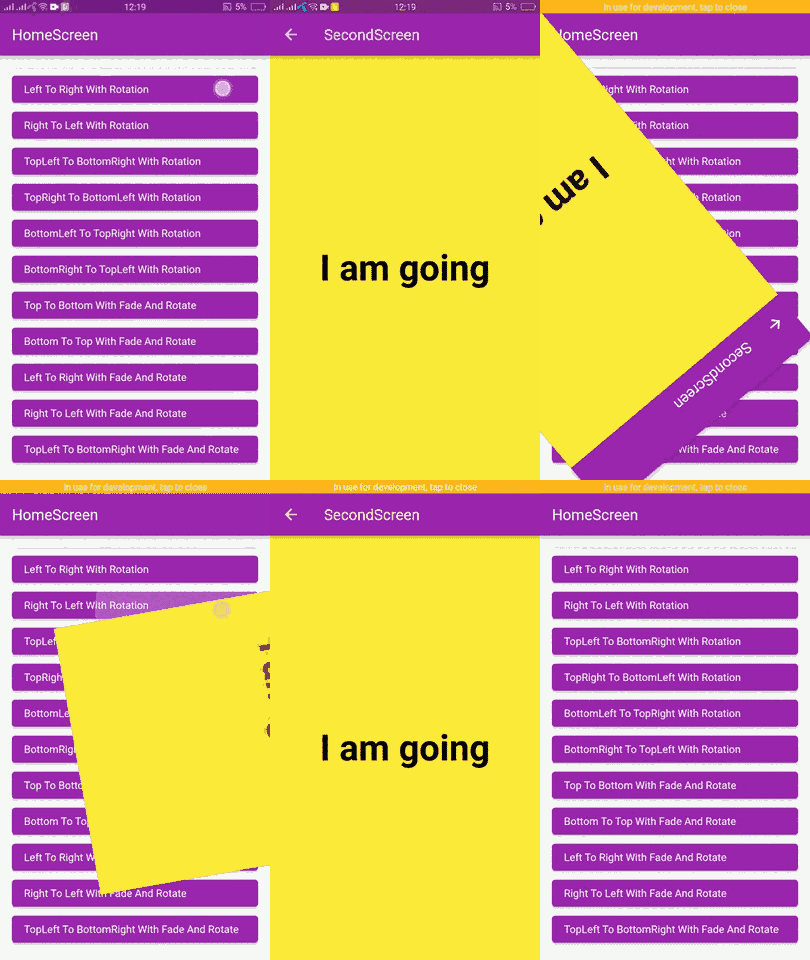
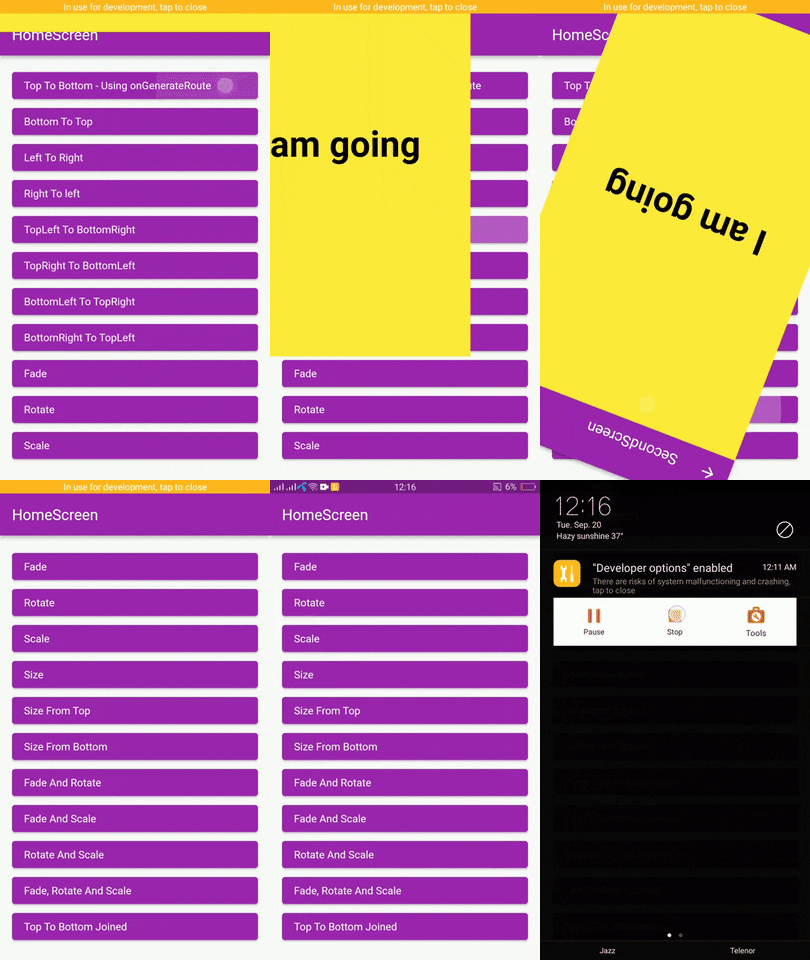
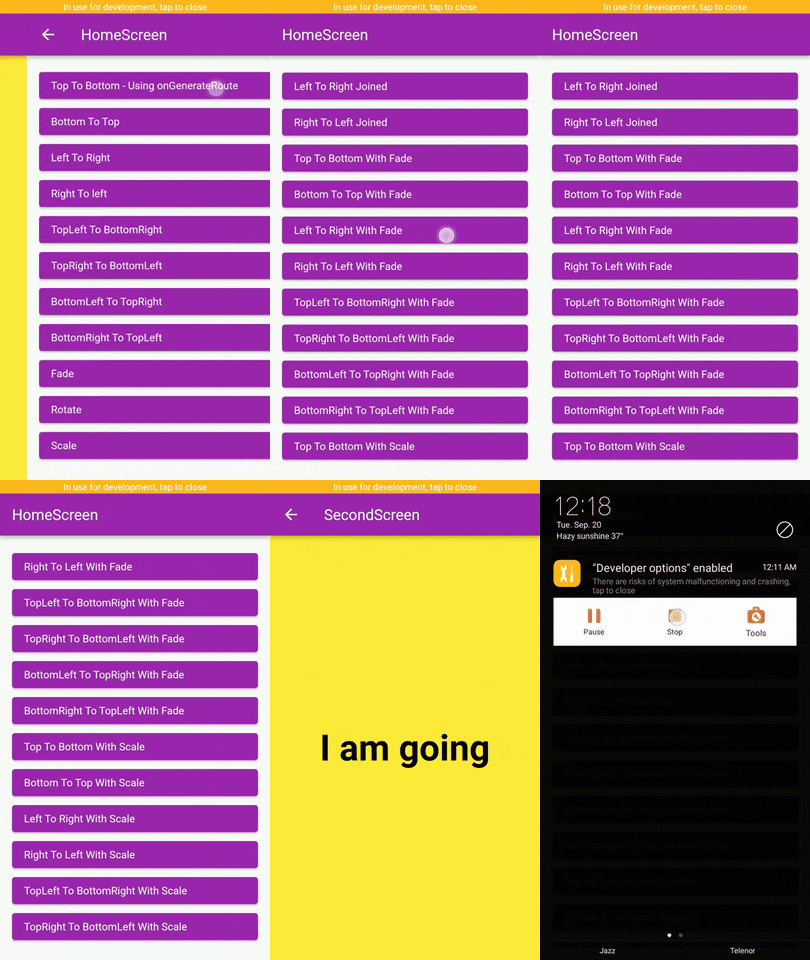
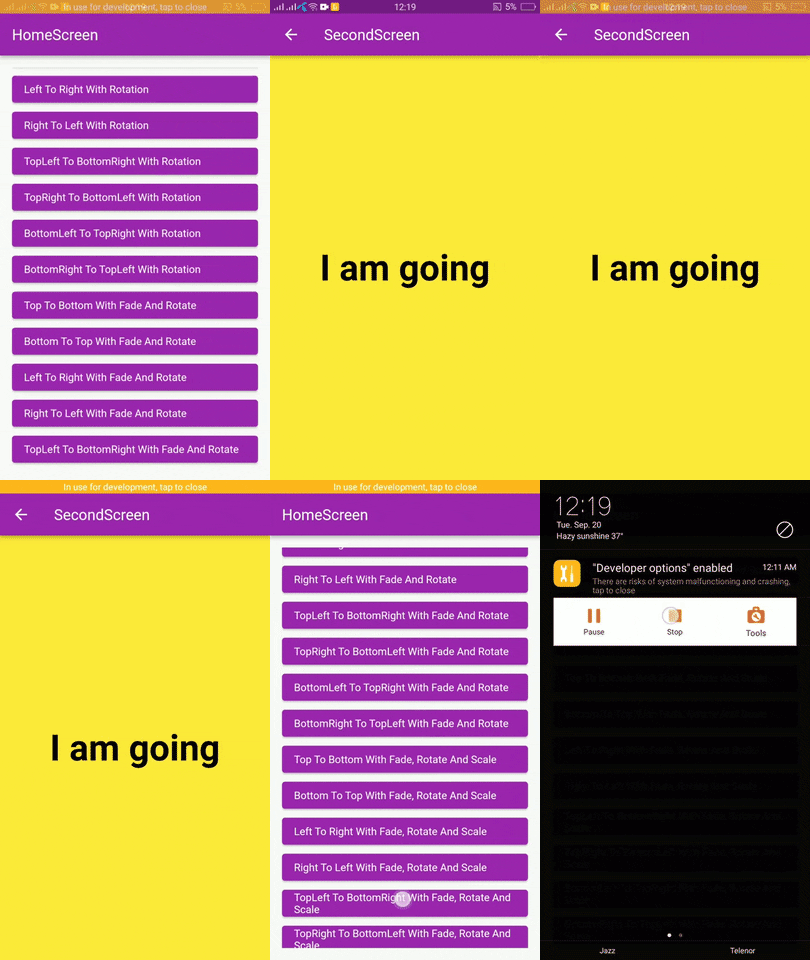
page_route_animator_20_transitions_p1 page_route_animator_20_transitions_p2 page_route_animator_20_transitions_p3

Getting Started

In the pubspec.yaml of your flutter project, add the following dependency:

dependencies:
  page_route_transition: ^1.0.4

Usage

To use this package you have to import it in your file by using below command:

import 'package:page_route_animator/page_route_animator.dart';

Code Example

import 'package:flutter/material.dart';
import 'package:page_route_animator/page_route_animator.dart';

void main(List<String> args) => runApp(const MyApp());

/// This widget is the root of your app.
class MyApp extends StatelessWidget {
  const MyApp({Key? key}) : super(key: key);

  @override
  Widget build(BuildContext context) {
    return MaterialApp(
      debugShowCheckedModeBanner: false,
      title: 'Page Route Animator Code Example',
      theme: ThemeData(primarySwatch: Colors.purple),
      home: const HomeScreen(),

      /// using onGenerateRoute
      onGenerateRoute: (settings) {

        switch (settings.name) {
          case '/second-screen':
            return PageRouteAnimator(
              child: const SecondScreen(),
              routeAnimation: RouteAnimation.topToBottom,
              settings: settings,
              curve: Curves.linear,
              duration: const Duration(milliseconds: 500),
              reverseDuration: const Duration(milliseconds: 500),
            );
          default:
            return null;
        }
      },
    );
  }
}

/// HomeScreen
class HomeScreen extends StatelessWidget {
  const HomeScreen({Key? key}) : super(key: key);

  @override
  Widget build(BuildContext context) {
    return Scaffold(
      appBar: AppBar(
        title: const Text('HomeScreen'),
      ),
      body: Padding(
        padding: const EdgeInsets.all(16.0),
        child: ListView(
          children: [
            /// Push using onGenerateRoute
            /// Navigator.pushNamed()
            ElevatedButton(
              onPressed: () {
                Navigator.pushNamed(
                  context,
                  '/second-screen',
                  arguments: 'I am going',
                );
              },
              child: getText('Top To Bottom - onGenerateRoute'),
            ),

            /// Navigator.push()
            ElevatedButton(
              onPressed: () {
                Navigator.push(
                  context,
                  PageRouteAnimator(
                    child: const SecondScreen(),
                    routeAnimation: RouteAnimation.bottomToTop,
                    settings: const RouteSettings(arguments: 'I am going'),
                    curve: Curves.slowMiddle,
                    duration: const Duration(milliseconds: 500),
                    reverseDuration: const Duration(milliseconds: 500),
                  ),
                );
              },
              child: getText('Bottom To Top'),
            ),

            ElevatedButton(
              onPressed: () {
                Navigator.push(
                  context,
                  PageRouteAnimator(
                    child: const SecondScreen(),
                    routeAnimation: RouteAnimation.leftToRight,
                    settings: const RouteSettings(arguments: 'I am going'),
                    curve: Curves.linear,
                  ),
                );
              },
              child: getText('Left To Right'),
            ),

            ElevatedButton(
              onPressed: () {
                Navigator.push(
                  context,
                  PageRouteAnimator(
                    child: const SecondScreen(),
                    routeAnimation: RouteAnimation.rightToLeft,
                    settings: const RouteSettings(arguments: 'I am going'),
                    curve: Curves.easeOut,
                  ),
                );
              },
              child: getText('Right To left'),
            ),

            ElevatedButton(
              onPressed: () {
                Navigator.push(
                  context,
                  PageRouteAnimator(
                    child: const SecondScreen(),
                    routeAnimation: RouteAnimation
                        .bottomRightToTopLeftWithFadeRotateAndScale,
                    settings: const RouteSettings(arguments: 'I am going'),
                    curve: Curves.easeOut,
                  ),
                );
              },
              child:
                  getText('BottomRight To TopLeft With Fade, Rotate And Scale'),
            ),
          ],
        ),
      ),
    );
  }
}

/// SecondScreen
class SecondScreen extends StatelessWidget {
  const SecondScreen({Key? key}) : super(key: key);

  @override
  Widget build(BuildContext context) {
    String? argument = ModalRoute.of(context)?.settings.arguments as String?;
    return Scaffold(
      backgroundColor: Colors.yellow,
      appBar: AppBar(
        title: const Text('SecondScreen'),
      ),
      body: Center(
        child: Text(
          argument ?? 'No Data',
          style: const TextStyle(
            fontSize: 48.0,
            fontWeight: FontWeight.bold,
            color: Colors.black,
          ),
        ),
      ),
    );
  }
}

// Helper Widget
Widget getText(String text) {
  return Align(
    alignment: Alignment.centerLeft,
    child: Text(text),
  );
}

Types Of Transitions

  • topToBottom,
  • bottomToTop,
  • leftToRight,
  • rightToLeft,
  • fade,
  • rotate,
  • scale,
  • size,
  • sizeFromTop,
  • sizeFromBottom,
  • fadeAndRotate,
  • fadeAndScale,
  • rotateAndScale,
  • fadeRotateAndScale,
  • topToBottomJoined,
  • bottomToTopJoined,
  • leftToRightJoined,
  • rightToLeftJoined,
  • topLeftToBottomRight,
  • topRightToBottomLeft,
  • bottomLeftToTopRight,
  • bottomRightToTopLeft,
  • topToBottomWithFade,
  • bottomToTopWithFade,
  • leftToRightWithFade,
  • rightToLeftWithFade,
  • topLeftToBottomRightWithFade,
  • bottomLeftToTopRightWithFade,
  • bottomRightToTopLeftWithFade,
  • topRightToBottomLeftWithFade,
  • topToBottomWithRotation,
  • bottomToTopWithRotation,
  • leftToRightWithRotation,
  • rightToLeftWithRotation,
  • topLeftToBottomRightWithRotation,
  • bottomLeftToTopRightWithRotation,
  • bottomRightToTopLeftWithRotation,
  • topRightToBottomLeftWithRotation,
  • topToBottomWithFadeAndRotate,
  • bottomToTopWithFadeAndRotate,
  • leftToRightWithFadeAndRotate,
  • rightToLeftWithFadeAndRotate,
  • topLeftToBottomRightWithFadeAndRotate,
  • topRightToBottomLeftWithFadeAndRotate,
  • bottomLeftToTopRightWithFadeAndRotate,
  • bottomRightToTopLeftWithFadeAndRotate,
  • topToBottomWithScale,
  • bottomToTopWithScale,
  • leftToRightWithScale,
  • rightToLeftWithScale,
  • topLeftToBottomRightWithScale,
  • topRightToBottomLeftWithScale,
  • bottomLeftToTopRightWithScale,
  • bottomRightToTopLeftWithScale,
  • topToBottomWithFadeRotateAndScale,
  • bottomToTopWithFadeRotateAndScale,
  • leftToRightWithFadeRotateAndScale,
  • rightToLeftWithFadeRotateAndScale,
  • topLeftToBottomRightWithFadeRotateAndScale,
  • topRightToBottomLeftWithFadeRotateAndScale,
  • bottomLeftToTopRightWithFadeRotateAndScale,
  • bottomRightToTopLeftWithFadeRotateAndScale,

Curves

Learn about Curves from official docs, curves.

License

BSD 3-Clause

श्रेणियाँ

सोर्स रिपॉज़िटरी

इस पैकेज का उपयोग करने वाले प्रोजेक्ट

अभी कोई डेटा उपलब्ध नहीं है।