सार्वजनिक जानकारी से बना चयन मार्गदर्शन। केवल संदर्भ हेतु।
एक फ्लटर पैकेज जो सर्च रिजल्ट दिखाने के लिए बिल्ट-इन पेजिनेशन के साथ एक सर्च बार प्रदान करता है। यह उपयोगकर्ताओं को प्रश्न टाइप करने और पृष्ठों में परिणामों को नैविगेट करने की अनुमति देता है, जब बड़े डेटासेट के साथ काम करते समय प्रदर्शन और उपयोगकर्ता अनुभव में सुधार करता है। लाइब्रेरी असिंक्रोनस सर्च ऑपरेशन को हैंडल करती है और न्यूनतम सेटअप के साथ मौजूदा UI में आसानी से एकीकृत होती है। यह कस्टमाइज़ेबल परिणाम प्रदर्शन और लोडिंग स्थितियों का समर्थन करता है, जिससे यह दक्ष, स्केलेबल सर्च कार्यक्षमता की आवश्यकता वाले ऐप्स के लिए आदर्श है।
उपयोग
बड़े डेटासेट की कुशलता से खोज
पेज़ वाले खोज परिणाम कार्यान्वयन
डेटा-भारी ऐप्स में उपयोगकर्ता अनुभव को बढ़ाना
गतिशील खोज इंटरफेस बनाना
खोज के लिए दूरस्थ API के साथ एकीकरण
खोज के दौरान मेमोरी उपयोग को कम करना
मुख्य विशेषताएँ
एम्बेडेड पेजिंग समर्थन
असिंक्रोनस सर्च हैंडलिंग
कस्टमाइज़ेबल परिणाम UI
लोडिंग और त्रुटि अवस्था प्रबंधन
मौजूदा विजेट्स के साथ आसान एकीकरण
दूरस्थ और स्थानीय डेटा स्रोत का समर्थन
इनके लिए उपयुक्त
खोज-भारी एप्लिकेशन बना रहे डेवलपर्स
बड़े डेटासेट वाले ऐप्स
स्मूथ स्क्रॉलिंग और लेट लोडिंग की आवश्यकता वाले UI
प्रदर्शन और उपयोगकर्ता अनुभव पर ध्यान केंद्रित टीमें
REST या GraphQL APIs का उपयोग करने वाले प्रोजेक्ट
Flutter शुरुआती उपयोगकर्ता पृणांकन पैटर्न सीख रहे हैं
विचार योग्य बातें
खोज तर्क के कार्यान्वयन की आवश्यकता है
मूल खोज UI कस्टमाइजेशन तक सीमित
कोई बिल्ट-इन फ़िल्टर या सॉर्टिंग नहीं
बाहरी डेटा स्रोत पर निर्भर करता है
जटिल डिजाइन के लिए अतिरिक्त स्टाइलिंग की आवश्यकता हो सकती है
डिबाउंस के बिना रियल-टाइम सर्च के लिए अनअप्टिमाइज़्ड
मूल README
संबंधित सोर्स रिपॉज़िटरी के मूल README का स्नैपशॉट। नवीनतम सामग्री के लिए रिपॉज़िटरी देखें।
Paginated Search Bar
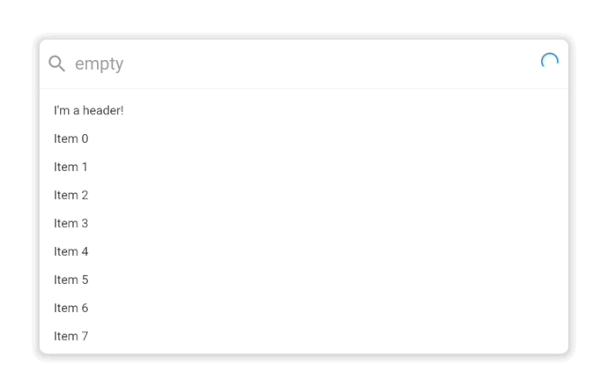
A search bar library that let's you search for items and paginate them in a results list. By default it looks like this:
.
It supports extensive customization with custom styling, headers, placeholders, footers and more powered by the Endless infinite scroll view library.
Usage
classExampleItem{
finalString title;
ExampleItem({
requiredthis.title,
});
}
PaginatedSearchBar<ExampleItem>(
onSearch: ({
required pageIndex,
required pageSize,
required searchQuery,
}) async {
// Call your search API to return a list of itemsreturn [
ExampleItem(title: 'Item 0'),
ExampleItem(title: 'Item 1'),
];
},
itemBuilder: (
context, {
required item,
required index,
}) {
returnText(item.title);
},
);
In this basic usage, all you need to get started is an onSearch function for fetching data and an itemBuilder for how it should be displayed in the search results list.
In this more advanced example, we've provided a few more customization options including an emptyBuilder and headerBuilderState. All of the builder functions like emptyBuilder provide the current BuildContext and return a widget to display. Each builder function additionally has a corresponding StateProperty builder like we see with headerBuilderState. The PaginatedSearchBar library uses the State property pattern for customizing the display of the widget based on the state of the system.
The complete list of paginated search bar states are:
enumPaginatedSearchBarState {
/// Present when the search bar is searching for items. Triggered when they update their search/// query in the input.
searching,
/// Present when the search bar is fetching a page of items either as a result of a modified search query/// or by scrolling to the bottom of the list view and triggering the next page load.
loading,
/// Present when the search bar has no matching items for the current search query.
empty,
/// Present when the search bar has no more items to fetch for the current search query. Triggered/// when the [PaginatedSearchBar.onSearch] function returns fewer than [PaginatedSearchBar.pageLimit]/// items or [EndlessPaginationDelegate.maxPage] has been reached and no more items can be fetched.
done,
/// Present the input is currently focused.
focused,
}
State properties builders then let us customize what we build based on these states. In the above example with headerBuilderState, we specified that it should only build the widget when the search results are empty.
If we instead wanted it show be shown when the search results are empty or done, we could use the state property resolveWith builder:
PaginatedSearchBar<ExampleItem>(
headerBuilderState: PaginatedSearchBarBuilderStateProperty.resolveWith((context, states) {
if (states.contain(PaginatedSearchBarState.empty) || states.contain(PaginatedSearchBarState.done)) {
returnconstText("I'm a header that only shows when the results are empty or done!");
}
}),
onSearch: ({
required pageIndex,
required pageSize,
required searchQuery,
}) async {
returnFuture.delayed(constDuration(milliseconds: 1000), () {
if (searchQuery == "empty") {
return [];
}
return [
ExampleItem(title: 'Page $pageIndex item 1'),
ExampleItem(title: 'Page $pageIndex item 2'),
];
});
},
itemBuilder: (
context, {
required item,
required index,
}) {
returnText(item.title);
},
);
The state properties are available for builders and style properties of the [PaginatedSearchBar].
Feedback
Let us know if there are any additional features or customization options you'd like to see to make a helpful search bar.

 .
