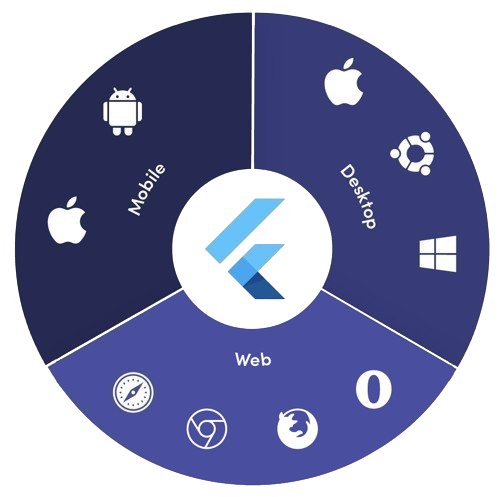
सार्वजनिक जानकारी से बना चयन मार्गदर्शन। केवल संदर्भ हेतु।
platform_detail एक हल्का Dart पैकेज है जो समग्र प्लेटफॉर्म-विशिष्ट जानकारी के प्राप्त करने को सरल बनाता है। यह Android, iOS, macOS, Windows और Linux जैसे कई प्लेटफॉर्म पर वर्तमान ऑपरेटिंग सिस्टम, डिवाइस प्रकार, आर्किटेक्चर और अन्य रनटाइम विवरण की पहचान करने के लिए एक एकीकृत, आसान उपयोग वाला इंटरफ़ेस प्रदान करता है। बॉइलरप्लेट कोड के बिना विश्वसनीय प्लेटफॉर्म निर्धारण की आवश्यकता वाले विकासकर्ताओं के लिए डिज़ाइन किया गया, यह निम्न-स्तरीय प्लेटफॉर्म जाँच को साफ़, पठनीय विधियों में स्थानांतरित करता है। यह पुस्तकालय वातावरण या डिवाइस विशेषताओं के आधार पर शर्ती तर्क के लिए आदर्श है।
उपयोग
प्लेटफॉर्म के आधार पर शर्ती UI रेंडरिंग
उपकरण-विशिष्ट फीचर टॉगल
क्रॉस-प्लेटफॉर्म डीबगिंग उपकरण
रनटाइम पर्यावरण अंतर्दृष्टि
प्रत्येक डिवाइस के प्रदर्शन को अनुकूलित करना
प्लेटफॉर्म-विशिष्ट व्यवहार का परीक्षण
मुख्य विशेषताएँ
Android, iOS, macOS, Windows और Linux का समर्थन करता है
प्लेटफ़ॉर्म और डिवाइस निर्धारण के लिए सरल API
विस्तृत प्रणाली सूचना लौटाता है
हल्का और कोई बाहरी निर्भरता नहीं
प्लेटफॉर्म के आधार पर सुसंगत इंटरफेस
pub add के माध्यम से आसान एकीकरण
इनके लिए उपयुक्त
क्रॉस-प्लेटफ़ॉर्म फ्लटर एप्प्स
प्लेटफ़ॉर्म-संवेदनशील तर्क की आवश्यकता वाले ऐप्स
न्यूनतम सेटअप चाहने वाले डेवलपर्स
डिबगिंग और निदान उपकरण
कई डेस्कटॉप और मोबाइल प्लेटफॉर्म के लिए लक्षित ऐप्स
विचार योग्य बातें
वेब प्लेटफॉर्म का समर्थन नहीं करता है
केवल रनटाइम प्लेटफॉर्म जानकारी तक सीमित
कोई वास्तविक समय प्लेटफॉर्म बदलाव का निरीक्षण नहीं
मूल प्लेटफॉर्म एपीआई पर निर्भर करता है
कुछ प्लेटफॉर्म पर अनुमति प्रबंधन की आवश्यकता हो सकती है
जटिल उपकरण फिंगरप्रिंटिंग के लिए नहीं बनाया गया है
मूल README
संबंधित सोर्स रिपॉज़िटरी के मूल README का स्नैपशॉट। नवीनतम सामग्री के लिए रिपॉज़िटरी देखें।
Platform Detail
About
Platform Detail is a lightweight and developer-friendly Flutter package that makes platform detection easier, more complete, and cross-platform.
It provides a unified and consistent API for checking the platform your app is running on — including web, something that native Flutter classes like TargetPlatform and Platform from dart:io don't currently support.
⚠️ Flutter’s native Platform and TargetPlatform do not provide support for detecting web, which can be a limitation in universal apps.
✅ platform_detail addresses this limitation by introducing a simple and intuitive API that includes web detection out of the box.
✅ Why Use This Package?
✅ Unified API across all platforms (including web).
✅ Clear separation between platform type and platform group.
✅ Static API with simple access from PlatformDetail.
✅ No need to manually check kIsWeb or rely on partial solutions.
If you only rely on TargetPlatform, you’ll miss web support.
voidmain() {
// Native TargetPlatform doesn't detect web:if (defaultTargetPlatform == TargetPlatform.android) {
// OK for Android
} elseif (kIsWeb) {
// Web has to be checked manually
}
}
With PlatformDetail, the check is unified:
voidmain() {
if (PlatformDetail.isWeb) {
print('Web detected ✔️');
}
}
🔎 Group-based Detection
Check whether the current platform belongs to a broader category:
voidmain() {
if (PlatformDetail.isMobile) {
print('Mobile platform');
}
if (PlatformDetail.isDesktop) {
print('Desktop platform');
}
if (PlatformDetail.isDesktopOrWeb) {
print('Desktop or Web platform');
}
}
voidmain() {
if (PlatformDetail.isIOS) print('iOS');
if (PlatformDetail.isAndroid) print('Android');
if (PlatformDetail.isFuchsia) print('Fuchsia');
if (PlatformDetail.isWindows) print('Windows');
if (PlatformDetail.isLinux) print('Linux');
if (PlatformDetail.isMacOS) print('macOS');
if (PlatformDetail.isWeb) print('Web');
}
Or create different cases through the enum with a switch:
ℹ️ No configuration is required for most platforms.
For macOS, you must add the following entry to both DebugProfile.entitlements and ReleaseProfile.entitlements files:
If you need more detailed information about the device and operating system it is running on.
voidmain() async {
final descriptionDevice = awaitPlatformDetail.deviceInfo();
}
Or maybe you need an information string about the device info:
voidmain() async {
final descriptionDevice = awaitPlatformDetail.deviceInfoDetails();
}
This will return something like this:
Android: Android 9 (SDK 28), Xiaomi Redmi Note 7
iOS: iOS 13.1, iPhone 11 Pro Max iPhone
Web: Google Chrome (115.0.5790.170)
Linux: Fedora 17 (Beefy Miracle)
Windows: Windows 10 Home (1903)
MacOS: macOS 13.5, MacBook Pro
Get compact environment details
If you need a typed and lightweight payload with platform, model and locale, use environmentDetails():
voidmain() async {
final details = awaitPlatformDetail.environmentDetails();
print(details.platformType); // PlatformType.androidprint(details.platform); // android 14print(details.deviceModel); // Google Pixel 8print(details.locale); // en-US
}
This returns an EnvironmentDetails object with these fields:
platformType: PlatformType
platform: String
deviceModel: String
locale: String
The example app includes a section that renders these values on screen.
Get app version and build number
If you need app package metadata, you can use versionDetails():
voidmain() async {
final details = awaitPlatformDetail.versionDetails();
print(details.appName); // My Appprint(details.packageName); // com.example.my_appprint(details.version); // 5.4.0print(details.buildNumber); // 12
}
This returns a VersionDetails object with these fields:
appName: String
packageName: String
version: String
buildNumber: String
Light/Dark Mode
You can detect too if the device is configured in light or dark mode:
voidmain() {
if (PlatformDetail.isLightMode) {
print('The current platform is configured with light mode');
}
if (PlatformDetail.isDarkMode) {
print('The current platform is configured with dark mode');
}
}
voidmain() {
if (PlatformDetail.theme == DeviceTheme.light) {
print('The current device is configured in light mode');
}
if (PlatformDetail.theme == DeviceTheme.dark) {
print('The current device is configured in dark mode');
}
}