पैकेज, रिपॉज़िटरी और ऐप श्रेणियाँ खोजें

show_up_animation कवर
पैकेज विवरणv2.1.2

show_up_animation

एक फ्लटर पैकेज जो "दिखाएं" एनीमेशन के कार्यान्वयन को सरल बनाता है

AndroidiOSWebmacOSWindowsLinux
30-दिन डाउनलोड
1.7 हज़ार
लाइक
175
Pub अंक
160

पैकेज इंस्टॉल करें

flutter pub add show_up_animation

पैकेज अवलोकन

सार्वजनिक जानकारी से बना चयन मार्गदर्शन। केवल संदर्भ हेतु।

एक फ्लटर पैकेज जिसका उद्देश्य 'शो अप' एनीमेशन के निर्माण को सरल बनाना है, जहां विजेट आसानी से स्क्रीन पर कस्टमाइज़ किए गए समय और प्रभाव के साथ दिखाई देते हैं। यह तत्वों को दृश्य में एनीमेट करने के लिए स्पष्ट और सुविधाजनक API प्रदान करता है, जो डायनामिक कंटेंट वाले ऐप्स में उपयोगकर्ता अनुभव को बढ़ाने के लिए आदर्श है। पैकेज सभी प्रमुख प्लेटफॉर्म, जैसे मोबाइल, वेब और डेस्कटॉप को समर्थन देता है, जिससे उपकरणों के बीच सुसंगत व्यवहार सुनिश्चित होता है। विकासकर्ता किसी भी विजेट पर एंट्रेंस एनीमेशन आसानी से लागू कर सकते हैं, जटिल एनीमेशन तर्क लिखने की आवश्यकता नहीं होती है।

उपयोग

  • ऑनबोर्डिंग स्क्रीन्स
  • लोडिंग कंटेंट ट्रांज़िशन
  • सूची आइटम प्रकटन एनिमेशन
  • मोडल पॉपअप एंट्रेंस
  • डायनामिक यूआई अपडेट्स

मुख्य विशेषताएँ

  • प्रवेश एनिमेशन के लिए सरल API
  • कस्टमाइज़ किए गए अवधि और देरी
  • क्रॉस-प्लेटफॉर्म संगतता
  • विभिन्न प्रकार के एनीमेशन समर्थित हैं
  • मौजूदा विजेट्स के साथ आसान एकीकरण

इनके लिए उपयुक्त

  • शुरुआती Flutter विकासकर्ता
  • माइक्रो-इंटरैक्शन का उपयोग करने वाले UI/UX डिज़ाइनर
  • चिकनी दृश्य संक्रमण की आवश्यकता वाले एप्लिकेशन
  • गतिशील सामग्री लोडिंग वाले प्रोजेक्ट्स
  • एनिमेशन के माध्यम से उपयोगकर्ता भागीदारी में सुधार करना

विचार योग्य बातें

  • अत्यधिक उपयोग करने पर प्रदर्शन पर प्रभाव पड़ सकता है
  • मूल एनीमेशन के अलावा सीमित कस्टमाइज़ेशन
  • असहज प्रभावों से बचने के लिए सावधानीपूर्वक समय का ध्यान रखने की आवश्यकता होती है
  • जटिल एनीमेशन क्रम के लिए उपयुक्त नहीं
  • उपयोग को सीमित रखें ताकि UX स्पष्टता बनी रहे

मूल README

संबंधित सोर्स रिपॉज़िटरी के मूल README का स्नैपशॉट। नवीनतम सामग्री के लिए रिपॉज़िटरी देखें।

show_up_animation Build Status

A flutter package to simplify the implementation of "show up" animation

Getting Started

Install dependencies

dependencies:
  show_up_animation: ^2.1.2

Then import wherever you want to implement the animation

import 'package:show_up_animation/show_up_animation.dart';
ShowUpAnimation

Wrap any widget you want to animate inside ShowUpAnimation widget and provide a Duration() to delayStart field to control after how much delay the animation fires.

ShowUpAnimation(
  delayStart: Duration(seconds: 1),
  animationDuration: Duration(seconds: 1),
  curve: Curves.bounceIn,
  direction: Direction.vertical,
  offset: 0.5,
  child: YourWidget(),
),
ShowUpList

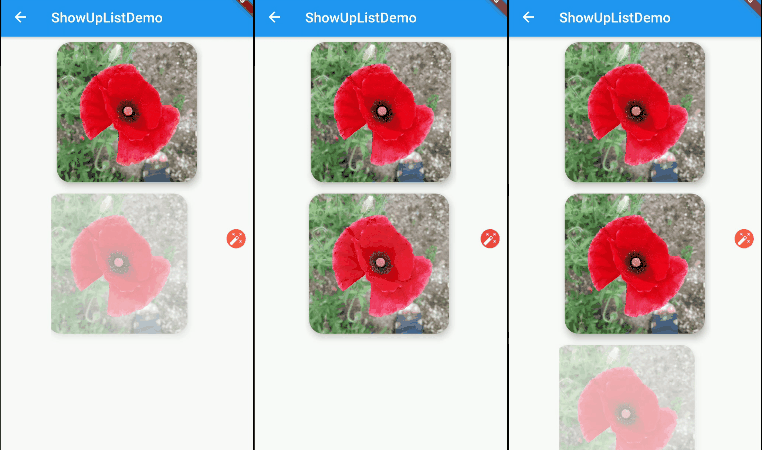
To create a list of "show up" animations, use ShowUpList and provide your list of widgets to children parameter.

ShowUpList(
  direction: Direction.horizontal,
  animationDuration: Duration(milliseconds: 1500),
  delayBetween: Duration(milliseconds: 800),
  offset: -0.2,
  children: <Widget>[
    Widget1(),
    Widget2(),
    Widget3(),
    Widget4(),
  ],
),

Properties

ShowUpAnimation Properties

You can customize how to do you want to animate your child using the parameters described below.

Property Function
child The widget on which to apply the given ShowUpAnimation
offset The offset by which to slide and [child] into view from [Direction]. Use negative value to reverse animation [direction]. Defaults to 0.2
curve The curve used to animate the [child] into view. Defaults to [Curves.easeIn]
direction horizontal or vertical
delayStart The delay with which to animate the [child]. Takes in a [Duration] and defaults to 0 seconds
animationDuration The total duration in which the animation completes. Defaults to 800 milliseconds
ShowUpList Properties
Property Function
children The list of widgets on which to apply the given ShowUpAnimation
offset The offset by which to slide and [child] into view from [Direction]. Use negative value to reverse animation [direction]. Defaults to 0.2
curve The curve used to animate each [child] into view. Defaults to [Curves.easeIn]
direction horizontal or vertical
delayBetween he delay between animating each [children] into view. Takes in a [Duration] and defaults to 300 milliseconds
animationDuration The total duration in which the animation of each child completes. Defaults to 500 milliseconds

Demo

Text demo Show up list demo

श्रेणियाँ

सोर्स रिपॉज़िटरी

इस पैकेज का उपयोग करने वाले प्रोजेक्ट

अभी कोई डेटा उपलब्ध नहीं है।