सार्वजनिक जानकारी से बना चयन मार्गदर्शन। केवल संदर्भ हेतु।
Updat एक सरल और विश्वसनीय Flutter-नेटिव पैकेज है जो कई प्लेटफॉर्मों पर एप्लिकेशन अपडेट को प्रबंधित करने के लिए डिज़ाइन किया गया है। यह Flutter ऐप्स में अपडेट चेक करने, डाउनलोड करने और लागू करने की प्रक्रिया को सरल बनाता है। एकीकरण की आसानी के लिए बनाया गया, Updat Android, iOS, macOS, Windows और Linux का समर्थन करता है, जो क्रॉस-प्लेटफॉर्म ऐप्स के लिए आदर्श है जिन्हें मजबूत अपडेट तंत्र की आवश्यकता होती है। पैकेज बैकग्राउंड डाउनलोड, संस्करण तुलना और अपडेट के बाद स्वचालित पुनरारंभ को हैंडल करता है, जिससे उपयोगकर्ता अनुभव चिकना रहता है। इसका हल्का डिज़ाइन और स्पष्ट API सभी स्तर के विकासकर्ताओं के लिए उपलब्ध है।
उपयोग
क्रॉस-प्लेटफॉर्म फ्लटर ऐप में ऐप अपडेट को स्वचालित करना
डेस्कटॉप और मोबाइल पर साइलेंट बैकग्राउंड अपडेट का निपटारा
अपडेट स्थापना के बाद स्वचालित पुनरारंभ सक्षम करें
स्टार्टअप या योजित अंतराल पर अपडेट चेक का प्रबंधन करें
विफल अपडेट प्रयासों के दौरान फॉलबैक तंत्र प्रदान करना
मुख्य विशेषताएँ
क्रॉस-प्लेटफॉर्म समर्थन (Android, iOS, macOS, Windows, Linux)
न्यूनतम बॉयलरप्लेट के साथ सरल एकीकरण
बैकग्राउंड अपडेट डाउनलोड और स्थापना
अपडेट के बाद स्वचालित ऐप पुनरारंभ
संस्करण तुलना और अपडेट का पता लगाना
इनके लिए उपयुक्त
क्रॉस-प्लेटफॉर्म Flutter ऐप्स बनाने वाले डेवलपर्स
विश्वसनीय स्वचालित अपडेट के आवश्यकता वाली टीमें
डेस्कटॉप और मोबाइल पर बिना किसी रुकावट के अपडेट अनुभव की आवश्यकता वाले ऐप्स
अपडेट में उपयोगकर्ता हस्तक्षेप को कम करना महत्वपूर्ण है
सीमित तकनीकी ज्ञान वाले परिदृश्यों में उपयोगकर्ताओं के लिए लक्षित अनुप्रयोग
विचार योग्य बातें
अपडेट मैनिफेस्ट के लिए सही सर्वर-साइड सेटअप की आवश्यकता होती है
अपडेट रोलबैक के हैंडलिंग के लिए कस्टम लॉजिक की आवश्यकता हो सकती है
जटिल अपडेट वर्कफ़्लो की आवश्यकता वाले ऐप्स के लिए उपयुक्त नहीं
अतिरिक्त कोड के बिना अपडेट UI/UX के लिए सीमित कस्टमाइज़ेशन
एक सर्वर पर होस्ट किए गए बाहरी अपडेट मेटाडेटा पर निर्भर करता है
मूल README
संबंधित सोर्स रिपॉज़िटरी के मूल README का स्नैपशॉट। नवीनतम सामग्री के लिए रिपॉज़िटरी देखें।
Updat - The simple-to-use, flutter-based desktop update package
Updat is a simple-to-use reliable flutter-native updater that handles your application's updates. All you need is a place to host your files and a place to check for the latest version.
Demo
Installing
To get started simply type flutter pub add updat in your terminal.
🎉 Done, It's that simple.
Getting Started
Integration with your app requires just a few lines of code, add the following widget wherever you want your updat widget to be:
UpdatWidget(
currentVersion: "1.0.0",
getLatestVersion: () async {
// Here you should fetch the latest version. It must be semantic versioning for update detection to work properly.return"1.0.1";
},
getBinaryUrl: (latestVersion) async {
// Here you provide the link to the binary the user should download. Make sure it is the correct one for the platform!return"https://github.com/latest/release/bin.exe";
},
// Lastly, enter your app name so we know what to call your files.
appName: "Updat Example",
),
That should get you up and running in just a few seconds ⚡️.
or use the UpdatWindowManager, and let updat handle everything on autopilot. Just place it right after your MaterialApp.
Required. Must be a semantic version. This is the current package's version.
N/A
getLatestVersion
Future<String>
Required. Must be a semantic version. This should request the latest version to the server
N/A
getBinaryUrl
Future<String>
Required. This should provide the link download the binary for a certain app version. Arguments: latestVersion
N/A
appNme
String
Required. The Application's name. It is used to name the binaries when downloading.
N/A
getChangelog
Future<String>
This will render a plain text view of the changelog.
N/A
callback
void Function(UpdatStatus)
A callback that is called when the UpdatStatus gets updated.
N/A
controller
UpdatController
Optional controller for programmatic update checks and actions.
N/A
getDownloadFileLocation
Future<File>
Choose where to download the update.
N/A
updateChipBuilder
Widget Function(...)
Overrides the default update chip.
N/A
updateDialogBuilder
Widget Function(...)
Overrides the default update dialog.
N/A
openOnDownload
bool
Whether Updat should open the installer automatically once it has been downloaded.
true
closeOnInstall
bool
Whether Updat should close the application automatically once it has been downloaded.
false
Theming
Updat is extremely easy to theme. We also use updateChipBuilder and updateDialogBuilder internally to design our widgets, so you have the same customizability we do. We provide a couple of themes to get you started.
To change the theme simply add the desired theme to the builder and you're set.
Chips
defaultChip which is an elevatedButton that only shows when an update is available. Shown by default.
defaultChipWithCheckFor which is an elevatedButton that shows under all conditions, allowing to recheck for updates.
defaultChipWithSilentDownload which is an elevatedButton that only shows when an update is downloaded and ready to install.
flatChip which is an textButton that only shows when an update is available
flatChipWithCheckFor which is an textButton that shows under all condition, allowing to recheck for updates.
flatChipWithSilentDownload which is an textButton that only shows when an update is downloaded and ready to install.
floatingExtendedChip which is a compact version of the dialog, which is a bit bigger and grabs user's attention more easily.
floatingExtendedChipWithSilentDownload which is a compact version of the dialog, which is a bit bigger and grabs user's attention more easily, and only shows when the update is ready to be installed.
Dialogs
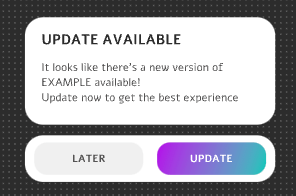
defaultDialog which is the default, M2 and M3 dialog that shows by default.
Programmatic update checks
Use an UpdatController to re-check for updates after the initial check completes — for example when your backend signals a new release via push notification or websocket:
final updatController = UpdatController();
UpdatWindowManager(
controller: updatController,
// ...
)
// Later, when your backend alerts the user:await updatController.checkForUpdate(notifyIfAvailable: true);
The *WithCheckFor chip themes also expose a UI button to recheck manually.
Advanced Usage
If you need to send additional HTTP headers when downloading a release asset, you may define your
headers by setting the downloadReleaseHeaders property of UpdatGlobalOptions, you should probably do this in the main function of your code.