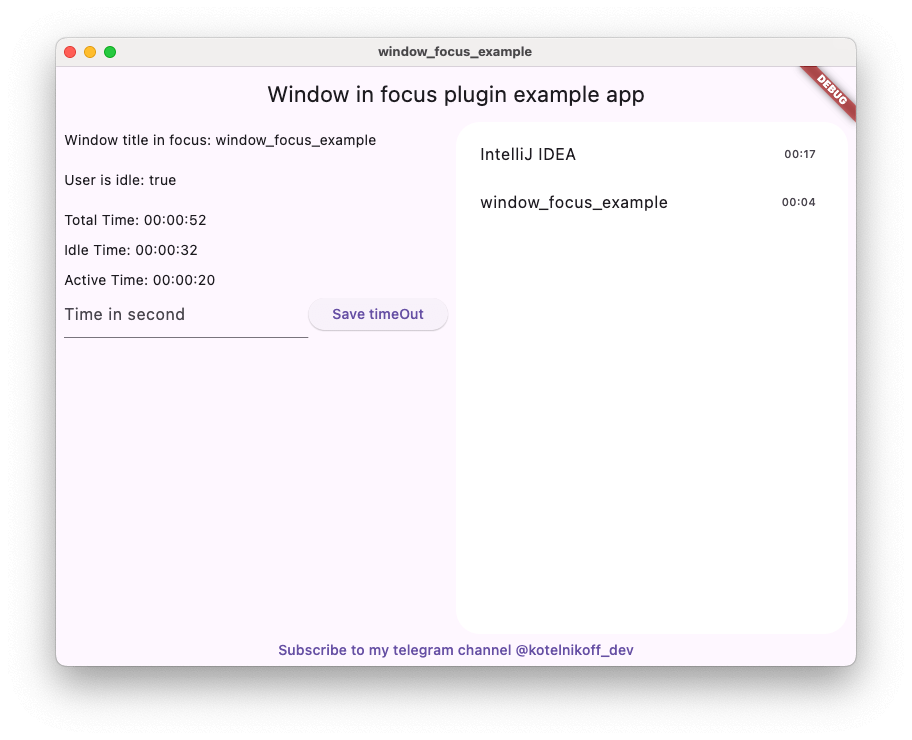
Window Focus एक सुविधाजनक प्लगइन है जो आपको उपयोगकर्ता निष्क्रियता का ट्रैक करने और मैक ओएस और विंडोज पर सक्रिय विंडो के शीर्षक के बारे में जानकारी प्राप्त करने की अनुमति देता है।
सार्वजनिक जानकारी से बना चयन मार्गदर्शन। केवल संदर्भ हेतु।
Window Focus एक Flutter प्लगइन है जो macOS और Windows पर उपयोगकर्ता निष्क्रियता के ट्रैकिंग और सक्रिय विंडो के शीर्षक को प्राप्त करने में सक्षम बनाता है। यह प्लगइन वर्तमान में फोकस में किस एप्लिकेशन या विंडो को देखकर उपयोगकर्ता के व्यवहार के बारे में जानकारी प्रदान करता है। यह प्लगइन उत्पादकता टूल, समय-ट्रैकिंग ऐप्स और डेस्कटॉप प्लेटफॉर्म पर उपयोगकर्ता संदर्भ के ज्ञान की आवश्यकता वाले ऐप्स के लिए विशेष रूप से उपयोगी है। यह macOS, Windows और Linux का समर्थन करता है, जिससे यह क्रॉस-प्लेटफॉर्म डेस्कटॉप विकास के लिए उपयुक्त है। पैकेज को pub के माध्यम से Flutter के पारिस्थितिकी तंत्र में बिना किसी अड़चन के एकीकृत किया जा सकता है।
उपयोग
समय ट्रैकिंग एप्लिकेशन
उत्पादकता और फोकस टूल
उपयोगकर्ता गतिविधि निगरानी
क्रॉस-प्लेटफॉर्म डेस्कटॉप एप्लिकेशन
संदर्भ-सजग एप्लिकेशन
मुख्य विशेषताएँ
सक्रिय विंडो शीर्षक का ट्रैक रखें
उपयोगकर्ता निष्क्रियता की निगरानी करता है
macOS, Windows और Linux का समर्थन करता है
हल्का और एकीकरण में आसान
वास्तविक समय में विंडो अवस्था अपडेट प्रदान करता है
इनके लिए उपयुक्त
डेस्कटॉप ऐप विकासकर्ता
उत्पादकता टूल निर्माता
समय प्रबंधन सॉफ्टवेयर
उपयोगकर्ता संदर्भ जागरूकता की आवश्यकता वाले अनुप्रयोग
क्रॉस-प्लेटफॉर्म डेस्कटॉप प्रोजेक्ट्स
विचार योग्य बातें
कुछ प्रणालियों में प्लेटफॉर्म-विशिष्ट अनुमतियाँ आवश्यक हैं
मैकओएस, विंडोज और लिनक्स पर सीमित
लिनक्स पर अतिरिक्त कॉन्फ़िगरेशन की आवश्यकता हो सकती है
मोबाइल प्लेटफॉर्म के लिए उपलब्ध नहीं
कार्यक्षमता के लिए मूल तंत्र API पर निर्भर है
मूल README
संबंधित सोर्स रिपॉज़िटरी के मूल README का स्नैपशॉट। नवीनतम सामग्री के लिए रिपॉज़िटरी देखें।
Window Focus is a Flutter plugin that allows you to track user activity and focus on the active window for Windows and macOS platforms. The plugin provides features such as detecting user inactivity, identifying the active application, and enabling debug mode for enhanced logging.
Key Features:
User Inactivity Tracking:
The plugin enables you to detect periods of user inactivity within your Flutter application. You can customize the inactivity threshold and handle inactivity events according to your needs.
Active Window Title Retrieval:
Provides the ability to retrieve the title of the active window of the operating system.
Windows: Full window title support.
macOS: Improved detection using CGWindowList. Supports capturing titles for the active process. Requires Screen Recording permission for accurate window titles.
Debug Mode
Enable detailed logs for troubleshooting during development.
Set Custom Idle Threshold
Define the timeout period after which the user is considered inactive.
Screenshot Capture
Capture the entire screen or just the active window. This is useful for time tracking applications.
Plugin Installation
Windows
No action required.
Mac OS
Setup for window focus tracking
You need to add the following code to the Info.plist file for MacOS:
To use the screenshot functionality on macOS 10.15+, you must request screen recording permission. You can check the permission status using checkScreenRecordingPermission() and request it using requestScreenRecordingPermission().
The user must manually enable this in:
System Preferences > Security & Privacy > Privacy > Screen Recording
Setup for Global Keyboard Tracking (macOS)
To track keyboard activity globally (outside the app) on macOS, the application requires Accessibility permissions.
Crucial: Without these permissions, the plugin will only detect mouse movements and clicks outside the app, but keyboard events will be ignored for security reasons.
The user must manually enable this in:
System Preferences > Security & Privacy > Privacy > Accessibility
(Or System Settings > Privacy & Security > Accessibility on macOS Ventura and newer).
Plugin Usage
Import the plugin:
import'package:window_focus/window_focus.dart';
Example
voidmain() {
final windowFocus = WindowFocus(debug: true, duration: Duration(seconds: 10));
// Add focus change listener
windowFocus.addFocusChangeListener((appWindow) {
print('Active window: ${appWindow.appName}, Title: ${appWindow.windowTitle}');
});
// Add user activity listener
windowFocus.addUserActiveListener((isActive) {
  if (isActive) {
    print('User is active');
  } else {
    print('User is inactive');
  }
});
}