パッケージ、リポジトリ、アプリカテゴリを検索

adaptive_dialog のカバー
パッケージ詳細v3.0.1

adaptive_dialog

プラットフォームに応じてアラートダイアログまたはモーダルアクションシートを適切に表示します。

AndroidiOSWebmacOSWindowsLinux
30日間ダウンロード
3.4万
いいね数
1080
Pub ポイント
160

パッケージをインストール

flutter pub add adaptive_dialog

パッケージ概要

公開情報に基づく選定ガイドです。参考としてご利用ください。

Adaptive Dialogは、プラットフォームに応じた方法でアラートダイアログやモーダルアクションシートを表示するFlutterパッケージです。自動的に各ターゲットプラットフォームに最適なUIパターンを選択します。AndroidおよびiOSではネイティブスタイルのダイアログを使用し、他のプラットフォームでは一貫したWeb/デスクトップレイアウトを使用します。これにより、手動でのプラットフォームチェックなしに、デバイス間で一貫したユーザー体験が確保されます。最小限のコードでクロスプラットフォーム対応のダイアログ実装を簡素化し、単純なアラートから複雑な操作まで対応可能です。既存のFlutterアプリへの統合もスムーズに行えます。

用途

  • クロスプラットフォーム対話の一貫性
  • モバイルでのネイティブ風ダイアログ
  • Webおよびデスクトップでの統合ダイアログ処理
  • プラットフォーム固有のダイアログロジックの簡素化
  • 適応型UIパターンによるUXの向上

主な機能

  • 自動プラットフォーム検出
  • Android および iOS のネイティブダイアログスタイル
  • Web およびデスクトップでの一貫性のある動作
  • 最小限のボイラープレートコード
  • アラートとアクションシートの両方をサポート

適している対象

  • 複数のプラットフォームをターゲットにする開発者
  • ネイティブなダイアログの外観を必要とするアプリ
  • UXの一貫性を重視するチーム
  • 頻繁にダイアログを使用するプロジェクト
  • シンプルなダイアログソリューションを探しているFlutter初心者

注意事項

  • 基本オプションを超えるカスタマイズは限られている
  • 下位プラットフォームのレンダリングに依存
  • 複雑なレイアウトには追加のスタイル設定が必要になる場合があります
  • 非常にカスタマイズされたダイアログデザインには向かない
  • 標準のアラートおよびアクションシートのシナリオに最適

元の README

関連するソースリポジトリの README 原文のスナップショットです。最新の内容はリポジトリをご覧ください。

adaptive_dialog

Show alert dialog or modal action sheet adaptively according to platform.

Web Demo: https://mono0926.com/adaptive_dialog/

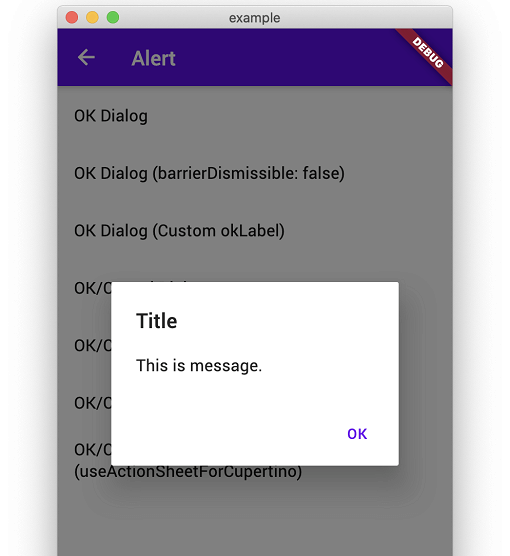
showOkAlertDialog

Convenient wrapper of showAlertDialog.

iOS Android
n1 n2

showOkCancelAlertDialog

Convenient wrapper of showAlertDialog.

iOS Android
n3 n4
n5 n6

showConfirmationDialog

Show Confirmation Dialog. For Cupertino, fallback to ActionSheet.

iOS Android
n3 n5

showModalActionSheet

iOS Android
n7 n8
n9 n10
n11 n12

showTextInputDialog

iOS Android
n1 n2
n3 n4

showTextAnswerDialog

Show text input dialog until answer is correct or cancelled. This is useful for preventing very destructive action is executed mistakenly.

iOS Android
n5 n6

FAQ

How can I customize it flexibly?

This packages keeps usage and UI simple like iOS official alert dialog. Therefore, if you need more flexibility than this package provides, I recommend that you build your own directly using standard APIs to meet your requirements without using this package.

  • https://github.com/mono0926/adaptive_dialog/issues/19#issuecomment-754476937
  • https://github.com/mono0926/adaptive_dialog/issues/76#issuecomment-1120686982
  • https://github.com/mono0926/adaptive_dialog/issues/108#issuecomment-1543068734

The getter modalBarrierDismissLabel was called on null

adaptive_dialog uses Cupertino-style widgets internally on iOS, so GlobalCupertinoLocalizations.delegate is required under certain conditions.

import 'package:flutter/material.dart';
import 'package:flutter_localizations/flutter_localizations.dart';

class App extends StatelessWidget {
  const App({Key key}) : super(key: key);

  @override
  Widget build(BuildContext context) {
    return MaterialApp(
      //...
      localizationsDelegates: const [
        GlobalMaterialLocalizations.delegate,
        GlobalWidgetsLocalizations.delegate,
        GlobalCupertinoLocalizations.delegate, // This is required
      ],
    );
  }
}

The input text color same with backgound when using CupertinoTextInputDialog

This fixes the problem.

import 'package:flutter/cupertino.dart';
import 'package:flutter/material.dart' hide Router;

class App extends StatelessWidget {
  const App({Key key}) : super(key: key);

  @override
  Widget build(BuildContext context) {
    return MaterialApp(
      darkTheme: ThemeData(
        cupertinoOverrideTheme: const CupertinoThemeData(
          textTheme: CupertinoTextThemeData(), // This is required
        ),
      ),
    );
  }
}

macOS style and Web / WASM compatibility

AdaptiveStyle.macOS utilizes macos_ui widgets on native macOS. On Web platforms (both JavaScript and WASM), macos_ui is excluded to ensure Web and WASM compatibility, and dialogs configured with macOS style automatically fall back to Cupertino (iOS-style) dialogs.

カテゴリー

依存関係

依存関係一覧 7 件

ソースリポジトリ

このパッケージを使用しているプロジェクト