パッケージ、リポジトリ、アプリカテゴリを検索

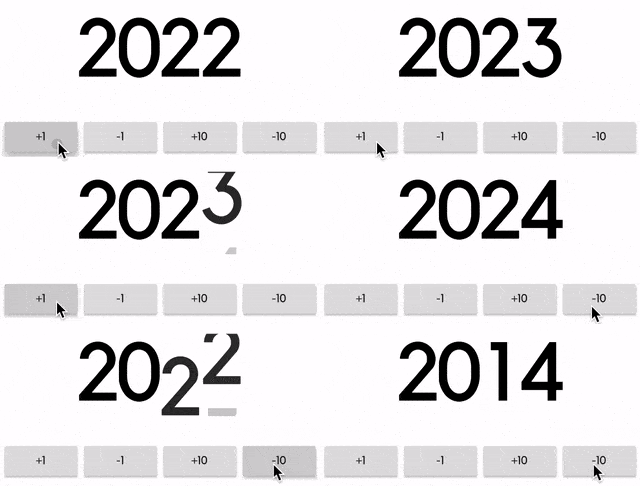
animated_flip_counter のカバー
パッケージ詳細v0.3.4

animated_flip_counter

1つの数値から別の数値に切り替わる暗黙のアニメーションウィジェットで、スタイル、少数桁、負の値をカスタマイズできます。

AndroidiOSWebmacOSWindowsLinux
30日間ダウンロード
6.3万
いいね数
653
Pub ポイント
150

パッケージをインストール

flutter pub add animated_flip_counter

パッケージ概要

公開情報に基づく選定ガイドです。参考としてご利用ください。

数値間の切り替え時に滑らかでアニメーション付きの裏返し効果を生成するFlutterウィジェットです。カスタマイズ可能なスタイル、少数桁、および負の値をサポートしており、アプリ内の動的カウンターに最適です。アニメーションは暗黙的であり、明示的なアニメーションコントローラーを必要とせずに自動的に遷移を処理します。スコア表示、タイマー、または視覚的に魅力的な数値変更が必要なUI要素に最適です。

用途

  • ゲーム内のスコアトラッキング
  • タイマー表示
  • 動的データの可視化
  • 進行状況インジケーター
  • Countdowns
  • 財務ダッシュボード

主な機能

  • スムーズなフリップアニメーション
  • カスタマイズ可能なテキストスタイル
  • 小数のサポート
  • 負の数を処理する
  • 暗黙的なアニメーション制御
  • クロスプラットフォーム互換性

適している対象

  • ゲーム開発者
  • ダッシュボード作成者
  • UI/UXデザイナー
  • リアルタイムデータアプリ
  • インタラクティブなウィジェット

注意事項

  • 多数のインスタンスがあるとパフォーマンスに影響する可能性があります
  • 数値のみに制限されます
  • 読みやすさのために注意深いスタイル設定が必要です
  • 高頻度の更新には適していません
  • 中程度のアニメーション期間と併用するのが最適です

元の README

関連するソースリポジトリの README 原文のスナップショットです。最新の内容はリポジトリをご覧ください。

animated_flip_counter

An implicit animation widget that flips from one number to another.

Usage

It can be useful to display information that's constantly changing.

Animated Counter

Simply pass in a value and an optional duration and curve, just like any other implicit animation widget in Flutter.

AnimatedFlipCounter(
  duration: Duration(milliseconds: 500),
  value: _value, // pass in a value like 2014
)
Decimal Display

Use fractionDigits to specify how many digits to show after the decimal point. It handles negative values as well.

AnimatedFlipCounter(
  value: _value,
  fractionDigits: 2, // decimal precision
  suffix: "%",
  textStyle: TextStyle(
      fontSize: 40,
      color: _value >= 0 ? Colors.green : Colors.red,
  ),
)
Custom Style

Use the familiar TextStyle parameter for styling, and use prefix and suffix for additional texts.

AnimatedFlipCounter(
  value: _value,
  prefix: "Level ",
  textStyle: TextStyle(
    fontSize: 80,
    fontWeight: FontWeight.bold,
    letterSpacing: -8.0,
    color: Colors.yellow,
    shadows: [
      BoxShadow(
        color: Colors.orange,
        offset: Offset(8, 8),
        blurRadius: 8,
      ),
    ],
  ),
)

カテゴリー

ソースリポジトリ

このパッケージを使用しているプロジェクト