パッケージ、リポジトリ、アプリカテゴリを検索

circular_bottom_navigation のカバー
パッケージ詳細v2.4.0

circular_bottom_navigation

円形の下部ナビゲーション(またはタブバーかもしれません)

AndroidiOSWebmacOSWindowsLinux
30日間ダウンロード
592
いいね数
223
Pub ポイント
130

パッケージをインストール

flutter pub add circular_bottom_navigation

パッケージ概要

公開情報に基づく選定ガイドです。参考としてご利用ください。

Flutter用の円形のボトムナビゲーションウィジェットで、従来のタブバーの現代的で視覚的に魅力的な代替を提供します。スムーズなアニメーションとカスタマイズ可能なアイコン、ラベル、色をサポートしています。Android、iOS、Web、macOS、Windows、Linuxなど複数のプラットフォームに対応しており、一貫したユーザー体験を提供します。パッケージは軽量で簡単に統合できるため、機能性を損なわず、独自のナビゲーションレイアウトを求めるアプリに最適です。

用途

  • モバイルアプリのナビゲーション
  • Webアプリケーションインターフェース
  • クロスプラットフォームUIデザイン
  • モダンなアプリの美学
  • カスタムタブバーの実装

主な機能

  • 円形レイアウトデザイン
  • スムーズなアニメーションの遷移
  • カスタマイズ可能なアイコンとラベル
  • マルチプラットフォーム対応
  • Flutter との簡単な統合
  • カスタマイズ可能なカラースキーム

適している対象

  • 独自のナビゲーションパターンを探している開発者
  • 画面スペースが限られたアプリ
  • デザイン重視のアプリケーション
  • クロスプラットフォームプロジェクト
  • UI/UX実験

注意事項

  • アクセシビリティのための追加のスタイリングが必要になる場合があります
  • 円形レイアウト(線形ではない)に限定
  • カスタマイズのための潜在的な学習曲線
  • 複雑なナビゲーション階層には適していません
  • 更新のために外部のGitHubリポジトリに依存しています

元の README

関連するソースリポジトリの README 原文のスナップショットです。最新の内容はリポジトリをご覧ください。

Circular Bottom Navigation (or maybe a tab bar).

Awesome Flutter

pub package APK

This is implementation of an artwork in Uplabs

Let's get started

1 - Install and import

In your Dart code, you can use:
import 'package:circular_bottom_navigation/circular_bottom_navigation.dart';
import 'package:circular_bottom_navigation/tab_item.dart';

2 - CheatSheet

3 - Use it like a charm

Make your TabItems
List<TabItem> tabItems = List.of([
    TabItem(Icons.home, "Home", Colors.blue, labelStyle: TextStyle(fontWeight: FontWeight.normal)),
    TabItem(Icons.search, "Search", Colors.orange, labelStyle: TextStyle(color: Colors.red, fontWeight: FontWeight.bold)),
    TabItem(Icons.layers, "Reports", Colors.red, circleStrokeColor: Colors.black),
    TabItem(Icons.notifications, "Notifications", Colors.cyan),
  ]);
Use this widget everywhere you want
CircularBottomNavigation(
      tabItems,
      selectedCallback: (int selectedPos) {
        print("clicked on $selectedPos");
      },
    )

CircularBottomNavigation supports RTL designs, If you wrap your widget in a Directionality widget and set the textDirection property you can customize the direction:

MaterialApp(
  title: 'Circular Bottom Navigation Demo',
  theme: ThemeData(
    primarySwatch: Colors.blue,
  ),
  home: Directionality(
    // use this property to change direction in whole app
    // CircularBottomNavigation will act accordingly
    textDirection: TextDirection.rtl,
    child: MyHomePage(title: 'circular_bottom_navigation'),
  ),
);
How to use CircularBottomNavigationController

With this controller you can read the current tab position, and set a tab position on widget (without needing to rebuild the tree) with the widget built in animation.

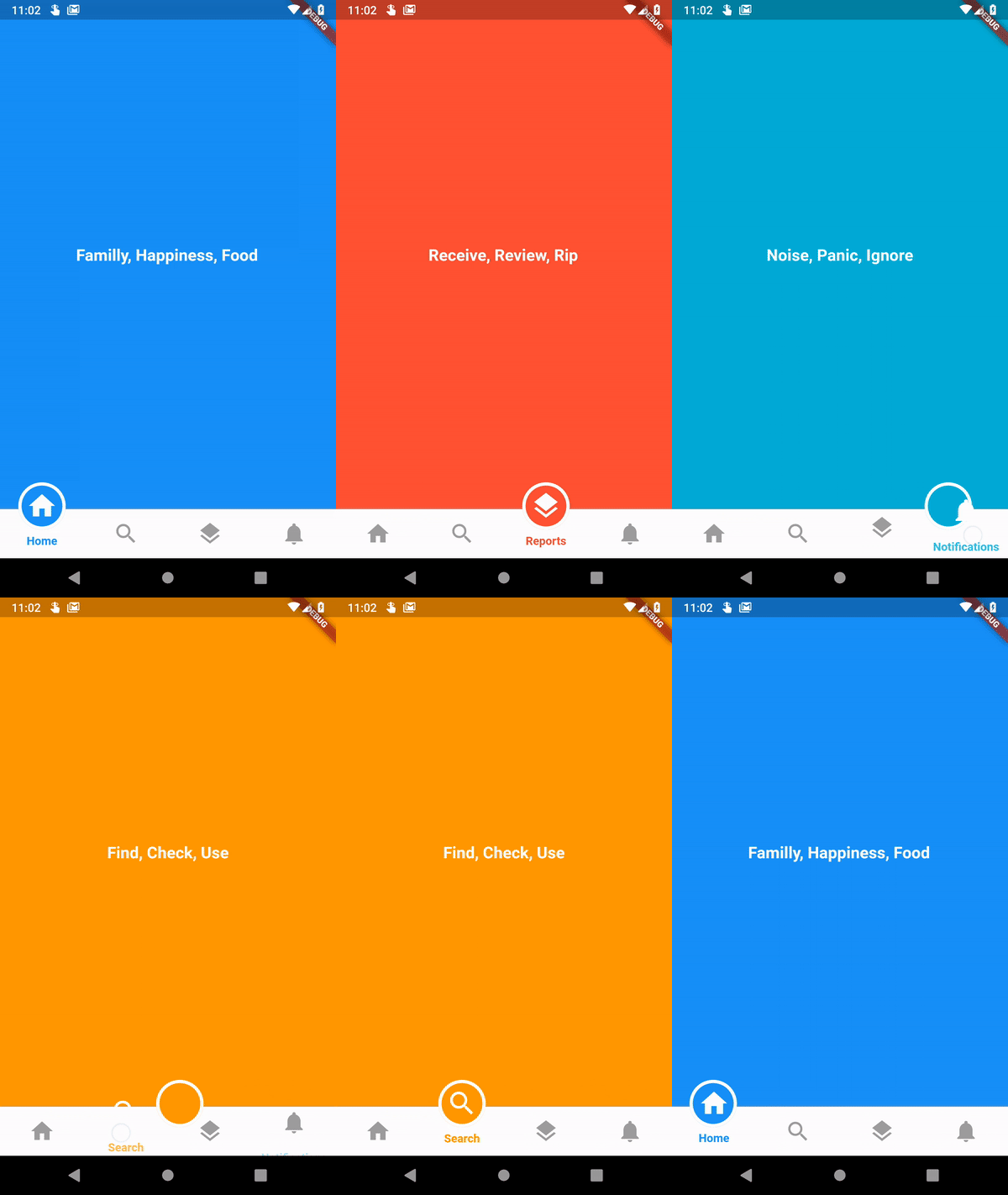
Just create a new instance of controller

CircularBottomNavigationController _navigationController =
new CircularBottomNavigationController(selectedPos);

Then pass it in your widget

CircularBottomNavigation(
      tabItems,
      controller: _navigationController,
    );

Now you can write (set new position with animation) and read value from it everywhere you want

// Write a new value
_navigationController.value = 0;

// Read the latest value
int latest = _navigationController.value;

カテゴリー

ソースリポジトリ

このパッケージを使用しているプロジェクト

データはまだありません。