パッケージ、リポジトリ、アプリカテゴリを検索

flutter_draggable_gridview のカバー
パッケージ詳細v1.0.0

flutter_draggable_gridview

このパッケージは、既存の GridView.builder にドラッグアンドドロップ機能を追加するのに役立ちます。

AndroidiOSWebmacOSWindowsLinux
30日間ダウンロード
5490
いいね数
136
Pub ポイント
155

パッケージをインストール

flutter pub add flutter_draggable_gridview

パッケージ概要

公開情報に基づく選定ガイドです。参考としてご利用ください。

GridView.builder にドラッグアンドドロップ機能を提供する Flutter パッケージで、ユーザーがグリッドレイアウト内のアイテムを再順序付けできるようにします。既存のグリッド構造に大幅なコード変更なしにシームレスに統合できます。複数のプラットフォームでスムーズで応答性の高いインタラクションを実現するように設計されており、カスタマイズ可能またはインタラクティブなグリッド配置が必要なアプリのユーザーエクスペリエンスを向上させます。軽量で導入が簡単なため、タスクマネージャー、ダッシュボード、画像ギャラリーでのリスト再順序付けに最適です。

用途

  • タスクリスト内のアイテムを並べ替えます
  • カスタマイズ可能なダッシュボードレイアウト
  • 画像ギャラリー項目の再配置
  • インタラクティブ製品グリッド
  • ユーザーの好みに基づく並び替え
  • ドラッグ可能なコンテンツ管理

主な機能

  • GridView.builder とのシームレスな統合
  • クロスプラットフォーム対応(Android、iOS、Web、macOS、Windows、Linux)
  • スムーズなドラッグアンドドロップアニメーション
  • 最小限のセットアップが必要
  • カスタムドラッグハンドルをサポート
  • 並べ替え中にグリッド構造を維持する

適している対象

  • インタラクティブなグリッドインターフェースを構築する開発者
  • ユーザー主導のアイテム再順序付けを必要とするアプリ
  • 動的なコンテンツレイアウトを持つプロジェクト
  • ユーザーエクスペリエンスを重視したアプリケーション
  • クロスプラットフォームの整合性を優先するチーム

注意事項

  • 追加の状態管理が必要になる可能性があります
  • 大規模なデータセットのパフォーマンスへの影響
  • 複雑なドラッグ動作に対するカスタマイズの制限
  • グリッド以外のスクロール可能なウィジェットには適していません
  • アイテムキーの取り扱いに注意が必要です
  • 小規模から中規模のデータセットと併用するのが最適です

元の README

関連するソースリポジトリの README 原文のスナップショットです。最新の内容はリポジトリをご覧ください。

flutter_draggable_gridview

flutter_draggable_gridview version flutter_draggable_gridview Git Stars MIT License

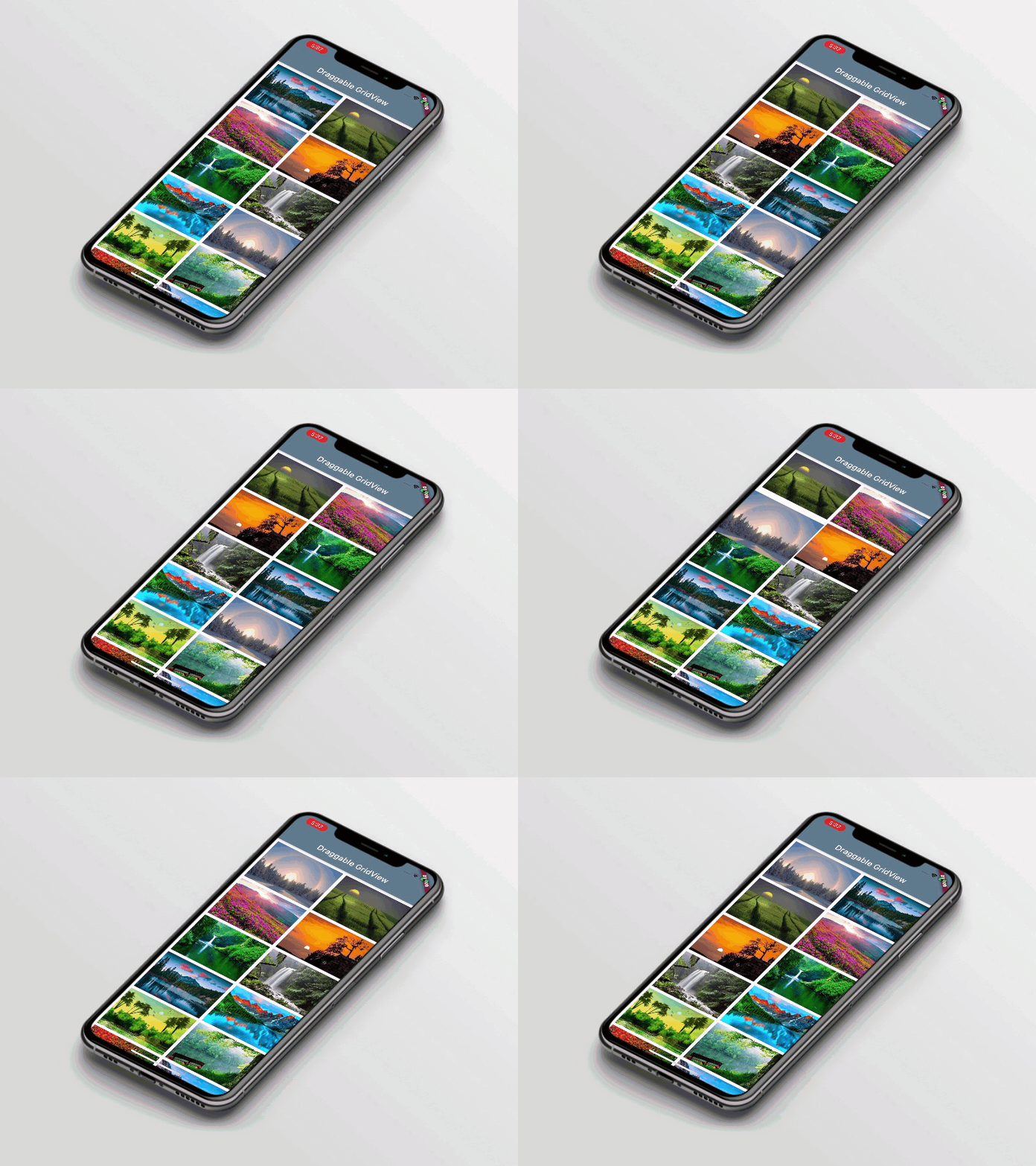
This package supports drag & drop widgets inside the GridView.builder for multiplatform. It provides all the properties which are available in Gridview.builder and easy to implement with the few lines of code.

Draggable GridView.

Draggable GridView

Usage

Example
      DraggableGridViewBuilder(
        gridDelegate: SliverGridDelegateWithFixedCrossAxisCount(
          crossAxisCount: 2,
          childAspectRatio: MediaQuery.of(context).size.width / (MediaQuery.of(context).size.height / 3),
        ),
        children: _listOfDraggableGridItem,
        isOnlyLongPress: false,
        dragCompletion: (List<DraggableGridItem> list, int beforeIndex, int afterIndex) {
          print( 'onDragAccept: $beforeIndex -> $afterIndex');
        },
        dragFeedback: (List<DraggableGridItem> list, int index) {
          return Container(
            child: list[index].child,
            width: 200,
            height: 150,
          );
        },
        dragPlaceHolder: (List<DraggableGridItem> list, int index) {
          return PlaceHolderWidget(
            child: Container(
              color: Colors.white,
            ),
          );
        },
      );
Required parameters
gridDelegate:

A delegate that controls the layout of the children within the GridView.

children:

This property contains list of [DraggableGridItem] and it is use to show the widget inside the GridView.builder to provide the drag & drop functionality. Also, it contains isDraggable parameter which manages enable/disable the drag & drop functionality.

dragCompletion:

This callback provides updated list and old and new indexes.

Optional parameters
isOnlyLongPress:

This property contains bool value. If this property is false then it works with simple press draggable or else it works with long press. default value is 'true'.

dragFeedback:

With this callback, you have to return a Widget and we will use this widget in feedback. Learn more about feedback from Draggable class.

dragPlaceHolder:

TWith this callback, you have to return a PlaceHolderWidget and we will use this widget in place holder.

dragChildWhenDragging:

With this callback, you have to return a Widget and we will display this widget instead of child when drags are under way. Learn more about childWhenDragging from Draggable class.

Last But Not Least :heart_eyes:
You can use all the GridView.builder properties with DraggableGridViewBuilder class.

Note:

The result returns in List. so it can be lost later, you are responsible for storing it somewhere permanent (if needed).

Guideline for contributors

Contribution towards our repository is always welcome, we request contributors to create a pull request to the develop branch only.

Guideline to report an issue/feature request

It would be great for us if the reporter can share the below things to understand the root cause of the issue.

  • Library version
  • Code snippet
  • Logs if applicable
  • Device specification like (Manufacturer, OS version, etc)
  • Screenshot/video with steps to reproduce the issue

LICENSE!

Flutter Draggable GridView is MIT-licensed.

Let us know!

We’d be really happy if you send us links to your projects where you use our component. Just send an email to sales@mindinventory.com And do let us know if you have any questions or suggestion regarding our work.


カテゴリー

ソースリポジトリ

このパッケージを使用しているプロジェクト