パッケージ、リポジトリ、アプリカテゴリを検索

flutter_list_view のカバー
パッケージ詳細v1.1.29

flutter_list_view

ジャンプインデックス、位置の保持などを含む拡張リストビューを提供します。

AndroidiOSWebmacOSWindowsLinux
30日間ダウンロード
1.1万
いいね数
133
Pub ポイント
140

パッケージをインストール

flutter pub add flutter_list_view

パッケージ概要

公開情報に基づく選定ガイドです。参考としてご利用ください。

標準のListViewを、ジャンプインデックスナビゲーション、再構築時の位置の永続性、および改善されたスクロール動作などの高度な機能で拡張するFlutterパッケージです。大規模なデータセットでの高速なナビゲーションとスクロール状態の保持により、リスト主体のアプリケーションにおけるスムーズなユーザー体験を提供することを目的としています。複数のプラットフォームで効率的かつ応答性のあるリスト管理が必要なアプリに最適です。

用途

  • 迅速なナビゲーションを備えた大規模なデータリスト
  • 更新後のスクロール位置を維持する
  • 長いリストでのユーザー体験の向上
  • クロスプラットフォーム一覧の整合性
  • スクロール状態を維持したまま動的コンテンツを再読み込み
  • アルファベットジャンプインデックスの実装

主な機能

  • 高速ナビゲーション用のジャンプインデックス
  • 再構築中にスクロール位置を保持する
  • 大規模なリスト向けのパフォーマンス最適化
  • すべての主要な Flutter プラットフォームをサポートしています
  • カスタマイズ可能なインデックスインジケーター
  • スムーズなスクロール遷移

適している対象

  • 複雑なリストインターフェースを構築する開発者
  • 動的または頻繁に更新されるリストを持つアプリ
  • 直感的なリストナビゲーションが必要なユーザー
  • クロスプラットフォームモバイルおよびWebアプリケーション
  • 高パフォーマンスなリストレンダリングを必要とするアプリケーション

注意事項

  • 既存のリストロジックとの統合に注意が必要です
  • バンドルサイズがわずかに増加する可能性があります
  • 50個以上の項目を含むリストに最適
  • 非標準的なリストレイアウトに対するカスタマイズの制限
  • 安定したFlutterバージョンの互換性に依存しています

元の README

関連するソースリポジトリの README 原文のスナップショットです。最新の内容はリポジトリをご覧ください。

Flutter List View

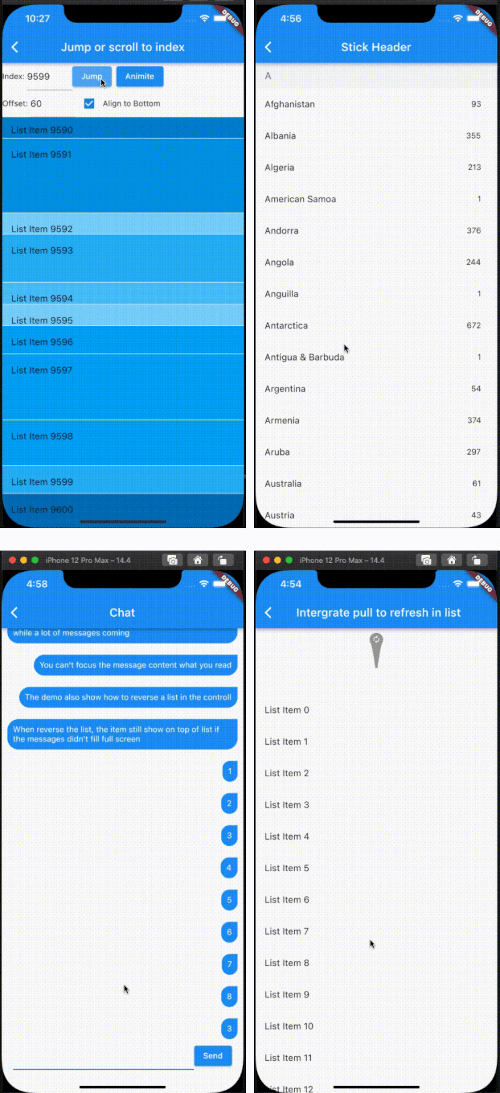
Enhance list view to support scroll to index, jump to index, header sticky, enable without scroll when insert data on top and turn performance to reused items.

Features

  1. Support the list view to jump to and scroll to index.
  2. Support for inserting data without scrolling
  3. Support for show top in reverse mode if the data can't fill the full viewport.
  4. Support sticky header.
  5. Support integrated pull_to_refresh
  6. When initializing data, allow for scrolling to specify an index.
  7. To save performance, flutter list_view always reuses the rendered item.
  8. Support to keep specifying items without reusing and disposing of them once the item is created.

[!NOTE]
The list item will be reuse when disableCacheItems=false and the invisible item will destroy. This mean, one item may be create or destroy multiple times. So The Item widget must not have any state, as it may lead to unforeseeable issues. If you want work same with list_view which item didn't destroy after create, please put onIsPermanent: (keyOrIndex) => true to FlutterListViewDelegate

FlutterListViewDelegate(
    (BuildContext context, int index) => _renderItem(index),
    childCount: messages.length,
    onItemKey: (index) => messages[index].id.toString(),
    // ...
    disableCacheItems: true,
    onIsPermanent: (keyOrIndex) => true,

Screen

Example

FlutterListView(
      delegate: FlutterListViewDelegate(
    (BuildContext context, int index) =>
        ListTile(title: Text('List Item ${data[index]}')),
    childCount: data.length,
  ))
Jump to index
flutterListViewController.jumpToIndex(100);

OR

/// Declare
FlutterListViewController controller = FlutterListViewController();
...
controller.sliverController
                      .jumpToIndex(100);
...
FlutterListView(
  controller: controller,
  delegate: FlutterListViewDelegate(
    (BuildContext context, int index) => Container(
      color: Colors.white,
      child: ListTile(title: Text('List Item ${data[index]}')),
    ),
    childCount: data.length,
  ))

If you want better user expierence, preferItemHeight or onItemHeight may set to.

  • preferItemHeight The package don't know the item's height, If you don't set, package alway think the item height is 50 util layout the item. If you know the height, you should set it.
  • onItemHeight like preferItemHeight, the function will used to get height of each item util the item layout.
Keep Position
_renderList() {
  return FlutterListView(
      reverse: true,
      delegate: FlutterListViewDelegate(
          (BuildContext context, int index) => Align(
                alignment: Alignment.centerRight,
                child: Padding(
                  padding: const EdgeInsets.all(10.0),
                  child: Container(
                    decoration: const BoxDecoration(
                        color: Colors.blue,
                        borderRadius: BorderRadius.only(
                            topLeft: Radius.circular(20),
                            bottomLeft: Radius.circular(20),
                            bottomRight: Radius.circular(20))),
                    child: Padding(
                      padding: const EdgeInsets.all(10.0),
                      child: Text(
                        chatListContents[index].msg,
                        style: const TextStyle(
                            fontSize: 14.0, color: Colors.white),
                      ),
                    ),
                  ),
                ),
              ),
          childCount: chatListContents.length,
          onItemKey: (index) => chatListContents[index].id.toString(),
          keepPosition: true,
          keepPositionOffset: 80,
          firstItemAlign: FirstItemAlign.end));
}

Notice: Keep positoin need implement onItemKey, the onItemKey used to identify the unique of item. The key should difference with other items' key. We use the key to know what position you insert to current list. if you insert a item before the rendered item, package should increase the scrollOffset.

Sticky header
Widget _renderHeader(String text) {
  return Container(
    color: const Color(0xFFF3F4F5),
    child: Padding(
      padding: const EdgeInsets.symmetric(horizontal: 16.0, vertical: 12.0),
      child: Text(
        text,
        style: const TextStyle(fontSize: 18, color: Color(0xFF767676)),
      ),
    ),
  );
}

Widget _renderItem(CountryModel itemData) {
  return Padding(
      padding: const EdgeInsets.only(right: 12.0),
      child: ListTile(
          title: Text(itemData.name), trailing: Text(itemData.phoneCode)));
}

@override
Widget build(BuildContext context) {
  return Scaffold(
    appBar: AppBar(title: const Text("Stick Header")),
    body: FlutterListView(
        delegate: FlutterListViewDelegate(
          (BuildContext context, int index) {
            var data = _countries[index];
            if (data is AlphabetHeader) {
              return _renderHeader(data.alphabet);
            } else {
              return _renderItem(data as CountryModel);
            }
          },
          childCount: _countries.length,
          onItemSticky: (index) => _countries[index] is AlphabetHeader,
        ),
        controller: controller),
  );
}

You can also check doc/stickyHeader.md

Integrate pull_to_refresh
@override
Widget build(BuildContext context) {
  return Scaffold(
    appBar: AppBar(
      title: const Text("Intergrate pull to refresh in list"),
    ),
    body: SmartRefresher(
      enablePullDown: true,
      enablePullUp: true,
      header: const WaterDropHeader(),
      footer: CustomFooter(
        builder: (context, mode) {
          Widget body;
          if (mode == LoadStatus.idle) {
            body = const Text("pull up load");
          } else if (mode == LoadStatus.loading) {
            body = const CupertinoActivityIndicator();
          } else if (mode == LoadStatus.failed) {
            body = const Text("Load Failed!Click retry!");
          } else if (mode == LoadStatus.canLoading) {
            body = const Text("release to load more");
          } else {
            body = const Text("No more Data");
          }
          return SizedBox(
            height: 55.0,
            child: Center(child: body),
          );
        },
      ),
      controller: _refreshController,
      onRefresh: _onRefresh,
      onLoading: _onLoading,
      child: FlutterListView(
          delegate: FlutterListViewDelegate(
        (BuildContext context, int index) =>
            ListTile(title: Text('List Item ${data[index]}')),
        childCount: data.length,
      )),
    ),
  );
}
Support to keep specifying items without reusing and disposing of them once the item is created.
FlutterListView(
  delegate: FlutterListViewDelegate(
      (BuildContext context, int index) =>
          Item(text: data[index].toString()),
      childCount: data.length,
      // If onItemKey is not given, the key is index
      // The example is indicate the "40" item will not be reused and disposed after it was created
      onIsPermanent: (key) => key == "40"))

カテゴリー

ソースリポジトリ

このパッケージを使用しているプロジェクト