パッケージ、リポジトリ、アプリカテゴリを検索

json_editor_flutter のカバー
パッケージ詳細v1.4.2

json_editor_flutter

このパッケージの助けを借りて、JSON オブジェクトを編集してください。この使いやすいウィジェットを使ってオブジェクトを作成および削除します。

AndroidiOSWebmacOSWindowsLinux
30日間ダウンロード
3560
いいね数
31
Pub ポイント
150

パッケージをインストール

flutter pub add json_editor_flutter

パッケージ概要

公開情報に基づく選定ガイドです。参考としてご利用ください。

json_editor_flutter は、アプリ内での JSON オブジェクトのインタラクティブな編集を可能にする使いやすい Flutter パッケージです。JSON のキーと値の作成、変更、削除に便利なクリーンで直感的なインターフェースを提供します。リアルタイムの検証およびネストされたオブジェクトの操作をサポートしており、UI 内で直接 JSON データを扱いたい開発者にとって最適です。すべての主要プラットフォームに対応しており、動的な JSON 入力が必要な Flutter アプリケーションへのシームレスな統合が可能です。

用途

  • 構成ファイルの編集
  • API応答のデバッグ
  • フォームビルダーの構築
  • JSONスキーマエディタの作成
  • プロトタイピングデータ構造

主な機能

  • インタラクティブな JSON ツリー表示
  • リアルタイム検証
  • ネストされたオブジェクトのサポート
  • クロスプラットフォーム互換性
  • Flutter フォームとの簡単な統合

適している対象

  • 管理者パネルを構築している開発者
  • JSON 入力を必要とするアプリケーション作成者
  • JSONを学ぶための教育ツール
  • API テストおよびデバッグ用ツール

注意事項

  • 複雑なレイアウトにはカスタムスタイルの適用が必要になる場合があります
  • 基本的なJSON操作に限定
  • 非常に大きなJSONファイルには最適化されていません
  • 組み込みのエクスポート/インポート機能なし

元の README

関連するソースリポジトリの README 原文のスナップショットです。最新の内容はリポジトリをご覧ください。

JsonEditor class

Edit your JSON object with this package. Create, edit and format objects using this user friendly widget.

See the sample below for an example.

JsonEditor Live Demo

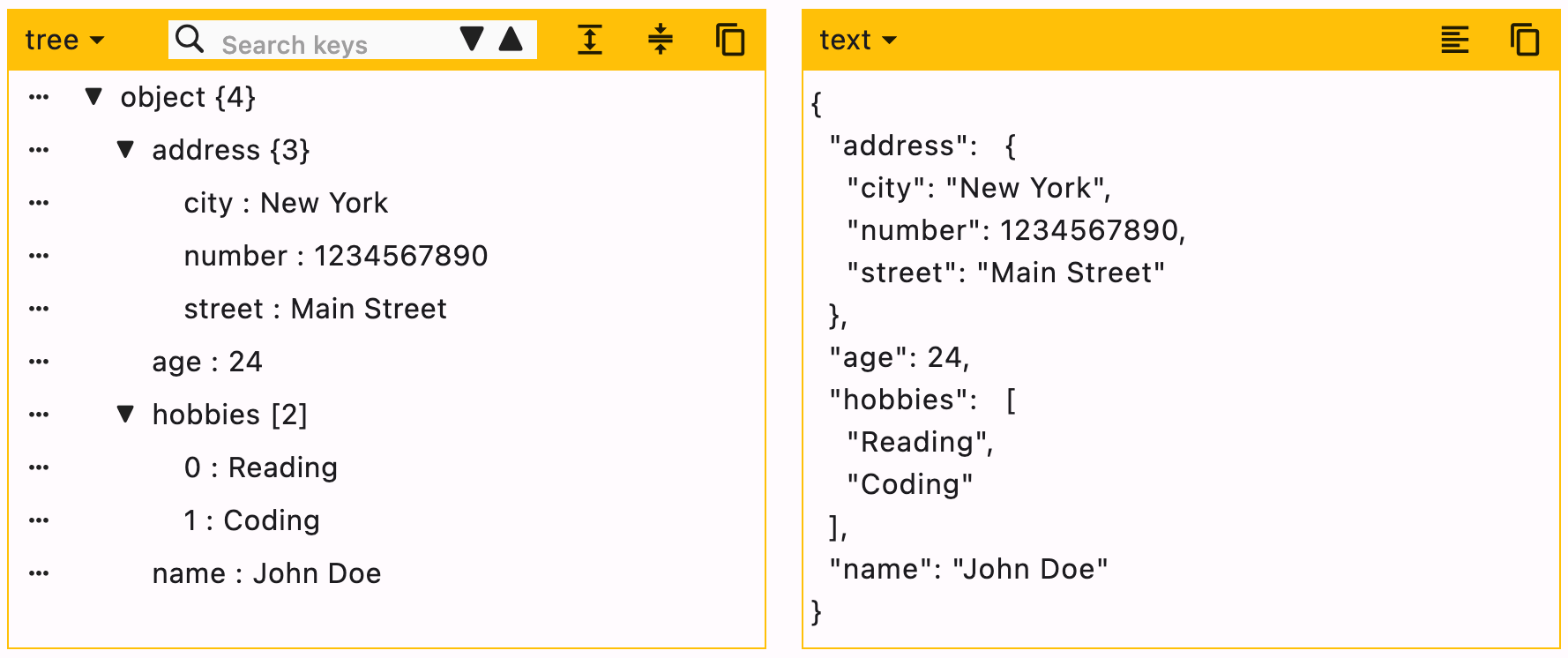
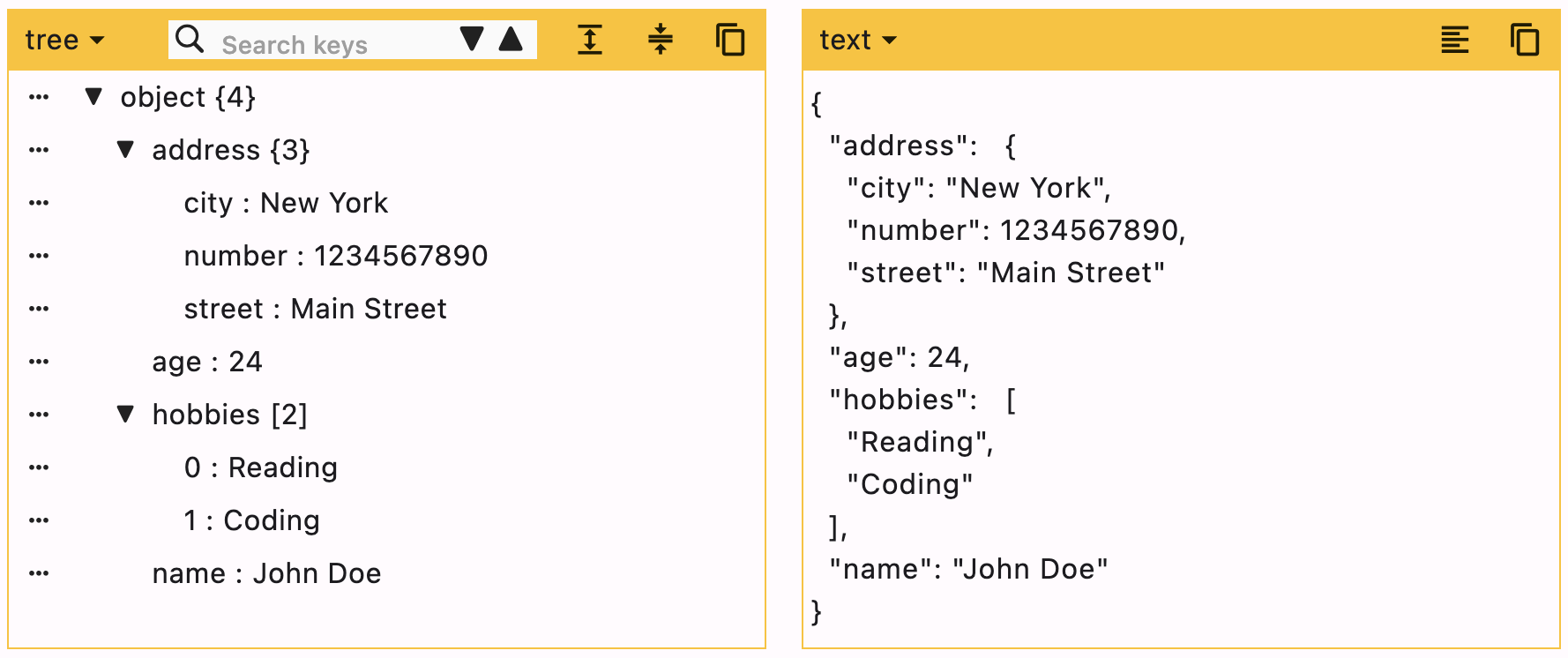
Screenshot

JsonEditor

Getting started

  • Add the package in your flutter project. Run this command in terminal flutter pub add json_editor_flutter.
  • Import the package import 'package:json_editor_flutter/json_editor_flutter.dart';.

Using JsonEditor

JSON can be edited in two ways, Tree editor or text editor. You can disable either of them.

When UI editor is active, you can disable adding/deleting keys by using enableMoreOptions. Editing keys and values can also be disabled by using enableKeyEdit and enableValueEdit.

When text editor is active, it will simply ignore enableMoreOptions, enableKeyEdit and enableValueEdit.

duration is the debounce time for onChanged function. Defaults to 500 milliseconds.

editors is the supported list of editors. First element will be used as default editor. Defaults to [Editors.tree, Editors.text].

Example

JsonEditor(
  onChanged: (value) {
    // Do something
  },
  json: jsonEncode({
    "name": "John Doe",
    "age": 24,
    "hobbies": ["Reading", "Coding"],
    "address": {
      "street": "Main Street",
      "number": 1234567890,
      "city": "New York"
    }
  }),
)

Enums

Supported editors for JSON Editor.

enum  Editors { tree, text }

Customization

expandedObjects

[expandedObjects] refers to the objects that will be expanded by default. Index can be provided when the data is a List.

data = {
  "hobbies": ["Reading books", "Playing Cricket"],
  "education": [
    {"name": "Bachelor of Engineering", "marks": 75},
    {"name": "Master of Engineering", "marks": 72},
  ],
}

For the given data

  1. To expand education pass => ["education"]
  2. To expand hobbies and education pass => ["hobbies", "education"]
  3. To expand the first element (index 0) of education list, this means we need to expand education too. In this case you need not to pass "education" separately. Just pass a list of all nested objects => [["education", 0]]
JsonEditor(
  expandedObjects: const [
    "hobbies",
    ["education", 0] // expands nested object in `education`
  ],
  onChanged: (_) {},
  json: jsonEncode(data),
)

Properties

Property Type Default Value Description
json String required JSON object to be edited
onChanged Function required Callback function that will be called with the new data
duration Duration 500 ms Debounce duration for onChanged function
enableMoreOptions bool true Enables more options like adding or deleting data
enableKeyEdit bool true Enables editing of keys
enableValueEdit bool true Enables editing of values
themeColor Color? null Theme color for the editor, changes the border color and header color
editors List [tree, text] List of supported editors, first element will be used as default editor
actions List<Widget> [] A list of Widgets to display in a row at the end of header
enableHorizontalScroll bool false Enables horizontal scroll for the tree view
searchDuration Duration 500 ms Debounce duration for search function
hideEditorsMenuButton bool false Hides the option of changing editor
expandedObjects List [] List of objects to expand by default

Additional information

You can raise an issue/feature request on github Json Editor Issues


Please leave a like if you find this package useful. :+1:

カテゴリー

ソースリポジトリ

このパッケージを使用しているプロジェクト

データはまだありません。