パッケージ、リポジトリ、アプリカテゴリを検索

selectable_list のカバー
パッケージ詳細v0.1.1

selectable_list

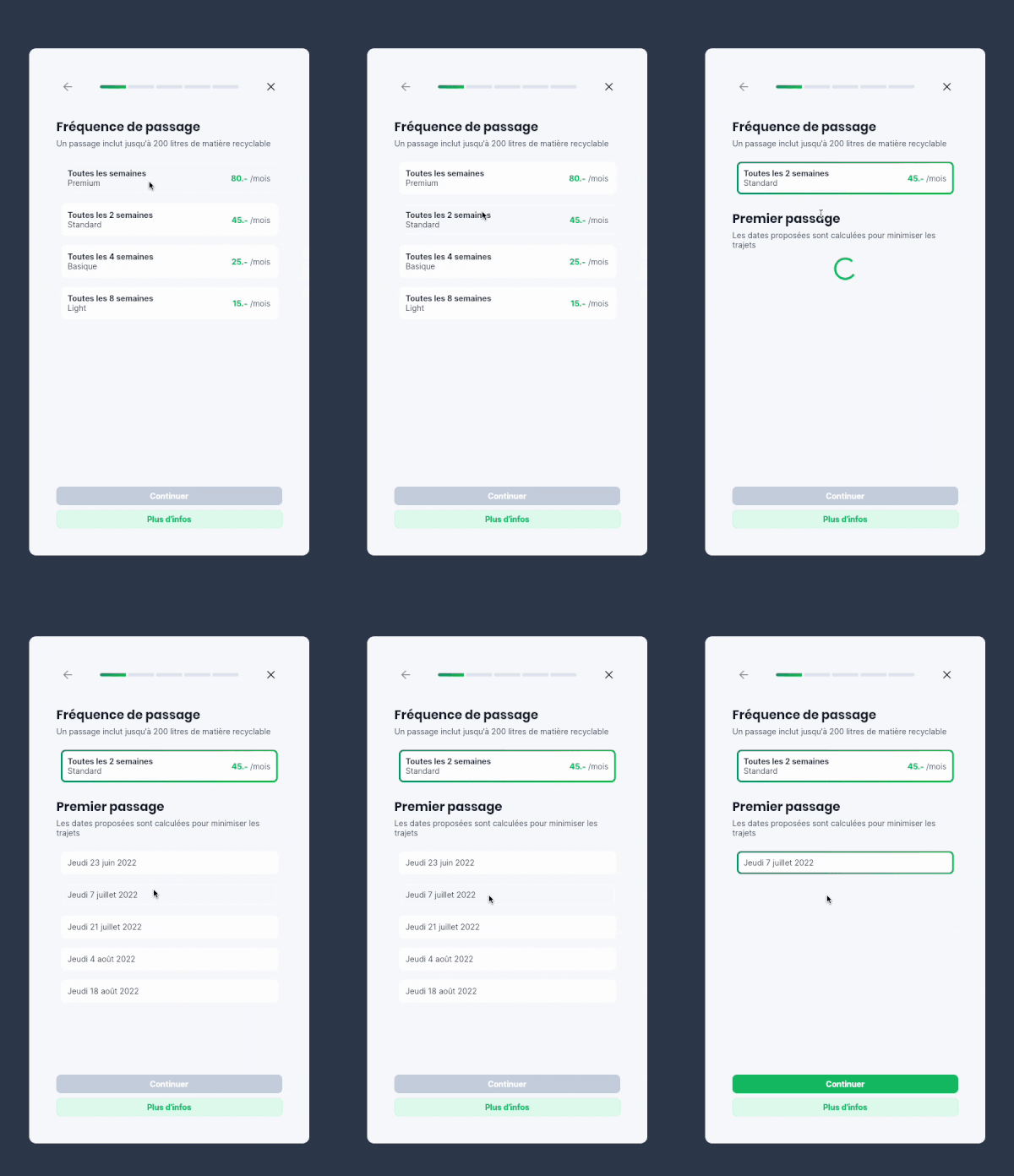
選択可能なアイテムのリストを表示するウィジェットです。アイテムの1つが選択されると、リスト内の他の要素がアニメーションで非表示になり、選択された値だけが残ります。

AndroidiOSWebmacOSWindowsLinux
30日間ダウンロード
16
いいね数
55
Pub ポイント
150

パッケージをインストール

flutter pub add selectable_list

パッケージ概要

公開情報に基づく選定ガイドです。参考としてご利用ください。

selectable_list パッケージは、Flutter ウィジェットを提供し、選択可能なアイテムのリストを表示します。選択すると、リスト内の他のアイテムはアニメーションで非表示になり、選択されたアイテムだけが表示されます。これにより、単一選択に適した洗練された、集中したユーザー体験が実現されます。アニメーションは滑らかでカスタマイズ可能であり、インタラクション中の視覚フィードバックを強化します。Android、iOS、Web、macOS、Windows、Linux など複数のプラットフォームをサポートしており、クロスプラットフォームアプリケーションに最適です。

用途

  • 単一項目選択インターフェース
  • 制限された選択肢を持つフォーム入力
  • インタラクティブなリストナビゲーション
  • オンボーディング画面
  • 動的コンテンツフィルタリング
  • ミニマリストUIデザイン

主な機能

  • 選択時のアニメーションアイテムの折りたたみ
  • 単一選択モード
  • クロスプラットフォーム互換性
  • カスタマイズ可能なアニメーション
  • Flutter との簡単な統合
  • レスポンシブレイアウトのサポート

適している対象

  • 直感的なピッカー・ウィジェットを開発する開発者
  • ミニマリスティックなインタラクションパターンを探しているデザイナー
  • 集中したユーザー入力を必要とするアプリ
  • 動的リストベースのワークフローを持つプロジェクト
  • スムーズなUX遷移を重視するチーム

注意事項

  • アイテム数が少ないリストに最適
  • 複雑なレイアウトには追加のスタイル設定が必要になる場合があります
  • アニメーションの挙動がすべてのユースケースに適しているとは限りません
  • 単一選択のみに制限される
  • 大規模なデータセットには適していません
  • 状態管理の適切な取り扱いが必要です

元の README

関連するソースリポジトリの README 原文のスナップショットです。最新の内容はリポジトリをご覧ください。

Selectable List

A widget displaying a list of selectable items

When one of the items is selected, the other elements of the list are animated out, leaving the selected value. When tapping on the value again, the other values are animated back into the list.

Example app

Features

  • Use this package when you want to allow the user to choose one element in a list, and only show this element when selected.

  • Based on the Flutter AnimatedList widget

Usage

Import the package

import 'package:selectable_list/selectable_list.dart';

Use the widget

class _ScrollableListExampleState extends State<_ScrollableListExample> {
  final persons = [
    Person("Ella", 3),
    Person("James", 25),
    Person("Gertrude", 99)
  ];

  String? selectedName;

  @override
  Widget build(BuildContext context) {
    return SelectableList<Person, String?>(
        items: persons,
        itemBuilder: (context, person, selected, onTap) => ListTile(
            title: Text(person.name),
            subtitle: Text('${person.age.toString()} years old'),
            selected: selected,
            onTap: onTap),
        valueSelector: (person) => person.name,
        selectedValue: selectedName,
        onItemSelected: (person) =>
            setState(() => selectedName = person.name),
        onItemDeselected: (person) => setState(() => selectedName = null),
    ),
  }
}

Examples of use

Forms

Useful to make forms cleaner and more compact on mobile

Example in a form

カテゴリー

ソースリポジトリ

このパッケージを使用しているプロジェクト

データはまだありません。