パッケージ、リポジトリ、アプリカテゴリを検索

sweetsheet のカバー
パッケージ詳細v0.4.0

sweetsheet

すばやく簡単に、確認ダイアログとして美しいボトムシートを表示します。

AndroidiOSWebmacOSWindowsLinux
30日間ダウンロード
50
いいね数
231
Pub ポイント
140

パッケージをインストール

flutter pub add sweetsheet

パッケージ概要

公開情報に基づく選定ガイドです。参考としてご利用ください。

Sweetsheetは、開発者が確認ダイアログとして魅力的なボトムシートを迅速かつ簡単に表示できるようにするFlutterパッケージです。最小限のコードでモーダルボトムシートを作成するプロセスを簡素化し、標準で洗練された現代的なUIを提供します。複数のプラットフォームにスムーズに統合できるように設計されており、Android、iOS、Web、macOS、Windows、Linuxをサポートしています。滑らかなアニメーションとカスタマイズ可能なレイアウトを提供することで、ユーザー体験を向上させながら、デザインのシンプルさと一貫性を維持しています。

用途

  • クイック確認ダイアログ
  • ユーザー操作プロンプト
  • フォーム送信の確認
  • モーダルナビゲーション
  • シンプルなポップアップインターフェース

主な機能

  • 使いやすい API
  • 美しいデフォルトのスタイリング
  • クロスプラットフォーム対応
  • カスタマイズ可能なコンテンツ
  • スムーズなアニメーション
  • 最小限のボイラープレート

適している対象

  • 迅速なボトムシート実装を求める開発者
  • 軽量な確認ダイアログが必要なプロジェクト
  • 一貫したUIパターンを持つアプリ
  • 開発スピードを最優先するチーム
  • Flutter 初心者がボトムシートを探索しています

注意事項

  • 基本的なスタイリングを超えるカスタマイズが限られている
  • 複雑なインタラクティブシートには向かない
  • 完全な機能を実現するには、外部の依存関係に依存しています
  • 高度なモーダルではなく、シンプルなユースケースに適している

元の README

関連するソースリポジトリの README 原文のスナップショットです。最新の内容はリポジトリをご覧ください。

sweetsheet

Show beautiful bottom sheet as confirmation dialog quickly and easily.

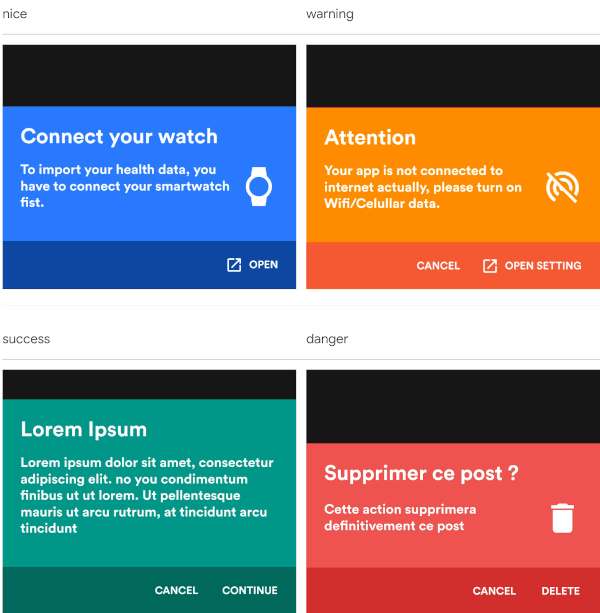
nice warning
nice warning
success danger
success danger

and since version 0.2.0 , it is fully customizable.

custom dark custom light
success danger

Getting Started

With increasingly large smartphones, it has become almost impossible to have good ergonomics in an application using confirmation dialogs. The SweetSheet package allows you to show beautiful bottoms sheets to replace your confirmation dialogs and maintain a good user experience.

How to use?

Add this to your package's pubspec.yaml file:

dependencies:
  sweetsheet: ^0.4.0

And import it:

import 'package:sweetsheet/sweetsheet.dart';

to start using the sheets, you have to create the instance of the SweetSheet class first.

final SweetSheet _sweetSheet = SweetSheet();

Now you can show the bottom sheet by calling the method show() on the instance. This is the signature of the show method

  show({
    required BuildContext context,
    Text? title,
    required Text description,
    required CustomSheetColor color,
    required SweetSheetAction positive,
    EdgeInsets? contentPadding = const EdgeInsets.symmetric(horizontal: 24.0, vertical: 24.0),
    EdgeInsets? actionPadding = const EdgeInsets.all(8.0),
    SweetSheetAction? negative,
    IconData? icon,
    bool useRootNavigator = false,
    bool isDismissible = true,
  }) {}

This is the signature of the SweetSheetAction widget.

class SweetSheetAction extends StatelessWidget {
  final String title;
  final VoidCallback onPressed;
  final IconData icon;
  final Color color;

  SweetSheetAction({
    @required this.title,
    @required this.onPressed,
    this.icon,
    this.color = Colors.white,
  });  
}

Attention : At least one action is required and the icons are IconData for uniformity purpose.

The SweetSheetColor is a class which have four static values and it determine the color of the sheet by creating a CustomSheetColor:

  • SweetSheetColor.SUCCESS (green)
  • SweetSheetColor.DANGER (red)
  • SweetSheetColor.WARNING (orange)
  • SweetSheetColor.NICE (blue)

Customisation

To customise, create a new instance of CustomSheetColor and pass it to the argument color when calling the method show. signature of CustomSheetColor:

class CustomSheetColor {
  Color main;
  Color accent;
  Color icon;

  CustomSheetColor({@required this.main, @required this.accent, this.icon});
}

To customise the action, pass a new color to color argument of SweetSheetAction.

Example:

Warning
_sweetSheet.show(
    context: context,
    title: Text("Attention"),
    description: Text(
        'Your app is not connected to internet actually, please turn on Wifi/Celullar data.'),
    color: SweetSheetColor.WARNING,
    icon: Icons.portable_wifi_off,
    positive: SweetSheetAction(
      onPressed: () {
        Navigator.of(context).pop();
      },
      title: 'OPEN SETTING',
      icon: Icons.open_in_new,
    ),
    negative: SweetSheetAction(
      onPressed: () {
        Navigator.of(context).pop();
      },
      title: 'CANCEL',
    ),
);
Custom Light
_sweetSheet.show(
    context: context,
    description: Text(
      'Place your order. Please confirm the placement of your order : Iphone X 128GB',
      style: TextStyle(color: Color(0xff2D3748)),
    ),
    color: CustomSheetColor(
      main: Colors.white,
      accent: Color(0xff5A67D8),
      icon: Color(0xff5A67D8),
    ),
    icon: Icons.local_shipping,
    positive: SweetSheetAction(
      onPressed: () {
        Navigator.of(context).pop();
      },
      title: 'CONTINUE',
    ),
    negative: SweetSheetAction(
      onPressed: () {
        Navigator.of(context).pop();
      },
      title: 'CANCEL',
  ),
);
That is all. Have fun!

カテゴリー

ソースリポジトリ

このパッケージを使用しているプロジェクト

データはまだありません。