パッケージ、リポジトリ、アプリカテゴリを検索

text_to_speech のカバー
パッケージ詳細v0.2.3

text_to_speech

Flutterプラグインは、TTS(テキストから音声)サービスを提供します。

AndroidiOSWebmacOS
30日間ダウンロード
698
いいね数
150
Pub ポイント
150

パッケージをインストール

flutter pub add text_to_speech

パッケージ概要

公開情報に基づく選定ガイドです。参考としてご利用ください。

Android、iOS、Web、macOSでテキスト読み上げ(TTS)機能を可能にするFlutterプラグインです。アプリがテキストを自然な発話に変換でき、言語、ピッチ、速度などのカスタマイズ可能な設定で音声再生をサポートします。アクセシビリティ機能、音声アシスタント、インタラクティブな学習アプリに最適です。このプラグインはFlutterエコシステムとスムーズに統合されており、コミュニティの貢献を受けるためにGitHubで管理されています。

用途

  • アクセシビリティ機能
  • 音声ガイドナビゲーション
  • インタラクティブな学習アプリ
  • アプリ内のオーディオフィードバック
  • リーディング支援ツール

主な機能

  • クロスプラットフォーム対応
  • カスタマイズ可能な発話パラメータ
  • シンプルなAPI統合
  • 複数の言語をサポートしています
  • リアルタイムテキスト変換

適している対象

  • アクセシブルなアプリを構築する開発者
  • 教育アプリの開発者
  • 音声アシスタントの統合
  • 音声フィードバックを必要とするアプリ

注意事項

  • プラットフォーム固有の権限が必要です
  • 一部のプラットフォームでの音声選択が限定されています
  • Webのサポートはブラウザによって異なる場合があります
  • パフォーマンスはデバイスのTTSエンジンに依存します
  • 言語の利用可能はOSに依存します

元の README

関連するソースリポジトリの README 原文のスナップショットです。最新の内容はリポジトリをご覧ください。

Text To Speech

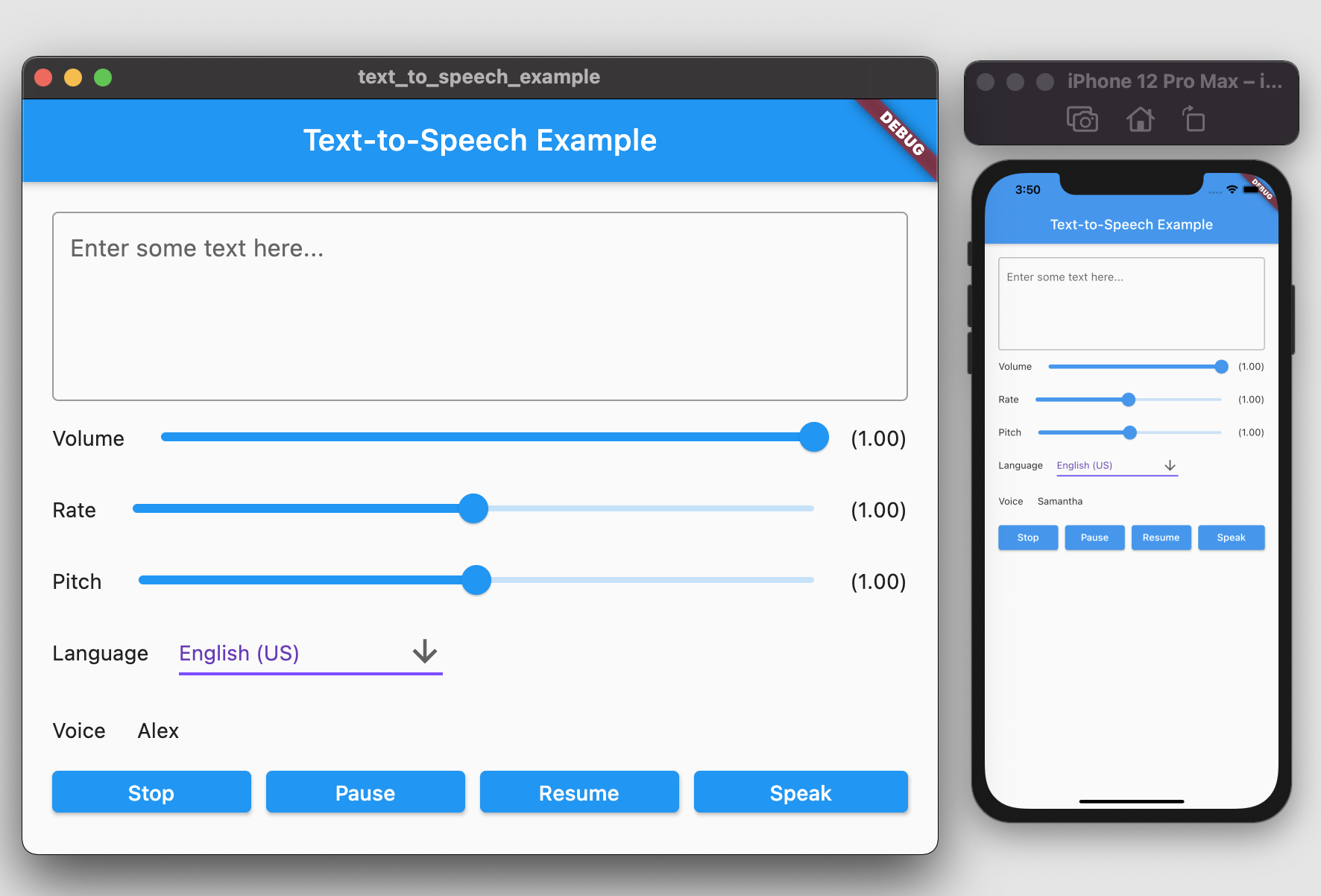
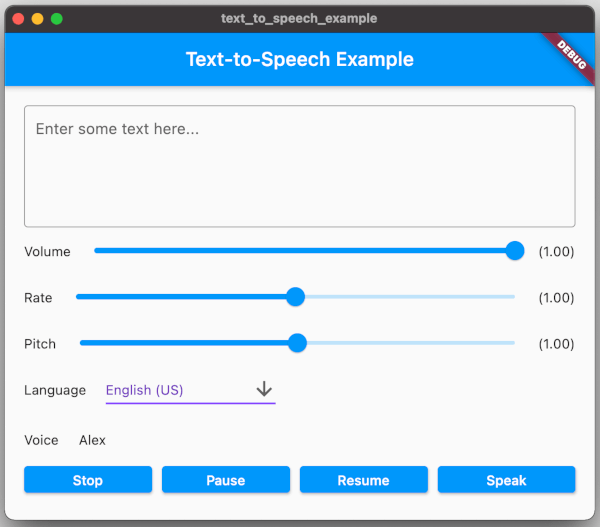
A Flutter plugin provides TTS (Text-To-Speech) Service. This plugin aims to offer the most of TTS API feature from iOS, Android, web, and macOS.

screenshot.png

Getting Started

To use this plugin, add text_to_speech as a dependency in your pubspec.yaml file:

dependencies:  
  text_to_speech: ^0.2.3

Installation

Android
  • Minimum SDK version: 21
  • Applications targeting SDK 30 (Android 11) need to declare TextToSpeech.Engine.INTENT_ACTION_TTS_SERVICE in the queries elements of Android Manifest (See Android documentation).
<queries>  
  <intent>  
      <action android:name="android.intent.action.TTS_SERVICE" />  
  </intent>  
 </queries>  
iOS & macOS
  • iOS minimum version: 7.0
  • macOs minimum version 10.14

(See Apple documentation).

Features

Feature Android iOS Web macOS
speak :white_check_mark: :white_check_mark: :white_check_mark: :white_check_mark:
stop :white_check_mark: :white_check_mark: :white_check_mark: :white_check_mark:
pause - :white_check_mark: :white_check_mark: :white_check_mark:
resume - :white_check_mark: :white_check_mark: :white_check_mark:
set volume :white_check_mark: :white_check_mark: :white_check_mark: :white_check_mark:
set rate :white_check_mark: :white_check_mark: :white_check_mark: :white_check_mark:
set pitch :white_check_mark: :white_check_mark: :white_check_mark: :white_check_mark:
set language :white_check_mark: :white_check_mark: :white_check_mark: :white_check_mark:
get language :white_check_mark: :white_check_mark: :white_check_mark: :white_check_mark:
get voice :white_check_mark: :white_check_mark: :white_check_mark: :white_check_mark:

Usages

To start, import the dependency in your code:

import 'package:text_to_speech/text_to_speech.dart';  

Then, create instance of TextToSpeech class:

TextToSpeech tts = TextToSpeech();  

Speak

String text = "Hello, Good Morning!";  
tts.speak(text);  

Set Volume

Volume range: 0-1 where 0 is silence, and 1 is the maximum volume (the default behavior).

double volume = 1.0;  
tts.setVolume(volume);  

Set Rate

Rate range: 0-2.
1.0 is the normal and default speech rate. Lower values slow down the speech (0.5 is half the normal speech rate). Greater values accelerate it (2.0 is twice the normal speech rate).

double rate = 1.0;  
tts.setRate(rate);  

Set Pitch

Pitch range: 0-2.
1.0 is the normal pitch, lower values lower the tone of the synthesized voice, greater values increase it.

double pitch = 1.0;  
tts.setPitch(pitch);  

Set Language

Accepting locale tag name of specific language, e.g. 'en-US'. You can retrieve list of supported language using getLanguage function.

String language = 'en-US';  
tts.setLanguage(language);  

Get Languages

Provide list of supported language codes in locale tag name format, e.g. 'en-US'. You can get display name for specific language code

String language = 'en-US';  
tts.setLanguage(language);  

Get Voice

We can get all available voices or get voices of specific language. This function will returns particular voice name.

List<String> voices = await tts.getVoices();  
  
String language = 'en-US';  
List<String> voices = await tts.getVoiceByLang(language);  

Native API Reference

  • Android TTS API: https://developer.android.com/reference/android/speech/tts/TextToSpeech
  • iOS/macOS AVSpeechSynthesizer API: https://developer.apple.com/documentation/avfaudio/avspeechsynthesizer
  • Web Speech API: https://dvcs.w3.org/hg/speech-api/raw-file/tip/speechapi.html#tts-section

Example

You can find example in the example folder and run it to check the implementation.
Move to example directory:

$ cd example  

Run Android / iOS

$ flutter run -d <device_name>  

Run Web

$ flutter run -d chrome  

Run macOS

$ flutter run -d macOS  

TODO

  • [ ] Utterance Status Listener
  • [ ] Linux Implementation
  • [ ] Windows Implementation

カテゴリー

依存関係

依存関係一覧 3 件

  • text_to_speech_macos^0.1.1
  • text_to_speech_platform_interface^0.1.3
  • text_to_speech_web^0.1.2

ソースリポジトリ

このパッケージを使用しているプロジェクト