パッケージ、リポジトリ、アプリカテゴリを検索

パッケージ詳細v0.3.4

timeline_editor

ビデオタイムラインのようにトラックを編集可能または編集不可能にできるタイムラインを管理するためのFlutterウィジェット。移動やアクションもサポートしています。

30日間ダウンロード
47
いいね数
41
Pub ポイント
30

パッケージをインストール

flutter pub add timeline_editor

パッケージ概要

公開情報に基づく選定ガイドです。参考としてご利用ください。

ビデオ編集インターフェースに似たタイムラインを管理するように設計されたFlutterウィジェットで、編集可能またはロック可能な複数のトラックをサポートしています。移動、追加、タイムラインアクションの管理など、直感的な操作が可能です。トラックレベルの制御が必要な視覚的タイムライン操作を必要とするアプリケーションに最適です。マルチメディア編集ワークフロー向けに構築されており、Flutterアプリにスムーズに統合されます。動的トラック管理とユーザー主導のタイムライン操作をサポートしています。

用途

  • 動画編集インターフェース
  • オーディオタイムライン管理
  • インタラクティブなプレゼンテーションツール
  • アニメーションシーケンスエディタ
  • 教育タイムラインビルダー
  • マルチメディアプロジェクト計画

主な機能

  • 編集可能および編集不可能なトラック
  • ドラッグアンドドロップによるタイムラインの移動
  • トラックベースのタイムライン組織
  • タイムライン操作のサポート
  • カスタマイズ可能なタイムラインUI
  • リアルタイムでのタイムライン更新

適している対象

  • メディア編集アプリを開発する開発者
  • インタラクティブなタイムラインを作成する教育者
  • タイムラインの可視化が必要なアプリ作成者
  • クリエイティブコンテンツプラットフォームに取り組むチーム
  • 正確なタイムライン制御を必要とするユーザー

注意事項

  • 慎重な状態管理が必要です
  • 長いタイムラインに対してパフォーマンスの最適化が必要になる可能性があります
  • 制限されたプラットフォーム固有の統合
  • 中程度の複雑さのタイムラインに最適
  • 更新のために外部リポジトリに依存しています
  • 組み込みのエクスポート機能なし

元の README

関連するソースリポジトリの README 原文のスナップショットです。最新の内容はリポジトリをご覧ください。

timeline_editor

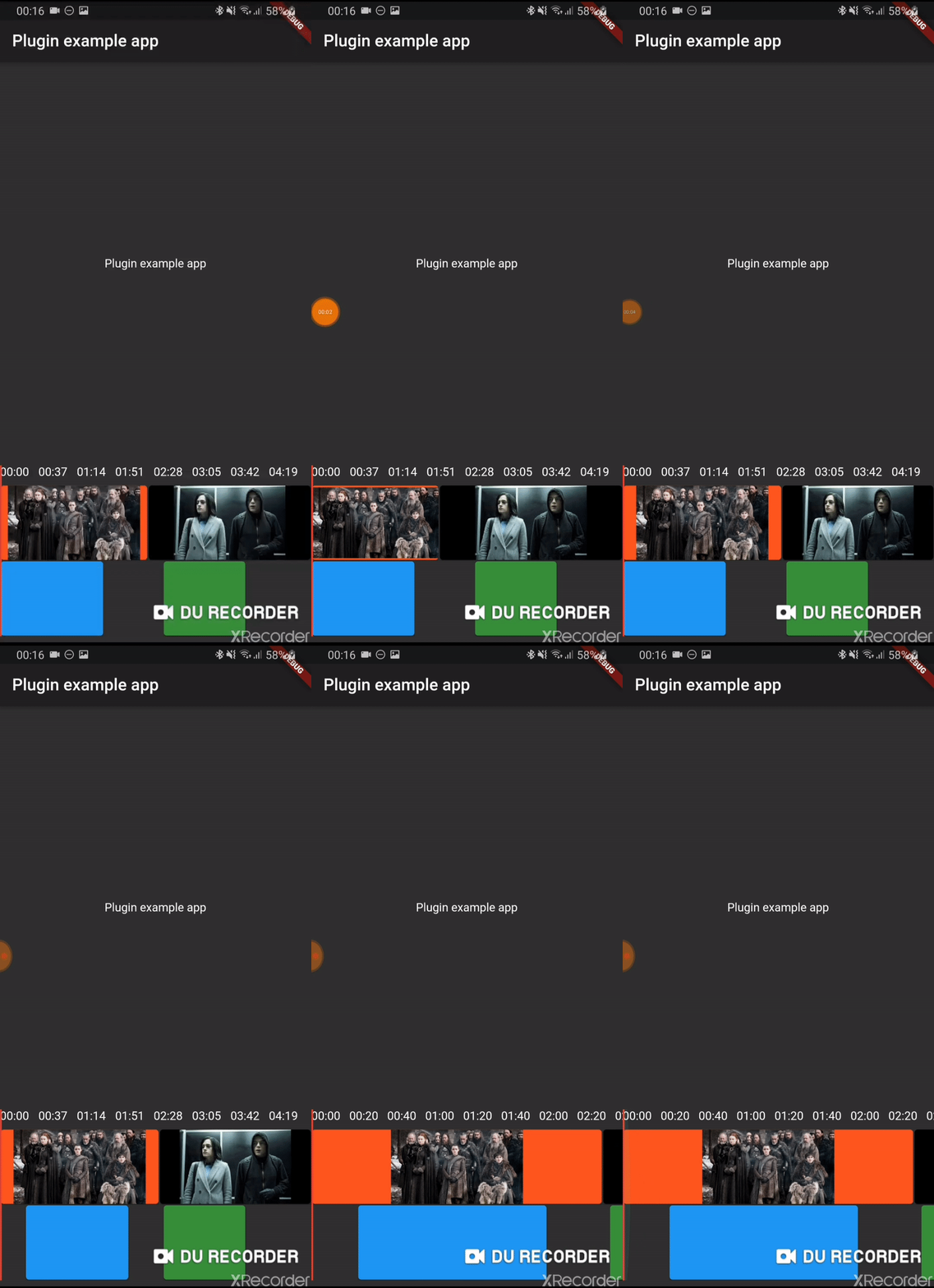
Early version of a timeline editor. Support:

  • Move of element
  • Context menu
  • Zoom of timeline
  • Progress indicator
  • track boxes
  • continuous tracks
  • scrub

Usage

Installation

Add timeline_editor as a dependency in your pubspec.yaml file (what?).

Import

Import timeline_editor:

import 'package:timeline_editor/timeline_editor.dart';
Migrate from V2 to V3

We now use Duration instead of seconds. To migrate you can use the helper functions to transform your seconds to Duration:

Duration durationFromSeconds(double seconds)
double durationToSeconds(Duration duration)
widgets

See example


TimelineEditor(
                  positionStream: positionStream,
                  onPositionTap: (s) => position = s,
                  countTracks: 2,
                  trackBuilder: (track, pps, duration) => track == 1
                      ? TimelineEditorTrack(
                          defaultColor: Colors.green[700],
                          boxes: [
                            TimelineEditorBox(box1Start, 100,
                                onMoved: updateBox1,
                                color: Colors.blue,
                                onMovedEnd: () => print('end moved')),
                            TimelineEditorBox(157, 80),
                          ],
                          pixelsPerSeconds: pps,
                          duration: duration,
                        )
                      : TimelineEditorTrack.fromContinuous(
                          continuousBoxes:[
                            TimelineEditorContinuousBox(
                                Duration.zero,
                                color: Colors.deepOrange,
                                child: const Image(image: const AssetImage('assets/image2.jpg')),
                            ),
                            TimelineEditorContinuousBox(
                                box2Start,
                                menuEntries: [
                                PopupMenuItem<String>(child: Text('Delete'), value: 'deleted')
                                ],
                                onMoved: updateBox2,
                                onSelectedMenuItem: (v) {
                                print('Selected: $v');
                                setState(() {
                                    deleted = true;
                                });
                                },
                                onTap: (start, duration) =>
                                    print('tapped for $start to ${start + duration}'),
                                color: Colors.black,
                                child: const Image(image: const AssetImage('assets/image.jpg')),
                            ),
                            ],
                          pixelsPerSeconds: pps,
                          duration: duration,
                        ),
                  duration: Duration(seconds: 300),
                ))

TimelineEditor

Main widget used to hold your tracks, display position and time

TimelineEditorTrack

A provided track to use with the TimelineEditor track builder (you can use your own)

It can either hold simple TimelineEditorBox with a start and an end

or TimelineEditorTrack.fromContinuous with TimelineEditorContinuousBox to have a conitunuous track where you only set start time and duration will be calculated so the box go up to the next box

Example

/example

カテゴリー

ソースリポジトリ

このパッケージを使用しているプロジェクト

データはまだありません。