패키지, 저장소 및 앱 카테고리 검색

adaptive_dialog 표지
패키지 상세v3.1.0

adaptive_dialog

플랫폼에 따라 경고 대화 상자 또는 모달 액션 시트를 적절하게 표시합니다.

AndroidiOSWebmacOSWindowsLinux
30일 다운로드
4.1만
좋아요
1.1천
Pub 점수
160

패키지 설치

flutter pub add adaptive_dialog

패키지 개요

공개 정보를 바탕으로 생성한 선택 가이드입니다.

적응형 다이얼로그는 플랫폼에 적합한 방식으로 경고 대화 상자 또는 모달 액션 시트를 표시하는 Flutter 패키지입니다. 각 타겟 플랫폼에 가장 적합한 UI 패턴을 자동으로 선택합니다. Android 및 iOS에서는 네이티브 스타일의 대화 상자를 사용하고, 다른 플랫폼에서는 일관된 웹/데스크톱 레이아웃을 사용합니다. 이를 통해 수동 플랫폼 확인 없이 기기 간 일관된 사용자 경험을 보장합니다. 최소한의 코드로 크로스플랫폼 대화 상자 구현을 단순화하며, 간단한 알림부터 복잡한 작업까지 지원합니다. 기존의 Flutter 앱에 원활하게 통합됩니다.

사용 사례

  • 크로스 플랫폼 대화 일관성
  • 모바일에서 네이티브처럼 보이는 대화상자
  • 웹 및 데스크톱에서의 통합 대화 처리
  • 플랫폼별 대화 로직 단순화
  • 적응형 UI 패턴을 통한 사용자 경험 향상

주요 기능

  • 자동 플랫폼 감지
  • 안드로이드 및 iOS의 네이티브 대화상자 스타일
  • 웹 및 데스크톱에서의 일관된 동작
  • 최소한의 보일러플레이트 코드
  • 경고 및 액션 시트 둘 다 지원

적합한 대상

  • 다중 플랫폼을 대상으로 하는 개발자
  • 네이티브 대화 상자 모양을 필요로 하는 앱
  • 사용자 경험의 일관성을 우선시하는 팀
  • 자주 대화 상자를 사용하는 프로젝트
  • 간단한 대화 상자 솔루션을 찾는 Flutter 초보자

고려 사항

  • 기본 옵션을 초과한 사용자 정의는 제한되어 있음
  • 하위 플랫폼 렌더링에 의존
  • 복잡한 레이아웃을 위해 추가 스타일링이 필요할 수 있습니다
  • 매우 맞춤형 대화 상자 설계에 적합하지 않음
  • 표준 알림 및 액션 시트 시나리오에 가장 적합

원본 README

연결된 소스 저장소의 README 원문 스냅샷입니다. 최신 내용은 저장소에서 확인하세요.

adaptive_dialog

Show alert dialog or modal action sheet adaptively according to platform.

Web Demo: https://mono0926.com/adaptive_dialog/

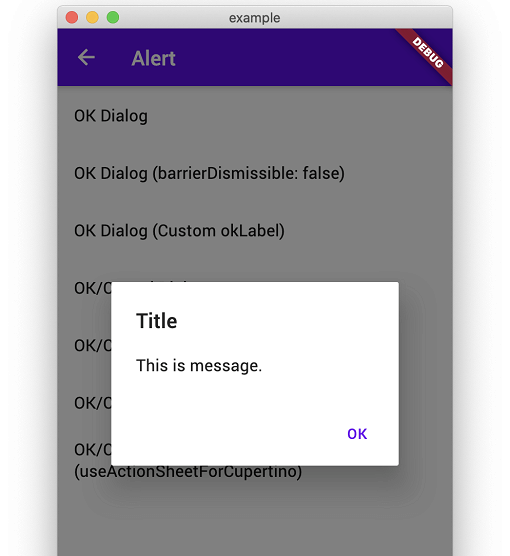
showOkAlertDialog

Convenient wrapper of showAlertDialog.

iOS Android
n1 n2

showOkCancelAlertDialog

Convenient wrapper of showAlertDialog.

iOS Android
n3 n4
n5 n6

showConfirmationDialog

Show Confirmation Dialog. For Cupertino, fallback to ActionSheet.

iOS Android
n3 n5

showModalActionSheet

iOS Android
n7 n8
n9 n10
n11 n12

showTextInputDialog

iOS Android
n1 n2
n3 n4

showTextAnswerDialog

Show text input dialog until answer is correct or cancelled. This is useful for preventing very destructive action is executed mistakenly.

iOS Android
n5 n6

FAQ

How can I customize it flexibly?

This packages keeps usage and UI simple like iOS official alert dialog. Therefore, if you need more flexibility than this package provides, I recommend that you build your own directly using standard APIs to meet your requirements without using this package.

  • https://github.com/mono0926/adaptive_dialog/issues/19#issuecomment-754476937
  • https://github.com/mono0926/adaptive_dialog/issues/76#issuecomment-1120686982
  • https://github.com/mono0926/adaptive_dialog/issues/108#issuecomment-1543068734

The getter modalBarrierDismissLabel was called on null

adaptive_dialog uses Cupertino-style widgets internally on iOS, so GlobalCupertinoLocalizations.delegate is required under certain conditions.

import 'package:flutter/material.dart';
import 'package:flutter_localizations/flutter_localizations.dart';

class App extends StatelessWidget {
  const App({Key key}) : super(key: key);

  @override
  Widget build(BuildContext context) {
    return MaterialApp(
      //...
      localizationsDelegates: const [
        GlobalMaterialLocalizations.delegate,
        GlobalWidgetsLocalizations.delegate,
        GlobalCupertinoLocalizations.delegate, // This is required
      ],
    );
  }
}

The input text color same with backgound when using CupertinoTextInputDialog

This fixes the problem.

import 'package:flutter/cupertino.dart';
import 'package:flutter/material.dart' hide Router;

class App extends StatelessWidget {
  const App({Key key}) : super(key: key);

  @override
  Widget build(BuildContext context) {
    return MaterialApp(
      darkTheme: ThemeData(
        cupertinoOverrideTheme: const CupertinoThemeData(
          textTheme: CupertinoTextThemeData(), // This is required
        ),
      ),
    );
  }
}

macOS style and Web / WASM compatibility

AdaptiveStyle.macOS utilizes macos_ui widgets on native macOS. On Web platforms (both JavaScript and WASM), macos_ui is excluded to ensure Web and WASM compatibility, and dialogs configured with macOS style automatically fall back to Cupertino (iOS-style) dialogs.

카테고리

의존성

의존성 목록 7 개

소스 저장소

이 패키지를 사용하는 프로젝트