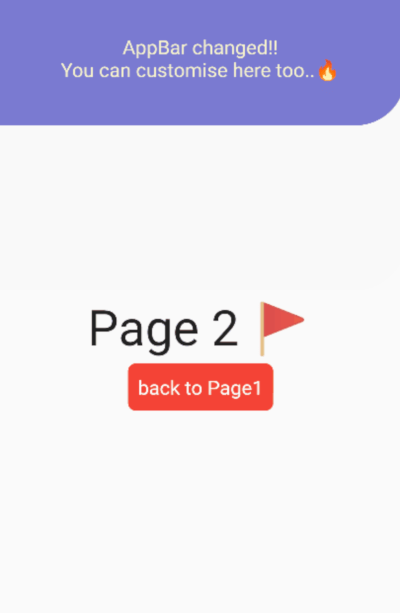
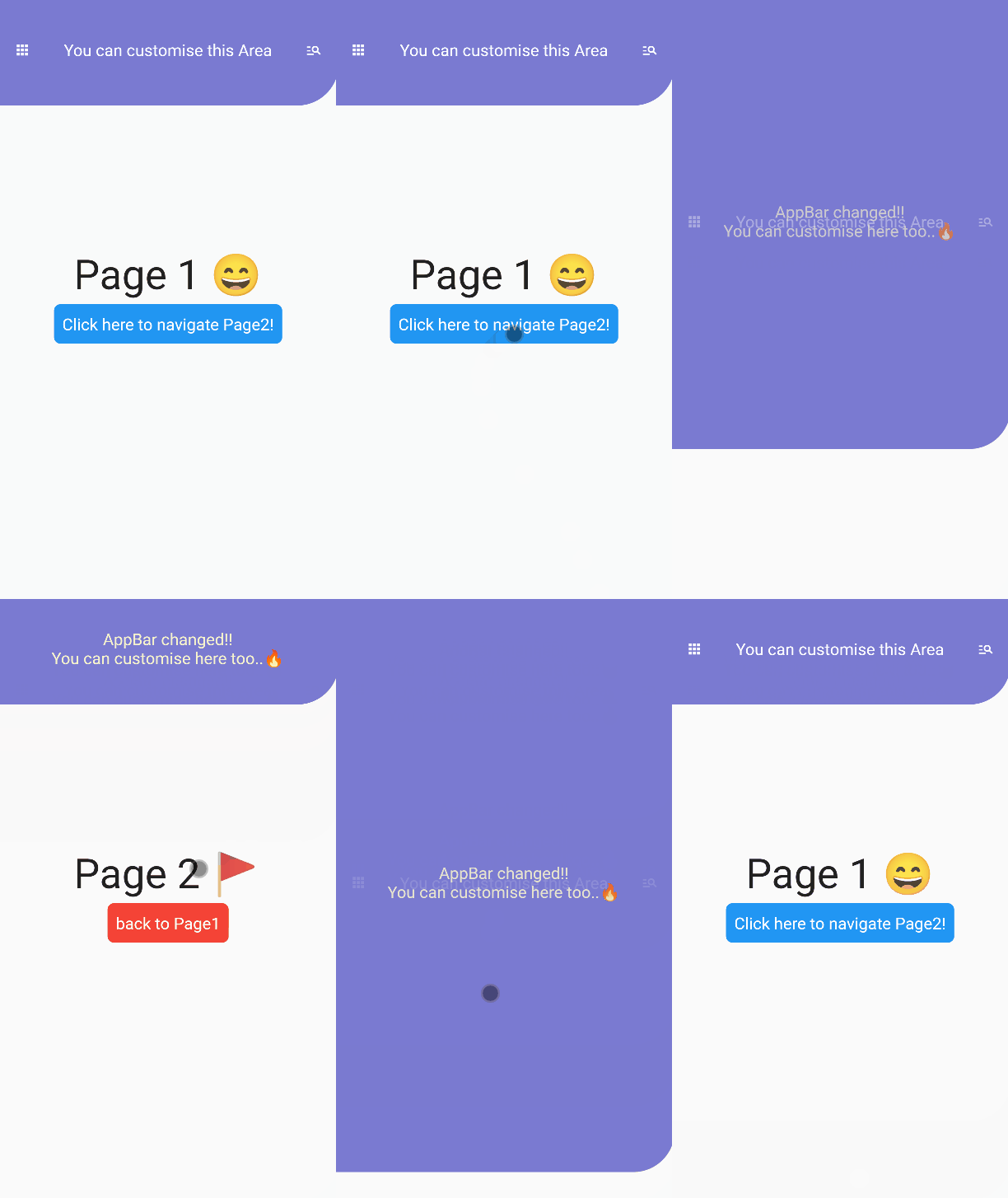
페이지 탐색 중에 AppBar의 높이를 동적으로 조정할 수 있는 Flutter 패키지로, 부드럽고 시각적으로 매력적인 사용자 경험을 제공합니다. 스크롤 또는 경로 전환에 따라 AppBar의 크기를 자동으로 애니메이션 처리하여 복잡한 네비게이션 흐름을 가진 앱에 적합합니다. 이 패키지는 가볍고 기존의 Flutter 프로젝트와 원활하게 통합됩니다. Android, iOS, Web, macOS, Windows, Linux 등 모든 주요 플랫폼을 지원합니다.
사용 사례
스크롤 가능한 페이지에서의 동적 헤더 크기 조정
앱 바 높이가 변경되는 화면 간 부드러운 전환
파라랙스 효과를 활용한 몰입형 UI 만들기
복잡한 앱 구조에서 탐색 경험 향상
다중 페이지 애플리케이션에서 반응형 앱 바 구현
주요 기능
내비게이션 중에 앱 바 높이를 자동으로 조정합니다
높이 전환을 위한 부드러운 애니메이션
크로스 플랫폼 호환성
MaterialApp 및 Navigator와의 간편한 통합
사용자 정의 높이 곡선 및 이징 지원
적합한 대상
상호작용 및 애니메이션 UI를 구축하는 개발자
동적 헤더가 필요한 앱
디자이너들은 유연한 탐색 경험에 집중하고 있습니다
다중 플랫폼을 대상으로 하는 프로젝트
Flutter 초보자가 상태 애니메이션에 대해 배우고 있습니다
고려 사항
중첩된 네비게이터를 주의 깊게 다뤄야 할 수 있습니다
오래된 장치에서 무거운 애니메이션 사용 시 성능 영향
높이 변경 외의 사용자 정의는 제한적입니다
정적 앱 바 디자인에 적합하지 않습니다
ScrollController 및 PageView 상호작용에 대한 이해가 필요합니다
원본 README
연결된 소스 저장소의 README 원문 스냅샷입니다. 최신 내용은 저장소에서 확인하세요.
animated_appbar
AppBar which can dynamically change height with page navigation.
Usage
This package is expected to be used with BaseLayout and AnimatedAppBar
// In this scenario// we have to pages.// In Page1, We will navigate to Page2 with dynamic animations.// In Page2, We will back to Page1 with dynamic animations.import'package:flutter/material.dart';
import'package:animated_appbar/animated_appbar.dart';
voidmain() {
runApp(MyApp());
}
classMyAppextendsStatefulWidget{
@override_MyAppStatecreateState() => _MyAppState();
}
class_MyAppStateextendsState<MyApp> withTickerProviderStateMixin{
@overrideWidgetbuild(BuildContext context) {
returnMaterialApp(
debugShowCheckedModeBanner: false,
// BaseLayout is declared in this package// If you wanna using AnimatedAppBar, You must use [BaseLayout]
home: BaseLayout(
// AnimatedAppBar is declared in this package
appBar: AnimatedAppBar(
initHeight: 135.0,
backgroundColor: Color(0xff7a7ad1),
child: Container(
// If you want to change your appbar,// You must set key like this.// If you don't set this properties,// You couldn't see beautiful animation.
key: UniqueKey(),
child:Center(
child: Row(
mainAxisAlignment: MainAxisAlignment.spaceAround,
crossAxisAlignment: CrossAxisAlignment.center,
children: [
Icon(
Icons.apps,
color: Colors.white,
size: 20.0,
),
Text(
"You can customise this Area",
style: TextStyle(
color: Colors.white,
fontSize: 20.0,
),
),
Icon(
Icons.manage_search,
color: Colors.white,
size: 20.0,
),
],
),
),
),
),
// Setting initial Page in here!!!!!
scaffold: Page1(),
),
);
}
}
// When routing page with this package,// You must write [with RoutePage] like below.// In this class, routing methods are defined.classPage1extendsStatelessWidgetwithRoutePage{
// This variable is Page2's new AppBar widget.// You have not using AnimatedAppBar// Just use any other Widget without AnimatedAppBarWidget newAppBar = Container(
// You must set key like this.// If you don't set this properties,// You couldn't see beautiful animation.
key:UniqueKey(),
child:Column(
mainAxisAlignment: MainAxisAlignment.center,
children: [
Text(
"AppBar changed!!",
style: TextStyle(
color: Color(0xfff7f4cc),
fontSize: 20,
),
),
Text(
"You can customise here too..🔥",
style: TextStyle(
color: Color(0xfff7f4cc),
fontSize: 20,
),
),
],
),
);
@overrideWidgetbuild(BuildContext context) {
returnScaffold(
body: Center(
child:Column(
mainAxisAlignment:MainAxisAlignment.center,
children: [
Text(
"Page 1 😄",
style:TextStyle(
fontSize: 50,
),
),
SizedBox(height: 5),
Container(
decoration:BoxDecoration(
color: Colors.blue,
borderRadius: BorderRadius.all(
Radius.circular(8)
),
),
padding: EdgeInsets.all(10.0),
child: TextButton(
// If you wanna route page, Using routePage(Widget page)!// Ig you wannt route page with new appbar, Using routePageWithNewAppBar(widget page, widget appBar)
onPressed: ()=> routePageWithNewAppBar(Page2(),newAppBar),
child: Text(
"Click here to navigate Page2!",
style: TextStyle(
fontSize: 20,
color: Colors.white
),
),
),
),
],
),
),
);
}
}
classPage2extendsStatelessWidgetwithRoutePage{
@overrideWidgetbuild(BuildContext context) {
returnScaffold(
body: Center(
child:Column(
mainAxisAlignment:MainAxisAlignment.center,
children: [
Text(
"Page 2 🚩",
style:TextStyle(
fontSize: 50,
),
),
SizedBox(height: 5),
Container(
decoration:BoxDecoration(
color: Colors.red,
borderRadius: BorderRadius.all(
Radius.circular(8)
),
),
padding: EdgeInsets.all(10.0),
child: TextButton(
// If you wanna back to previous page, Just using [previousPage()] method.
onPressed: () => previousPage(),
child: Text(
"back to Page1",
style: TextStyle(
fontSize: 20,
color: Colors.white
),
),
),
),
],
),
),
);
}
}
If you have any requests / contributes or questions, please feel free to visit github.