패키지, 저장소 및 앱 카테고리 검색

animated_icon_button 표지
패키지 상세v1.0.2

animated_icon_button

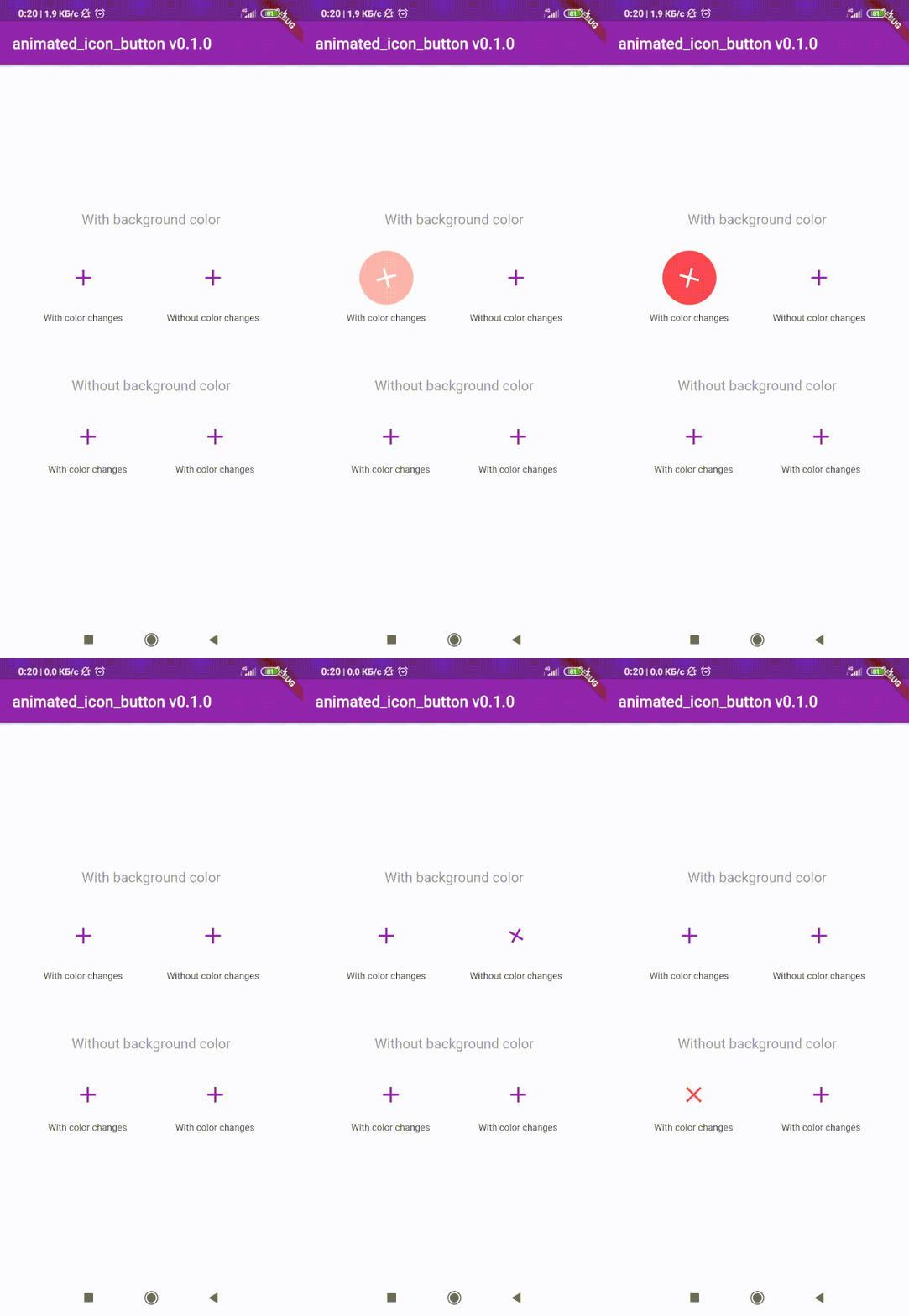
사용자 정의 애니메이션 IconButton를 생성하기 위한 Flutter 패키지입니다. 사용 가능한 모든 아이콘을 포함하고 있으며, 기본 IconButton 기반입니다.

AndroidiOSWebmacOSWindowsLinux
30일 다운로드
1.7만
좋아요
295
Pub 점수
160

패키지 설치

flutter pub add animated_icon_button

패키지 개요

공개 정보를 바탕으로 생성한 선택 가이드입니다.

기본 IconButton을 부드럽고 사용자 정의 가능한 애니메이션으로 향상시키는 플러터 패키지입니다. 모든 사용 가능한 아이콘을 지원하며, 최소한의 코드로 시각적으로 매력적인 버튼 상호작용을 만들 수 있습니다. 플러터의 기본 IconButton 위에 구축되어 호환성을 유지하면서 스케일, 회전 및 색상 전환과 같은 동적 효과를 추가합니다. 사용자 피드백과 시각적 매력이 중요한 현대 UI에 적합합니다.

사용 사례

  • 인터랙티브 앱 버튼 만들기
  • 양식 내 사용자 피드백 향상
  • 대시보드에 마이크로 인터랙션 추가하기
  • 애니메이션 탐색 요소 설계
  • 시각적 신호를 통한 접근성 향상
  • 매력적인 온보딩 화면 만들기

주요 기능

  • 사전 구축된 애니메이션 프리셋
  • 모든 플러터 아이콘 지원
  • 사용자 지정 가능한 애니메이션 지속 시간 및 곡선
  • 기존 코드와의 간편한 통합
  • 경량이고 성능이 뛰어남
  • 크로스 플랫폼 호환성

적합한 대상

  • 동적 컴포넌트를 찾는 UI/UX 디자이너
  • 인터랙티브 앱을 개발하는 개발자
  • 섬세하면서도 효과적인 애니메이션을 필요로 하는 프로젝트
  • 사용자 참여에 초점을 맞춘 앱
  • 다중 플랫폼 배포를 위해 플러터를 사용하는 팀

고려 사항

  • 패키지 크기가 약간 증가할 수 있습니다
  • 성능을 위해 애니메이션은 적절히 사용해야 합니다
  • 고주파 버튼 클릭에 적합하지 않음
  • Flutter의 애니메이션 시스템에 대한 이해가 필요합니다
  • 접근성에 최적의 의미 있는 버튼 레이블과 함께 사용

원본 README

연결된 소스 저장소의 README 원문 스냅샷입니다. 최신 내용은 저장소에서 확인하세요.

animated_icon_button

😊 Flutter package to create custom animated IconButton.

😵 Includes all available icons. Based on native IconButton.


Breaking Change

After 1.0.2 version you can use multiple icons.

Getting Started

Follow these steps to use this library

Add dependency
dependencies:
  animated_icon_button: ^1.0.2 #latest version
Add import package
import 'package:animated_icon_button/animated_icon_button.dart';
Easy to use

Simple example of use AnimatedIconButton
Put this code in your project at an screen and wait for magic 😊

    AnimatedIconButton(
        onPressed: () => print('all icons pressed'),
        icons: [
            AnimatedIconButtonEntry(
                icon: Icon(Icons.add),
                onPressed: () => print('add pressed'),
            ),
            AnimatedIconButtonEntry(
                icon: Icon(Icons.close),
            ),
        ],
    ),
More icons

Now you can use more than 2 icons Add new icons to your list and they will change one by one

    AnimatedIconButton(
        size: 35,
        onPressed: () {
            print('all icons pressed');
        },
        duration: const Duration(milliseconds: 200),
        icons: <AnimatedIconButtonEntry>[
            AnimatedIconButtonEntry(
                icon: Icon(
                    Icons.mic,
                    color: Colors.purple,
                ),
                onPressed: () => print('mic pressed'),
                backgroundColor: Colors.white,
            ),
            AnimatedIconButtonEntry(
                icon: Icon(
                    Icons.g_translate,
                    color: Colors.purple,
                ),
                backgroundColor: Colors.white,
            ),
            AnimatedIconButtonEntry(
                icon: Icon(
                    Icons.collections_sharp,
                    color: Colors.purple,
                ),
                backgroundColor: Colors.white,
            ),
        ],
    ),
Custom animation controller

In order to animate your icons in a custom way, like on text changed or when pressing a button, just use the animationController property as follows.

    var animationController = AnimationController(
        vsync: this,
        duration: Duration(milliseconds: 200),
        reverseDuration: Duration(milliseconds: 200),
    );

    AnimatedIconButton(
        animationController: animationController,
        size: 35,
        onPressed: () {
            print('all icons pressed');
        },
        duration: const Duration(milliseconds: 200),
        icons: <AnimatedIconButtonEntry>[
            AnimatedIconButtonEntry(
                icon: Icon(
                    Icons.mic,
                    color: Colors.purple,
                ),
                onPressed: () => print('mic pressed'),
                backgroundColor: Colors.white,
            ),
            AnimatedIconButtonEntry(
                icon: Icon(
                    Icons.g_translate,
                    color: Colors.purple,
                ),
                backgroundColor: Colors.white,
            ),
            AnimatedIconButtonEntry(
                icon: Icon(
                    Icons.collections_sharp,
                    color: Colors.purple,
                ),
                backgroundColor: Colors.white,
            ),
        ],
    ),

Then, whenever you want, execute your animationController.forward() and animationController.reverse() methods to get your icons animated.

Don't forget when you use this property duration is not used, so it can be emitted.

카테고리

의존성

의존성 목록 1 개

소스 저장소

이 패키지를 사용하는 프로젝트