패키지, 저장소 및 앱 카테고리 검색

card_scanner 표지
패키지 상세v1.0.4

card_scanner

플러터용 빠르고 정확하며 안전한 신용 및 직불 카드 스캔 라이브러리입니다.

AndroidiOS
30일 다운로드
975
좋아요
124
Pub 점수
130

패키지 설치

flutter pub add card_scanner

패키지 개요

공개 정보를 바탕으로 생성한 선택 가이드입니다.

Card Scanner는 신용카드 및 직불카드를 스캔하기 위해 설계된 빠르고 정확하며 안전한 Flutter 라이브러리입니다. 장치 카메라 기능을 활용하여 카드 경계를 감지하고, 높은 정밀도로 카드 번호, 만료일, CVV를 추출합니다. 개인정보 보호를 고려해 로컬에서 데이터를 처리하며 외부 서버에 민감한 정보를 전송하지 않습니다. 결제 양식, 체크아웃 흐름, 원활한 카드 입력이 필요한 금융 애플리케이션에 적합합니다. 이 패키지는 Android와 iOS 플랫폼을 모두 지원하며 간단한 pub add 명령어로 쉽게 통합할 수 있습니다.

사용 사례

  • 결제 양식 자동화
  • 체크아웃 흐름 개선
  • 금융 앱 통합
  • 카드 데이터 추출
  • 카드 입력을 통한 사용자 온보딩

주요 기능

  • 실시간 카드 감지
  • 로컬 데이터 처리
  • 높은 정밀도 스캔
  • 카드 정보의 안전한 처리
  • 크로스 플랫폼 지원 (Android 및 iOS)

적합한 대상

  • 전자상거래 앱
  • 은행 및 금융 앱
  • 모바일 결제 솔루션
  • 빠른 카드 입력이 필요한 앱
  • 보안과 속도를 우선시하는 개발자

고려 사항

  • 카메라 권한이 필요합니다
  • 최적의 성능을 위해 보정이 필요할 수 있습니다
  • 신용/직불 카드 형식으로 제한됨
  • 기기 카메라 품질에 따라 다릅니다
  • 비표준 카드 형상에 대한 지원 없음

원본 README

연결된 소스 저장소의 README 원문 스냅샷입니다. 최신 내용은 저장소에서 확인하세요.

Fast, Accurate and Secure Credit & Debit card scanner for Flutter

card_scanner is a flutter plugin for accurately and quickly scanning debit and credit cards.

Features

  • 🔒Fully OFFLINE scan makes it a completely secure scanner !
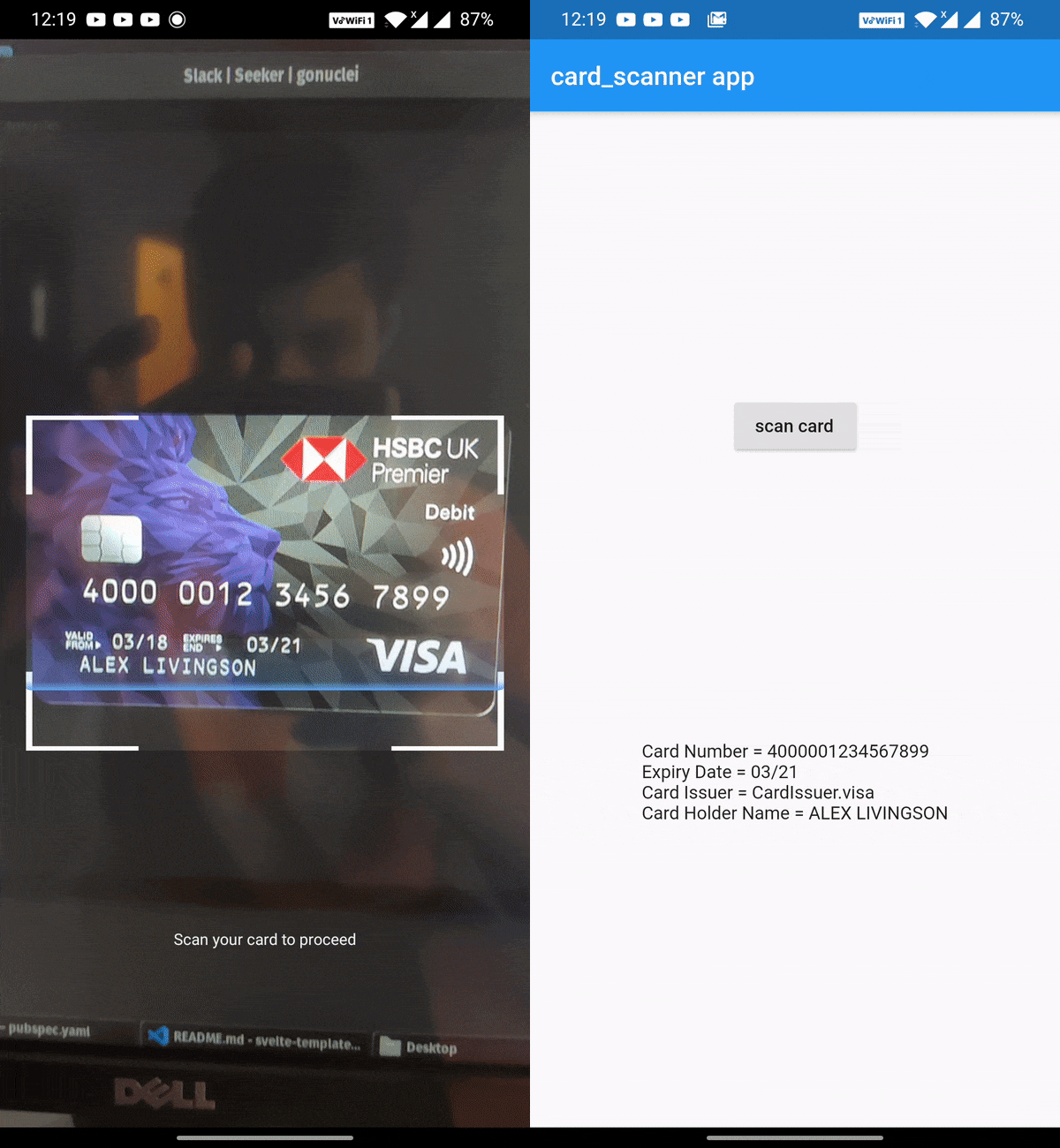
  • 🎈 Can scan Expiry date , Card Holder name and Card Issuer (lacked by other scanners) along with the Card number✨
  • 🔋Powered by Google's Machine Learning models
  • ⚡ Great performance and accuracy
  • 🧹Auto checks the card number for errors using card checksum algorithms
  • 🎚Supports controlling parameters that determine the balance between speed and accuracy
  • ❤️ Simple, powerful, & intuitive API
Get Demo App Here :

Vision App

Install

Add this to your package's pubspec.yaml file:

dependencies:
  card_scanner: <latest-version>

get the latest version number here

Usage

Just import the package and call scanCard:

import 'package:card_scanner/card_scanner.dart';
var cardDetails = await CardScanner.scanCard();

print(cardDetails);

Example Output:

Card Number = 5173949117389006
Expiry Date = 11/26

The above code opens the device camera, looks for a valid card and gets the required details and returns the CardDetails object.


Scan Options

If you wish to obtain the card holder name and card issuer, you can specify the options:

import 'package:card_scanner/card_scanner.dart';
var cardDetails = await CardScanner.scanCard(
    scanOptions: CardScanOptions(
        scanCardHolderName: true,
        scanCardIssuer: true,
    ),
);


print(cardDetails);

Example Output :

Card Number = 5173949117389006
Expiry Date = 11/26
Card Issuer = mastercard
Card Holder Name = PAUL SAMUELSON

iOS Requirements

  • The minimum target for iOS should be >= 12.0.0
  • Comment out the use_frameworks! line from under Podfile of your Flutter project. You can find this Podfile under your_flutter_project/ios/Podfile
Documentation & Samples 📖

카테고리

소스 저장소

이 패키지를 사용하는 프로젝트

아직 데이터가 없습니다.