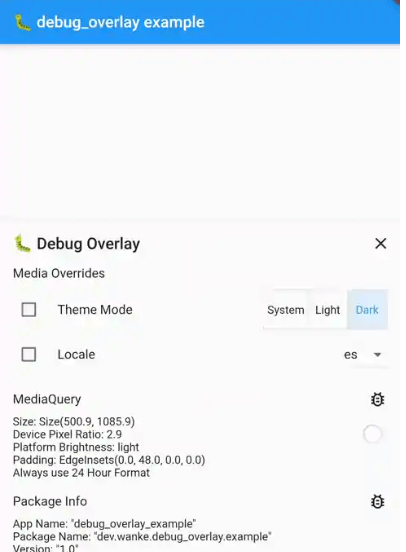
debug_overlay 패키지는 개발 중에 디버그 정보를 표시하고 설정을 동적으로 조정할 수 있도록 Flutter 앱에서 중앙 집중식 오버레이를 제공합니다. 개발자는 앱의 실시간 메트릭을 확인하고, 기능을 전환하며, 앱을 재시작하지 않고도 상태를 검사할 수 있습니다. 오버레이는 간단한 제스처로 접근 가능하며 Android 및 iOS 빌드에 원활하게 통합됩니다. 사용 편의성을 고려하여 설계되어, 앱 인터페이스 내에서 진단 데이터와 구성 가능한 옵션에 빠르게 접근함으로써 디버깅 워크플로우를 향상시킵니다.
사용 사례
개발 중 실시간 디버깅
실시간으로 앱 기능 전환
모니터링 앱 성능 메트릭
상태 변경 검사
다른 구성 테스트
디버그 도구에 빠르게 접근
주요 기능
중앙화된 디버그 오버레이
제스처 기반 활성화
라이브 설정 조정
Android 및 iOS 플랫폼 지원
pub add를 사용한 최소 설정
런타임 앱 정보 표시
적합한 대상
활발한 개발 중인 플러터 개발자
빠른 디버깅이 필요한 팀
동적 기능 전환을 필요로 하는 앱
프로토타이핑 및 테스트 단계
개발자들은 디버깅 중 사용자 경험에 집중하고 있습니다
고려 사항
생산 사용을 위한 것이 아님
테스트 중 오버레이가 UI에 영향을 줄 수 있습니다
릴리스 전 수동 제거 필요
제한된 사용자 정의 옵션
민감한 디버그 데이터에 대한 내장 보안 없음
대규모 앱에서는 성능에 약간의 영향을 줄 수 있습니다
원본 README
연결된 소스 저장소의 README 원문 스냅샷입니다. 최신 내용은 저장소에서 확인하세요.
debug_overlay
🐛 View debug infos and change settings via a central overlay for your app.
To add a debug overlay to your app, pass DebugOverlay.builder() to MaterialApp/CupertinoApp/WidgetsApp.builder:
MaterialApp(
  builder: DebugOverlay.builder(),
  // And other customization...
)
The debug overlay only works in debug mode and is not included in your widget tree in profile or release mode unless you pass enableOnlyInDebugMode: false.
To open the overlay, call DebugOverlay.show().
By default, this overlay includes MediaQueryDebugHelper, PackageInfoDebugHelper, and DeviceInfoDebugHelper.
Debug Helpers
To add a debug helper, you have to register it by calling either of the following two (which accept any sliver widget):
DebugOverlay.prependHelper(myDebugHelper) to add it to the front of the list
DebugOverlay.appendHelper(myDebugHelper) to add it to the end of the list
Or, if you want to override all currently registered overlays, set DebugOverlay.helpers.value to a list of sliver widget.
The error field can also hold data for non-error logs.
If it stores JSON data (on an object with a toJson() method), the data can be inspected using json_view.
MediaOverridesDebugHelper
This allows you to override the theme mode and locale of your app. To use it, follow these steps:
Store its mutable state, e.g., in a global variable:
final mediaOverrideState = ValueNotifier(MediaOverrideState());
Register the helper and supply its state, e.g., in main():
voidmain() {
if (kDebugMode) {
DebugOverlay.prependHelper(MediaOverrideDebugHelper(
mediaOverrideState,
// To support overriding locales, this value must be set and should// contain the same locales as passed to [MaterialApp.supportedLocales],// [CupertinoApp.supportedLocales] or [WidgetsApp.supportedLocales].
supportedLocales: supportedLocales,
));
}
runApp(MyApp());
}
When building your MaterialApp/CupertinoApp/WidgetsApp, wrap it in a ValueListenableBuilder that uses the state from step 1:
ValueListenableBuilder<MediaOverrideState>(
valueListenable: mediaOverrideState,
builder: (context, overrideState, child) {
returnMaterialApp(
// You can access overridden values via [overrideState]:
themeMode: overrideState.themeMode,
locale: overrideState.locale,
builder: DebugOverlay.builder(),
supportedLocales: supportedLocales,
// And your other customizations...
);
},
);
To implement your own debug helper, you can use the provided DebugHelper class for the layout.
If your information can be represented with Flutter's DiagnosticsNode, you can use DiagnosticsBasedDebugHelper which automatically provides filtering.
This is also used internally by DeviceInfoDebugHelper, MediaQueryDebugHelper, and PackageInfoDebugHelper.