패키지, 저장소 및 앱 카테고리 검색

dotted_decoration 표지
패키지 상세v3.0.0

dotted_decoration

점선 장식은 점선 구분선, 사각형, 원 또는 둥근 사각형의 점선 테두리를 그리는 데 유용한 패키지입니다.

AndroidiOSWebmacOSWindowsLinux
30일 다운로드
10.5만
좋아요
156
Pub 점수
150

패키지 설치

flutter pub add dotted_decoration

패키지 개요

공개 정보를 바탕으로 생성한 선택 가이드입니다.

dotted_decoration 패키지는 Flutter 애플리케이션에서 점선 및 테두리를 생성하는 간단하고 유연한 방법을 제공합니다. 개발자는 점의 크기, 간격, 색상을 사용자 정의할 수 있는 점선 구분선이나 사각형, 원, 둥근 사각형 주위의 테두리를 그릴 수 있습니다. 분리선, 외곽선 또는 장식적인 강조 요소와 같은 UI 요소에 이상적이며, 복잡한 커스텀 페인팅 없이도 시각적 디자인을 향상시킵니다. 이 패키지는 가볍고 Android, iOS, Web, macOS, Windows, Linux 등 모든 주요 플랫폼과 호환됩니다.

사용 사례

  • 목록에서 점선 구분선 만들기
  • 카드나 컨테이너에 점선 테두리 추가하기
  • 순환형 또는 둥근 점선 외곽선 설계
  • 폼 필드 스타일 개선
  • 사용자 정의 UI 구분자 만들기
  • 장식적인 선 패턴 추가

주요 기능

  • 사용이 쉬운 점선 장식 클래스
  • 직사각형, 원 및 둥근 사각형을 지원합니다
  • 사용자 정의 가능한 점 크기 및 간격
  • 사용자 정의 색상 및 스트로크 폭
  • 크로스 플랫폼 호환성
  • 경량이며 최소한의 종속성

적합한 대상

  • 장식 요소를 찾는 UI 디자이너
  • 양식 또는 목록을 구축하는 개발자
  • 시각적 구분 또는 강조가 필요한 앱
  • 일관된 디자인 시스템을 갖춘 프로젝트
  • Flutter 초보자들이 사용자 정의 장식 탐색 중

고려 사항

  • 기본 점무늬로 제한됨
  • 대시 또는 사용자 정의 선 스타일 지원 없음
  • 정밀한 레이아웃을 위해 수동 정렬이 필요할 수 있습니다
  • 고성능 애니메이션에 적합하지 않음
  • 정적 또는 낮은 빈도의 렌더링에 가장 적합

원본 README

연결된 소스 저장소의 README 원문 스냅샷입니다. 최신 내용은 저장소에서 확인하세요.

dotted_decoration

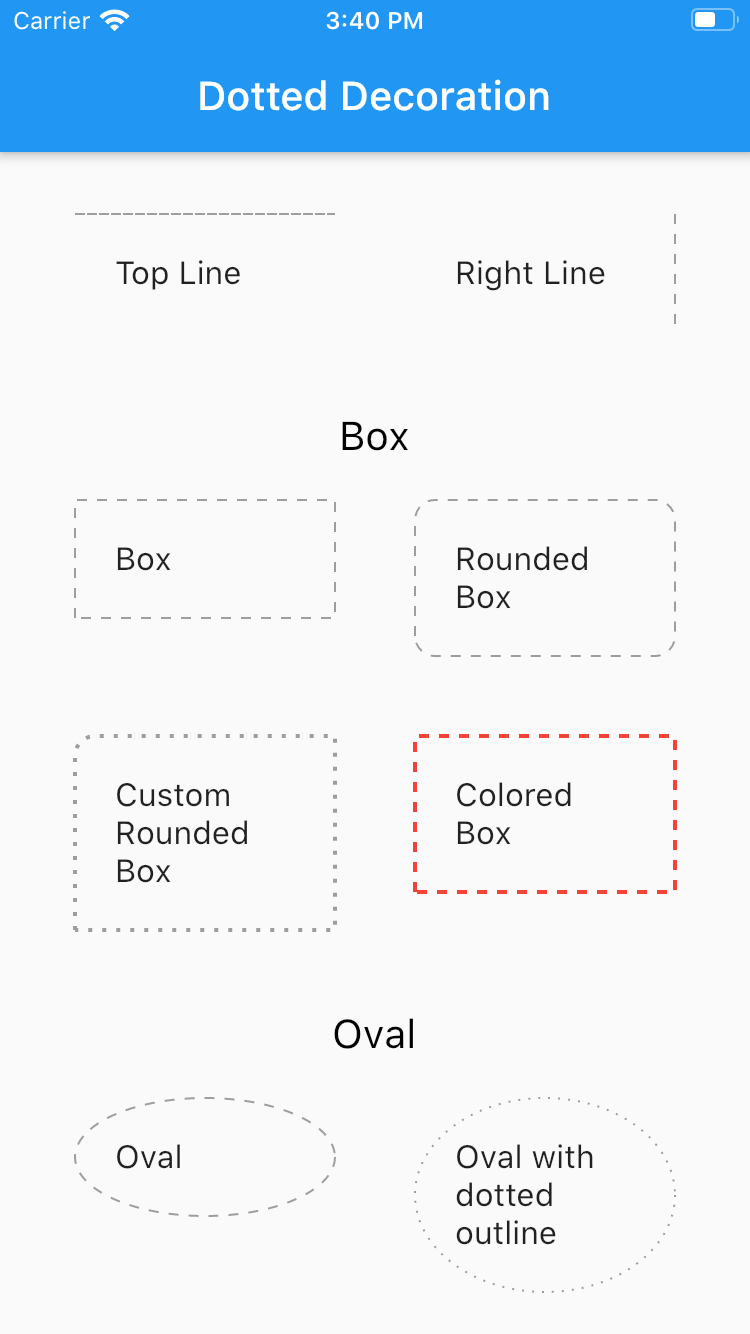
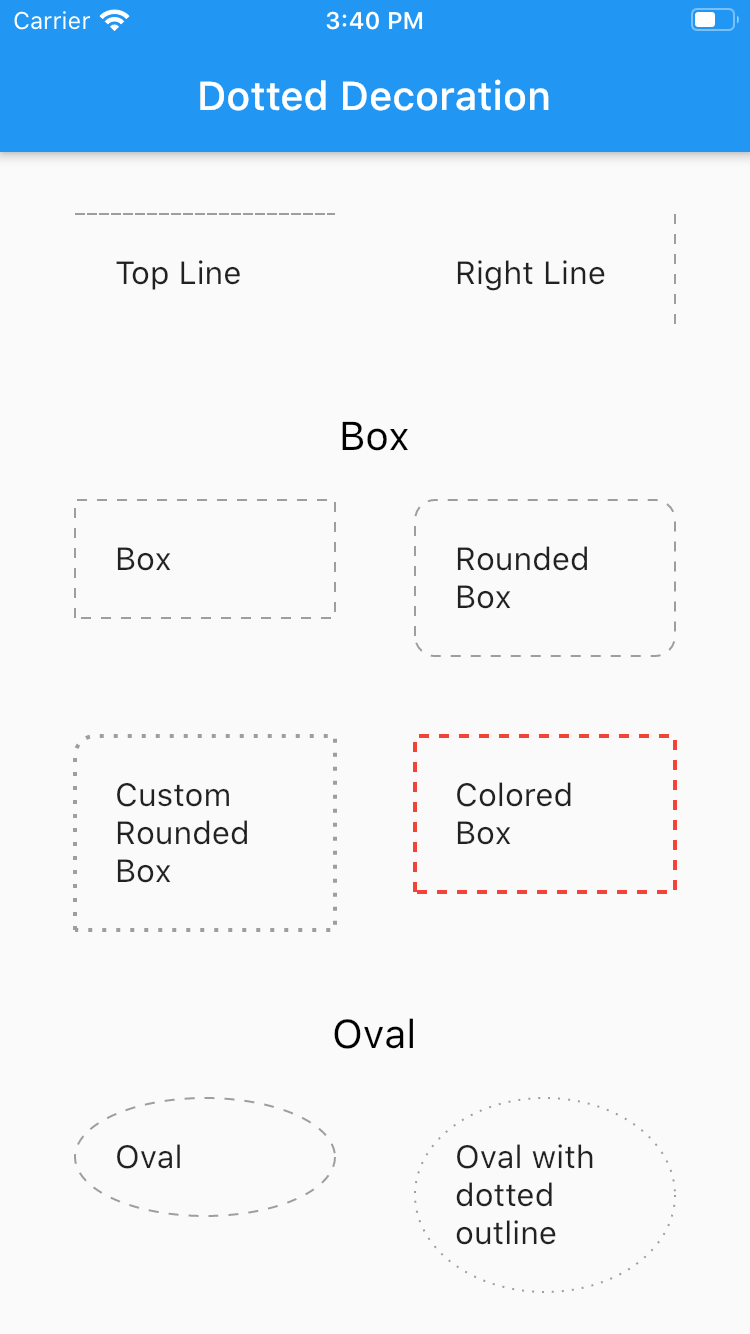
Dotted line decoration is custom decoration as simple as BoxDocoration can be used in Container widget to draw dotted divider, dotted border for rectangle, oval or circle.

Preview

Flutter Dotted Decoration screenshot

Installing

To use this package, add dotted_decoration as a dependency in your pubspec.yaml file.

Usage

Create a container widget and assign DottedDecoration as decoration

Container(
    decoration: DottedDecoration()
    child: Text('Dotted Decoration')
)
Container(
    decoration: DottedDecoration()
    child: Text('Dotted Decoration')
)

To draw line

DottedDecoration(
  shape: Shape.line, linePosition: LinePosition.bottom),

To add rounded rection

DottedDecoration(
  shape: Shape.box,
  borderRadius: BorderRadius.circular(10), //remove this to get plane rectange
),

To add circle

//make sure width & height of container is same to get perfect circle or else it will end up in oval
DottedDecoration(shape: Shape.circle, dash: <int>[1, 4]);

Parameters

Shape

Kind of outline shape, default shape is Shape.line.

shape: Shape.line shape: Shape.box shape: Shape.oval

linePosition

Where line is located, default shape is LinePosition.bottom.

linePosition: LinePosition.bottom linePosition: LinePosition.left linePosition: LinePosition.right linePosition: LinePosition.top

dash

Border line order, first in dash and second is space.

dash: <int>[2, 5]

strokeWidth

Line width.

strokeWidth: 2

color

Color of line, default shape is Colors.grey.

color: Colors.red

카테고리

소스 저장소

이 패키지를 사용하는 프로젝트