패키지, 저장소 및 앱 카테고리 검색

패키지 상세v1.0.2+1

extended_navbar_scaffold

확장 가능하고 부유형 네비게이션 바를 갖춘 사용자 정의 확장 Scaffold

30일 다운로드
12
좋아요
88
Pub 점수
40

패키지 설치

flutter pub add extended_navbar_scaffold

패키지 개요

공개 정보를 바탕으로 생성한 선택 가이드입니다.

표준 Scaffold를 확장하여 전개 가능하고 부유형 하단 탐색 바를 갖춘 사용자 정의 가능한 Flutter Scaffold입니다. 스크롤 시 탐색 바 숨기기 또는 추가 항목을 표시하기 위해 탐색 바 확장과 같은 동적 동작을 허용하여 복잡한 탐색 요구 사항이 있는 앱에서 사용자 경험을 향상시킵니다. 반응형이고 상호작용 가능한 하단 바가 필요한 현대적인 UI에 적합합니다. 패키지는 가볍고 기존 Flutter 프로젝트와 원활하게 통합됩니다.

사용 사례

  • 복잡한 하단 탐색을 가진 앱
  • 스크롤 기반의 인터랙티브 탐색 바
  • 사용자 정의 가능한 부유형 탐색 인터페이스
  • 확장 가능한 네비게이션 바로 사용자 경험 향상
  • 현대적인 모바일 앱 디자인

주요 기능

  • 확장 가능한 하단 탐색 바
  • 플로팅 네비게이션 바 지원
  • 사용자 정의 가능한 애니메이션 및 동작
  • Flutter Scaffold와의 원활한 통합
  • 가볍고 구현하기 쉬움

적합한 대상

  • 현대적인 Flutter 앱을 개발하는 개발자
  • 상호작용 탐색 패턴을 찾는 디자이너
  • 반응형 하단 바가 필요한 프로젝트
  • 여러 탐색 대상이 있는 모바일 앱
  • 사용자 인터페이스 중심 애플리케이션

고려 사항

  • 제한된 플랫폼별 사용자 정의
  • 내장된 다크 모드 지원 없음
  • 상태 관리를 수동으로 처리해야 합니다
  • 매우 큰 탐색 항목 목록에 최적화되지 않음
  • 복잡한 레이아웃을 위해 추가 스타일링이 필요할 수 있습니다

원본 README

연결된 소스 저장소의 README 원문 스냅샷입니다. 최신 내용은 저장소에서 확인하세요.

extended_navbar_scaffold

Pub Awesome Flutter

Custom Extended Scaffold

Custom Flutter widgets that makes Bottom Navigation Floating and can be expanded with much cleaner and easier way.

Installing

Add the following to your pubspec.yaml file:

dependencies:
  extended_navbar_scaffold: any

Creating

ExtendedNavigationBarScaffold(
  body: Container(
    color: Colors.deepOrange,
  ),
  elevation: 0,
  floatingAppBar: true,
  appBar: AppBar(
    shape: kAppbarShape,
    leading: IconButton(
      icon: Icon(
        EvaIcons.person,
        color: Colors.black,
      ),
      onPressed: () {},
    ),
    title: Text(
      'Extended Scaffold Example',
      style: TextStyle(color: Colors.black),
    ),
    centerTitle: true,
    backgroundColor: Colors.white,
  ),
  navBarColor: Colors.white,
  navBarIconColor: Colors.black,
  moreButtons: [
    MoreButtonModel(
      icon: MaterialCommunityIcons.wallet,
      label: 'Wallet',
      onTap: () {},
    ),
    MoreButtonModel(
      icon: MaterialCommunityIcons.parking,
      label: 'My Bookings',
      onTap: () {},
    ),
    MoreButtonModel(
      icon: MaterialCommunityIcons.car_multiple,
      label: 'My Cars',
      onTap: () {},
    ),
    MoreButtonModel(
      icon: FontAwesome.book,
      label: 'Transactions',
      onTap: () {},
    ),
    MoreButtonModel(
      icon: MaterialCommunityIcons.home_map_marker,
      label: 'Offer Parking',
      onTap: () {},
    ),
    MoreButtonModel(
      icon: FontAwesome5Regular.user_circle,
      label: 'Profile',
      onTap: () {},
    ),
    null,
    MoreButtonModel(
      icon: EvaIcons.settings,
      label: 'Settings',
      onTap: () {},
    ),
    null,
  ],
  searchWidget: Container(
    height: 50,
    color: Colors.redAccent,
  ),
  // onTap: (button) {},
  // currentBottomBarCenterPercent: (currentBottomBarParallexPercent) {},
  // currentBottomBarMorePercent: (currentBottomBarMorePercent) {},
  // currentBottomBarSearchPercent: (currentBottomBarSearchPercent) {},
  parallexCardPageTransformer: PageTransformer(
    pageViewBuilder: (context, visibilityResolver) {
      return PageView.builder(
        controller: PageController(viewportFraction: 0.85),
        itemCount: parallaxCardItemsList.length,
        itemBuilder: (context, index) {
          final item = parallaxCardItemsList[index];
          final pageVisibility =
              visibilityResolver.resolvePageVisibility(index);
          return ParallaxCardsWidget(
            item: item,
            pageVisibility: pageVisibility,
          );
        },
      );
    },
  ),
);

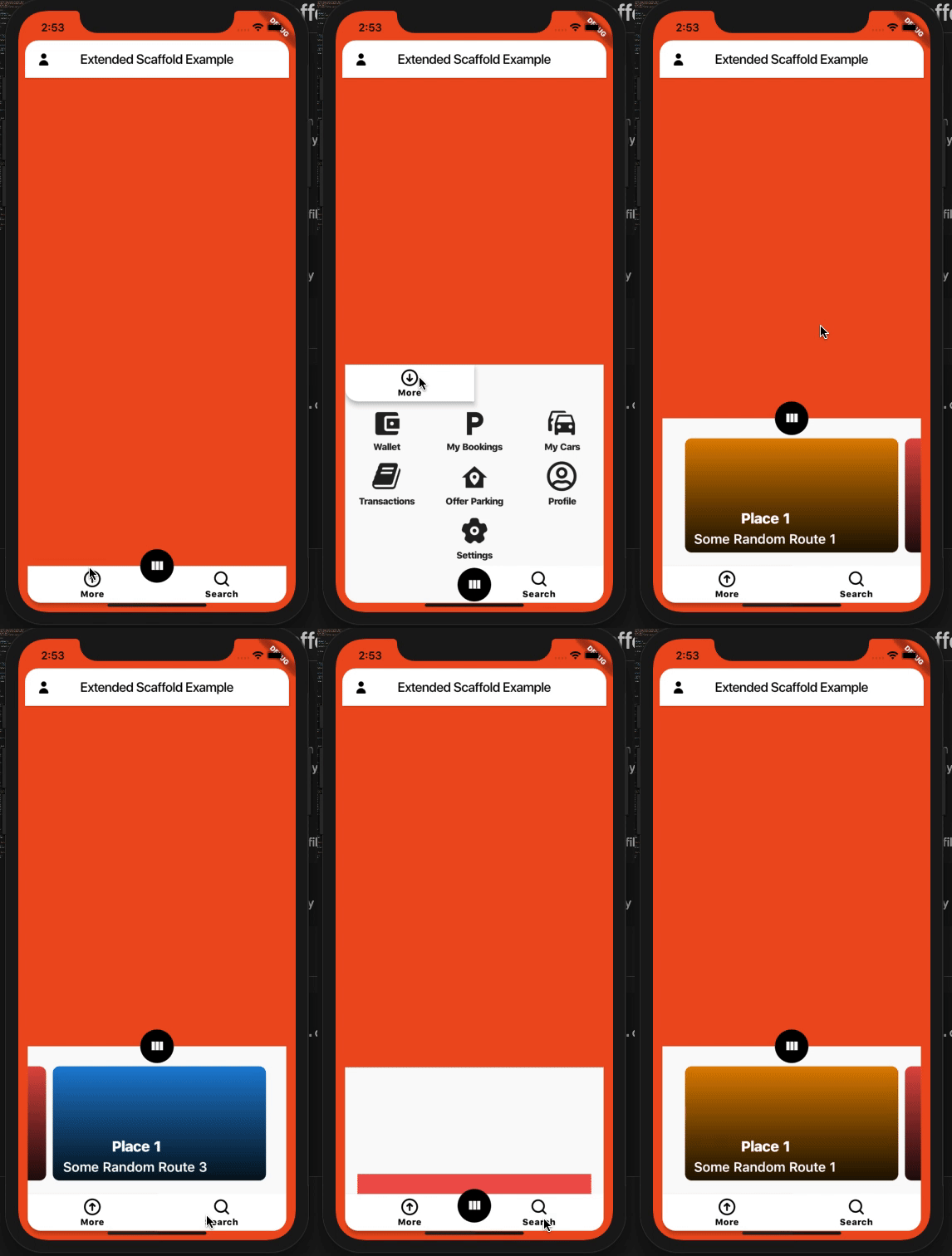
Screenshots

Implementation

Implementation

Widget Demo

Demo

카테고리

의존성

의존성 목록 1 개

소스 저장소

이 패키지를 사용하는 프로젝트

아직 데이터가 없습니다.