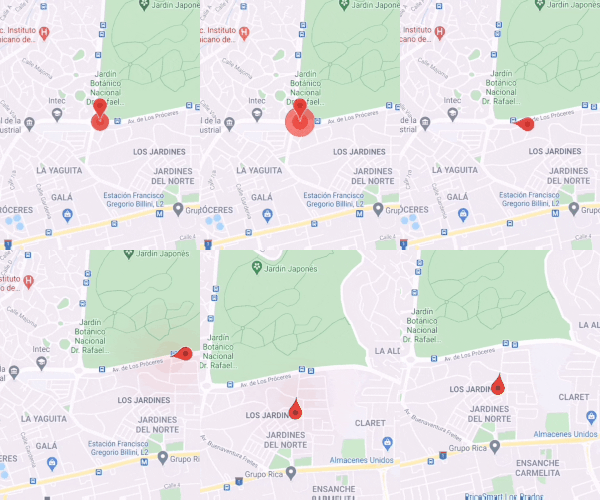
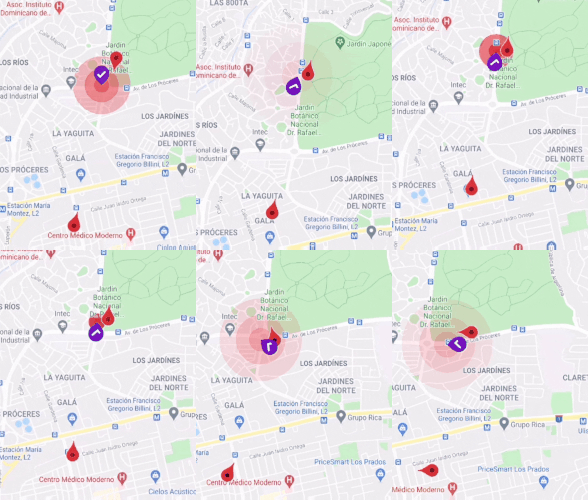
Flutter Animarker는 Flutter 애플리케이션에서 Google 지도의 마커를 애니메이션화하기 위한 전용 패키지입니다. 부드럽고 동적인 마커 이동과 전환을 가능하게 하며, 실시간 위치 추적이나 경로 애니메이션 시각화에 이상적입니다. 성능과 통합 용이성을 고려하여 설계되었으며, Android, iOS, Web, macOS, Windows, Linux 등 모든 주요 플랫폼을 지원합니다. Google 지도 기능을 확장하여 애니메이션 속도, 이징, 마커 행동을 제어할 수 있는 직관적인 API를 제공합니다. 내비게이션 앱, 배송 추적 또는 애니메이션 지리 정보 마커가 필요한 모든 사용 사례에 적합합니다.
사용 사례
실시간 위치 추적
애니메이션 경로 시각화
배달 또는 라이드셰어링 앱
인터랙티브 지도 투어
지리공간 데이터 스토리텔링
주요 기능
부드러운 마커 애니메이션
크로스 플랫폼 지원
사용자 정의 애니메이션 속도
이징 커브 제어
간단한 API 통합
실시간 위치 업데이트
적합한 대상
위치 기반 앱을 개발하는 개발자
애니메이션 지도 마커가 필요한 앱
동적 데이터를 사용한 Google Maps 프로젝트
크로스 플랫폼 일관성을 우선시하는 팀
고려 사항
Google Maps SDK 설정이 필요합니다
Google 지도 통합에 제한됨
성능은 애니메이션의 복잡성에 따라 달라집니다
고주파 업데이트를 위한 최적화가 필요할 수 있습니다
원본 README
연결된 소스 저장소의 README 원문 스냅샷입니다. 최신 내용은 저장소에서 확인하세요.
Google Maps Marker Animation - Overview
Sometimes you need more than place a Marker📍 at map canvas 🌍, you need to smoothly move through Google Maps.
This package will help you to animate Markers' position changes and more.
This version v3.0.0 includes many useful features, namely:
Marker's position animation
Multiple markers' animations at the same time
Null-safety compatible
Ripple effect over marker position
Marker's rotation or bearing/heading of direction
Multipoint linear animation (Piecewise Linear Approximation Algorithm)
Support animation curves and duration
Widget-based with fully customized behaviors
Animation warm-up for improving performance
Useful LocationTween, AngleTween and PolynomialLocationInterpolator core logic
Note
This package only animate the marker's changes. Both Geolocation and Google Maps configuration are out of the scope of this package. So, before trying this package to ensure that you place a marker you Google Map or get location updates.
You only need to use the marker wrapper class RippleMarker, and set the ripple flag in order you can the ripple state.
Animarker(
// Other properties
rippleRadius: 0.5, //[0,1.0] range, how big is the circle
rippleColor: Colors.teal, // Color of fade ripple circle
rippleDuration: Duration(milliseconds: 2500), //Pulse ripple duration
markers: <Marker>{
//Ripple MarkerRippleMarker(
markerId: MarkerId('MarkerId1'),
position: LatLng(0, 0),
ripple: true, //Ripple state
),
//Non-ripple markerMarker(
markerId: MarkerId('MarkerId2'),
position: LatLng(0, 0),
),
},
// Other properties
)
So, Let's it rip!
Using Rotation
The Marker rotation can be useful for Uber-like or delivery apps. The bearing or heading is the angle of direction which the Marker is moving toward to over the earth.
  Animarker(
    // Other properties
    useRotation : true, // Actived by default
    markers: <Marker>{
      Marker(
      markerId: MarkerId('MarkerId2'),
      position: LatLng(0, 0),
      )
    },
  // Other properties
  )
This way useRotation = true, you control globally if Marker should rotate or not.
Using Curve and Duration
Just like a normal Flutter animation, you can set a Curve o Duration to get the desire effect or result. So flexible, right?
BSD-3-Clause License Copyright 2020 Gauris Javier. All rights
reserved.
Redistribution and use in source and binary forms, with or without
modification, are permitted provided that the following conditions are met:
Redistributions of source code must retain the above copyright
notice, this list of conditions and the following disclaimer.
Redistributions in binary form must reproduce the above copyright
notice, this list of conditions and the following disclaimer in the documentation and/or other materials provided with the distribution.
Neither the name of the copyright holder nor the names of its contributors
may be used to endorse or promote products derived from this software without specific prior written permission.
THIS SOFTWARE IS PROVIDED BY THE COPYRIGHT HOLDERS AND CONTRIBUTORS "AS IS"
AND ANY EXPRESS OR IMPLIED WARRANTIES, INCLUDING, BUT NOT LIMITED TO, THE IMPLIED WARRANTIES OF MERCHANTABILITY AND FITNESS FOR A PARTICULAR PURPOSE ARE DISCLAIMED. IN NO EVENT SHALL THE COPYRIGHT HOLDER OR CONTRIBUTORS BE LIABLE FOR ANY DIRECT, INDIRECT, INCIDENTAL, SPECIAL,
EXEMPLARY, OR CONSEQUENTIAL DAMAGES (INCLUDING, BUT NOT LIMITED TO, PROCUREMENT OF SUBSTITUTE GOODS OR SERVICES; LOSS OF USE, DATA, OR PROFITS;
OR BUSINESS INTERRUPTION) HOWEVER CAUSED AND ON ANY THEORY OF LIABILITY, WHETHER IN CONTRACT, STRICT LIABILITY, OR TORT (INCLUDING
NEGLIGENCE OR OTHERWISE) ARISING IN ANY WAY OUT OF THE USE OF THIS SOFTWARE, EVEN IF ADVISED OF THE POSSIBILITY OF SUCH DAMAGE.```